

 By Kaustubh Saini
Python is one of the easiest programming languages to pick up, and it is also one of the most useful once you know it. People use it to build websites, crunch data, train machine learning models, automate boring tasks, and a hundred other things. This tutorial is your starting point. It walks you through the language from the very first line of code to the bigger ideas, and it links out to deeper lessons on each topic so you always know what to learn next.
You do not need any prior coding experience. If you can follow a recipe, you can learn Python. Open an editor, type the examples as you read, and run them. That habit alone will take you further than any amount of passive reading.
What is Python?
Python is a high level, general purpose programming language. "High level" means it reads close to plain English, so you spend your time solving the problem instead of fighting the computer. "General purpose" means it is not locked to one job. The same language powers Instagram's backend, scientific research, and a small script that renames the files on your laptop.
Here is the classic first program. It prints a message to the screen:
print("Hello, world!")
# Output: Hello, world!
That is a complete, working Python program. No setup ceremony, no extra boilerplate. This simplicity is a big reason beginners start with Python and experienced engineers stick with it.
Why learn Python first?
If you are choosing a first language, Python is a strong pick for a few honest reasons:
- The syntax is clean. Code is short and readable, so you can focus on logic instead of punctuation.
- It is everywhere. Web development, data science, AI, automation, finance, and testing all use Python heavily.
- The job market is strong. Python skills show up in a huge number of job listings, often as a core requirement.
- The community is massive. Almost any error you hit has already been answered online, and there are libraries for nearly everything.
- It scales with you. The same language that runs your first ten line script also runs large production systems.
How to install Python and run your first program
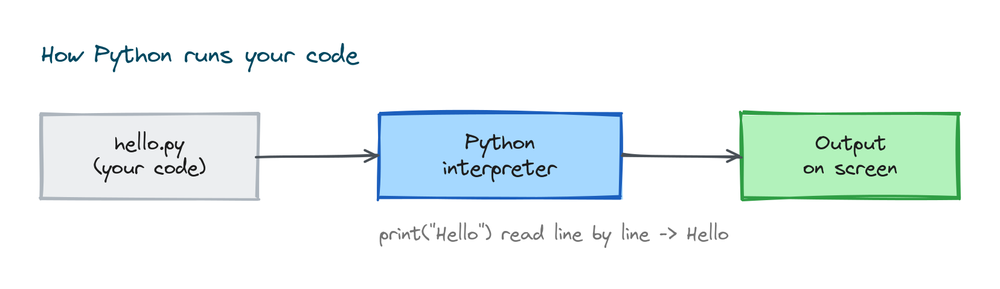
Before you write much code, you need Python on your computer. The current version is Python 3.14, and you download it free from python.org. On Windows there is one box you must tick during setup, "Add Python to PATH", or the commands below will not work.
Once it is installed, open a terminal and check the version:
python --version
# Output: Python 3.14.6
Then save a file called hello.py with one line in it and run it:
# hello.py
print("My first Python program")
# Output: My first Python program
We have a full, step by step walkthrough for every operating system in the guide to installing Python, including how to fix the most common setup errors.
Variables and data types
A variable is a name that holds a value. You do not declare a type in Python. You just assign, and Python figures out the type for you.
name = "Aman"      # a string (text)
age = 21           # an integer (whole number)
height = 5.9       # a float (decimal number)
is_student = True  # a boolean (True or False)

print(name, age, height, is_student)
# Output: Aman 21 5.9 True
You can check any value's type with the type() function, which is handy when you are unsure what you are holding:
print(type(age))      # Output: <class 'int'>
print(type(height))   # Output: <class 'float'>
print(type(name))     # Output: <class 'str'>
Strings, numbers, and booleans are the basic building blocks. Once you are comfortable with them, you move on to collections that hold many values at once.
Collections: lists, tuples, sets, and dictionaries
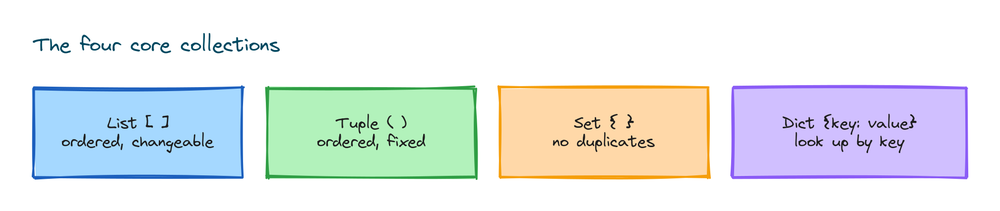
Most real programs work with groups of values, not single ones. Python gives you four core collection types, and knowing when to use each is a big step up as a beginner.
fruits = ["apple", "banana", "cherry"]   # list: ordered, changeable
point = (4, 9)                           # tuple: ordered, fixed
unique = {1, 2, 3}                       # set: no duplicates
person = {"name": "Riya", "age": 22}     # dictionary: key to value

print(fruits[0])         # Output: apple
print(point[1])          # Output: 9
print(person["name"])    # Output: Riya
A quick rule of thumb: use a list for data that changes, a tuple for data that stays fixed, a set when you need to remove duplicates, and a dictionary when you want to look things up by a name or key. Once you have the basics down, the tuples tutorial is a good next read.
Operators and expressions
Operators let you do math, compare values, and combine conditions. They are the verbs of the language.
print(10 + 3)     # Output: 13     addition
print(10 / 3)     # Output: 3.333... division
print(10 // 3)    # Output: 3      floor division
print(10 % 3)     # Output: 1      remainder
print(2 ** 4)     # Output: 16     power

print(5 > 3)      # Output: True   comparison
print(5 == 5)     # Output: True   equality
print(True and False)  # Output: False
Making decisions with if statements
An if statement runs code only when a condition is true. This is how programs make choices. Notice the indentation, which Python uses instead of curly braces to group code.
age = 18

if age >= 18:
    print("You can vote")
elif age >= 13:
    print("You are a teenager")
else:
    print("You are a child")
# Output: You can vote
The colon and the indented block are not optional. Python decides what belongs to the if by how far the lines are indented, so keep your spacing consistent.
Repeating work with loops
Loops let you repeat an action without copying and pasting. A for loop walks through a collection, and a while loop runs as long as a condition holds.
for fruit in ["apple", "banana", "cherry"]:
    print(fruit)
# Output:
# apple
# banana
# cherry

count = 1
while count <= 3:
    print("count is", count)
    count = count + 1
# Output:
# count is 1
# count is 2
# count is 3
The range() function is the loop's best friend when you want to repeat something a set number of times:
for i in range(3):
    print("Hello", i)
# Output:
# Hello 0
# Hello 1
# Hello 2
Writing your own functions
A function is a named block of code you can reuse. You define it once and call it as many times as you like. Functions keep your programs short and easy to read.
def greet(name):
    return "Hello, " + name

print(greet("Aman"))    # Output: Hello, Aman
print(greet("Riya"))    # Output: Hello, Riya
Functions can take several inputs and hand back a result. As your programs grow, you will split them into small functions that each do one clear job.
def add(a, b):
    return a + b

total = add(7, 5)
print(total)    # Output: 12
Classes and objects (a first look at OOP)
Once your programs get bigger, you will want to bundle data and the actions on that data together. That is what a class does. A class is a blueprint, and an object is a real thing built from it.
class Dog:
    def __init__(self, name):
        self.name = name

    def bark(self):
        return self.name + " says woof"

d = Dog("Bruno")
print(d.bark())    # Output: Bruno says woof
This is your introduction to object oriented programming, often shortened to OOP. You do not need it for your first scripts, but it becomes important as you build larger projects.
Handling errors gracefully
Programs hit problems: a file is missing, a user types text where a number was expected. Instead of crashing, you can catch the error and respond to it with try and except.
try:
    number = int("hello")
except ValueError:
    print("That was not a number")
# Output: That was not a number
Catching errors is what separates a fragile script from a program people can actually rely on.
The standard library and pip
Python ships with a large standard library, a big set of ready made tools you can use without installing anything. You bring them in with import.
import math
import random

print(math.sqrt(16))        # Output: 4.0
print(random.randint(1, 6)) # Output: a random number from 1 to 6
When the standard library does not have what you need, you install extra packages with pip, Python's package installer. This is how you get tools like requests for the web, pandas for data, or Django for full websites.
pip install requestsA suggested learning path
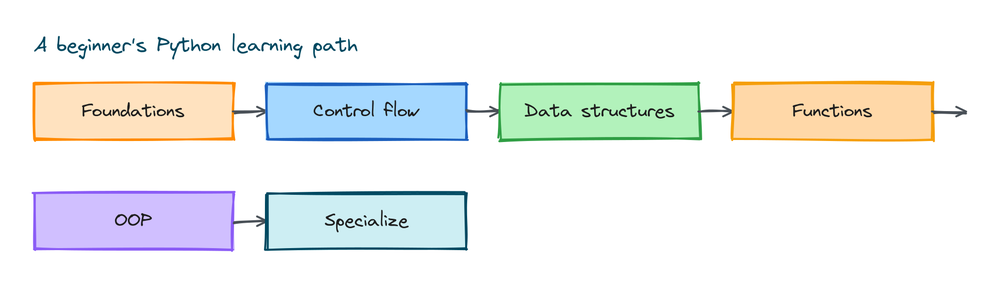
It helps to have an order to follow so you are never guessing what to study next. Here is a sensible path from beginner to confident:
- Foundations: install Python, run your first program, learn variables, data types, and operators.
- Control flow: if statements, for and while loops, and the range function.
- Data structures: lists, tuples, sets, and dictionaries.
- Functions: writing functions, arguments, and return values.
- OOP: classes, objects, and inheritance.
- Real tools: file handling, error handling, modules, and pip.
- Specialize: pick a track such as web development, data science, or automation.
Work through one topic at a time and build a tiny project after each stage. A number guessing game, a to do list, or a script that organizes your downloads folder are all great early wins.
Practice exercises
Reading is not enough. Type each of these yourself, then check the solution. The struggle is where the learning happens.
Exercise 1: Greet a user
Ask for the user's name with input() and print a greeting that includes it.
# Solution
name = input("Your name: ")
print("Hi there,", name)
# If you type Sara, the Output is: Hi there, Sara
Exercise 2: Even or odd
Store a number in a variable and print whether it is even or odd using an if statement and the % operator.
# Solution
n = 7
if n % 2 == 0:
    print("even")
else:
    print("odd")
# Output: odd
Exercise 3: Sum a list
Given nums = [3, 5, 8, 2], print the total without using the built in sum().
# Solution
nums = [3, 5, 8, 2]
total = 0
for n in nums:
    total = total + n
print(total)    # Output: 18
Exercise 4: A reusable function
Write a function square(x) that returns x times x, then print the square of 9.
# Solution
def square(x):
    return x * x

print(square(9))    # Output: 81
Common mistakes beginners make
- Inconsistent indentation. Python uses spaces to group code, so mixing tabs and spaces or misaligning lines causes an
IndentationError. Pick four spaces and stay consistent. - Forgetting the colon. Every
if,for,while,def, andclassline ends with a colon. Leaving it off is the most common early error. - Using = instead of ==. A single
=assigns a value, while==compares two values. Use==inside conditions. - Counting from one. Indexes start at 0, so the first item of a list is
items[0], notitems[1]. - Mixing up Python 2 and 3. Old tutorials write
print "hi"without brackets. In Python 3 it is alwaysprint("hi").
Frequently asked questions
Is Python good for beginners?
Yes. Python has simple, readable syntax and a huge community, which makes it one of the most beginner friendly languages. You can write a working program on your first day.
How long does it take to learn Python?
You can learn the basics in a few weeks of steady practice. Becoming job ready usually takes a few months of building projects, but it depends on how much time you put in and what you want to do with it.
Do I need to be good at math to learn Python?
No. Basic arithmetic is enough for general programming. You only need deeper math if you go into specific fields like data science or machine learning, and even then you learn it as you go.
Which Python version should I learn?
Learn Python 3, the current major version. Python 2 reached its end of life in 2020 and should not be used for new code. Install the latest 3.x release from python.org.
What can I build with Python?
Websites, data analysis tools, machine learning models, desktop apps, games, automation scripts, and much more. Python is general purpose, so it fits almost any kind of project.
Key takeaways
- Python is a readable, general purpose language that is great for your first programming steps.
- Start by installing Python 3 and running a one line program, then learn variables and data types.
- Control flow (if statements and loops) and data structures (lists, tuples, sets, dictionaries) are the core skills.
- Functions and classes help you organize bigger programs as you grow.
- The standard library plus pip give you ready made tools for almost any task.
- Follow a clear path and build small projects to lock in what you learn.
That is the map of the whole language in one place. Pick the next topic from the learning path, open the matching tutorial, and keep writing code. The fastest way to learn Python is to use it on something you actually care about.