

 By Kaustubh Saini
You have probably heard the name Python more than once, maybe from a friend learning to code, a job listing, or an article about artificial intelligence. So what is it, and why does almost everyone seem to recommend it as a first language? This introduction answers that in plain terms, with small examples you can run as you read.
By the end you will know what Python is, what makes it special, what people build with it, and how to write your very first lines of code. No experience needed.
What is the Python programming language?
Python is a high level, general purpose programming language created to be easy to read and quick to write. A programming language is simply a set of words and rules you use to tell a computer what to do. Python's rules are designed to look close to plain English, which is why beginners get productive in it so fast.
Here is a complete Python program. It does something useful and reads almost like a sentence:
name = "Sara"
print("Welcome,", name)
# Output: Welcome, Sara
Compare that to languages where the same task needs several lines of setup, and you start to see the appeal. Python gets out of your way so you can focus on the actual problem.
A quick look at where Python came from
Python was created by a Dutch programmer named Guido van Rossum, who started building it in late 1989 and released the first version in 1991. He wanted a language that was powerful but also pleasant and readable. The name, by the way, has nothing to do with snakes. It comes from the British comedy group Monty Python.
Today Python is one of the most popular languages in the world, maintained by a large community and used by companies of every size. If you want the full story, we cover it in the history of Python.
What makes Python different?
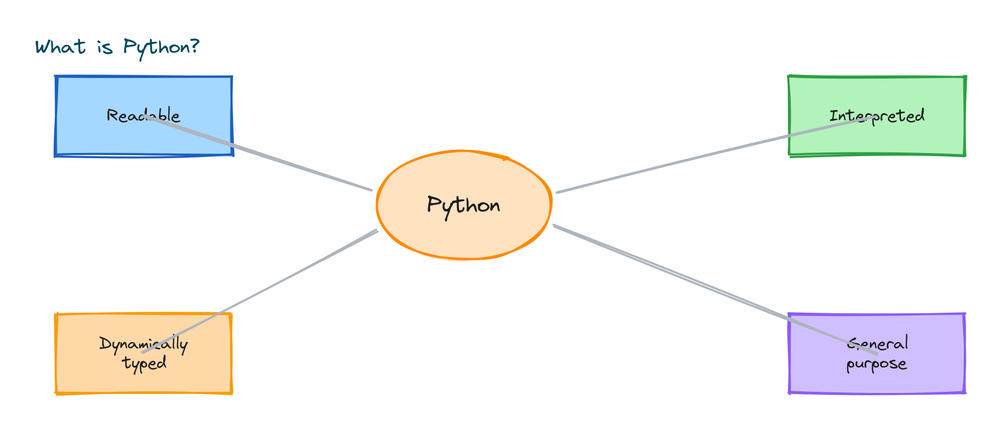
Plenty of languages exist, so it is fair to ask what sets Python apart. A few features come up again and again.
It is easy to read
Python uses indentation, the spaces at the start of a line, to group code. Other languages use curly braces and semicolons. The result is that Python code looks clean and tidy by default.
if 5 > 3:
    print("Five is greater")
    print("This line is inside the if")
print("This line is always run")
# Output:
# Five is greater
# This line is inside the if
# This line is always run
It is interpreted
Python runs your code line by line through a program called the interpreter. You do not have to compile it into a separate file first, so you can write a line and see the result immediately. That tight feedback loop is great for learning.
It is dynamically typed
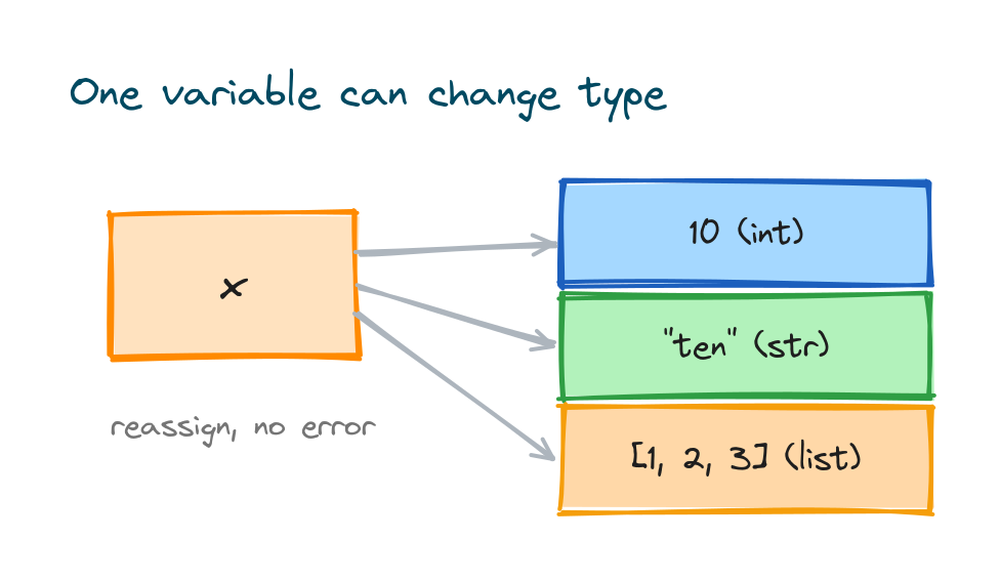
You do not tell Python whether a value is text or a number. You just assign it, and Python keeps track. The same variable can even hold different types at different times.
x = 10        # x is a number now
print(x)      # Output: 10

x = "ten"     # now x holds text, and that is fine
print(x)      # Output: ten
It comes with batteries included
Python ships with a large standard library, a collection of ready made tools for dates, math, files, web requests, and much more. On top of that, hundreds of thousands of extra packages are a single command away.
How Python actually runs your code
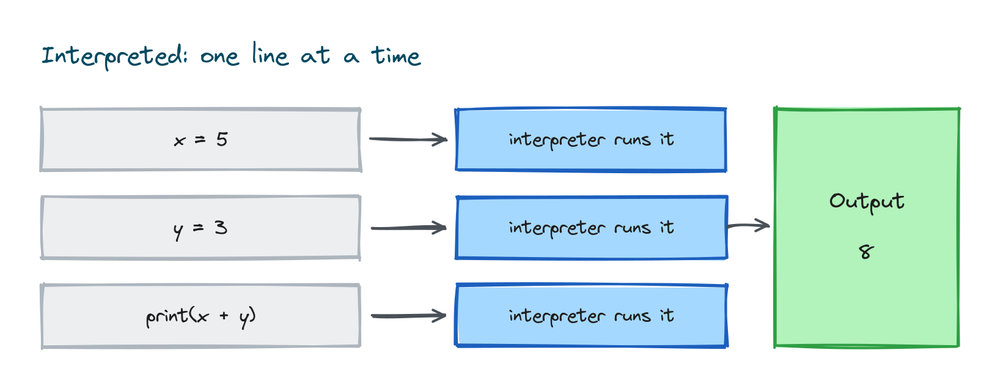
When you run a Python file, the interpreter reads it from top to bottom and carries out each instruction. You write code in a plain text file ending in .py, then run it. There is no heavy build step in between.
# save this as intro.py, then run:  python intro.py
print("Line one")
print("Line two")
# Output:
# Line one
# Line two
You can also open an interactive shell and type code one line at a time, which is perfect for trying things out. This back and forth style is one of the reasons Python is such a friendly place to start.
Your first real Python program
Let us write something slightly more interesting than a single print. This short program asks for your name and greets you.
name = input("What is your name? ")
print("Nice to meet you,", name)
# If you type Aman, the Output is:
# Nice to meet you, Aman
The input() function pauses and waits for the user to type something, then hands that text back to your program. With just print and input you can already build small interactive tools.
The basic building blocks
Almost everything in Python is built from a handful of simple pieces. Here they are in one place so the words are not a mystery later.
message = "Hello"     # string: text in quotes
count = 7             # integer: a whole number
price = 19.99         # float: a decimal number
is_open = True        # boolean: True or False

print(message, count, price, is_open)
# Output: Hello 7 19.99 True
You group many values together with collections like lists and dictionaries:
colors = ["red", "green", "blue"]   # a list of values
user = {"name": "Riya", "age": 22}  # a dictionary of key to value

print(colors[0])        # Output: red
print(user["age"])      # Output: 22
Do not worry about memorizing these now. You will meet each one properly in its own lesson. The point is just to see how readable Python stays even as it does more.
What can you build with Python?
Python is general purpose, which means it is not tied to one kind of project. Here are some of the most common things people build with it:
- Websites and web apps using frameworks like Django and Flask.
- Data analysis and visualization with pandas and matplotlib.
- Machine learning and AI with libraries like scikit-learn and PyTorch.
- Automation scripts that rename files, send emails, or scrape websites.
- Desktop apps and simple games.
For a fuller breakdown with examples, see our piece on Python features and applications.
Who uses Python?
This is not a beginner only language that you outgrow. Major companies run real products on Python. It is used in web backends, scientific research, finance, and the data teams behind many well known apps. Learning it opens doors in a lot of different industries, not just one.
Is Python the right first language for you?
For most people who are new to programming, yes. The syntax is gentle, errors are usually readable, and there is an enormous amount of free help online. You can write something that works on your first day, and that early momentum keeps you going.
The one honest tradeoff is speed. Python is not the fastest language for raw number crunching, so performance critical systems sometimes use other languages for their hottest parts. For learning, building, and the vast majority of real projects, that tradeoff almost never matters.
How to get started today
You only need two things to begin: Python installed on your computer and an editor to write code in. Install the latest version from python.org, then confirm it is working:
python --version
# Output: Python 3.14.6
From there, write a file, run it, change something, run it again. We have a complete setup walkthrough in the install Python guide, and a wider roadmap in the Python tutorial.
Practice exercises
Try these small tasks to make your first lines of Python stick. Write each one yourself before peeking at the solution.
Exercise 1: Print three lines
Use three separate print() calls to display your name, your favorite color, and your age.
# Solution
print("Aman")
print("blue")
print(21)
# Output:
# Aman
# blue
# 21
Exercise 2: A simple total
Store two numbers in variables, add them, and print the result with a label.
# Solution
a = 12
b = 8
print("Total is", a + b)
# Output: Total is 20
Exercise 3: Check the type
Create one string and one integer, then print the type of each using type().
# Solution
word = "hello"
number = 42
print(type(word))     # Output: <class 'str'>
print(type(number))   # Output: <class 'int'>
Common beginner mistakes
- Forgetting quotes around text.
print(hello)looks for a variable named hello and errors. Text needs quotes:print("hello"). - Mixing up = and ==. Use one
=to assign a value and two==to compare values. - Wrong indentation. Code inside an
ifor loop must be indented consistently, or Python raises an error. - Using Python 2 print. In Python 3, print is a function:
print("hi"), with brackets. - Expecting a type to be fixed. A variable can change type when you reassign it, so check what it holds if you are unsure.
Frequently asked questions
What is Python used for?
Python is used for web development, data science, machine learning, automation, scripting, desktop apps, and more. It is a general purpose language, so it fits almost any kind of software project.
Is Python hard to learn?
No. Python is widely seen as one of the easiest languages for beginners because its syntax is clean and reads close to English. Most people can write a simple working program on their first day.
What does it mean that Python is interpreted?
It means Python runs your code line by line through an interpreter, with no separate compile step. You can write a line and see the result right away, which makes learning and testing faster.
Is Python free?
Yes. Python is free and open source. You can download it, use it, and even read its source code at no cost, for personal or commercial projects.
Should I learn Python 2 or Python 3?
Learn Python 3. Python 2 reached its end of life in 2020 and is no longer supported. All new code should use Python 3.
Key takeaways
- Python is a high level, general purpose language built to be readable and quick to write.
- It is interpreted and dynamically typed, so you can run code instantly without declaring types.
- The basic pieces are strings, numbers, booleans, and collections like lists and dictionaries.
- You can build websites, data tools, AI models, and automation with it.
- It is a great first language, with a small tradeoff in raw speed that rarely matters while learning.
- Install Python 3, write a file, and run it to get started today.
Now that you know what Python is and why it is worth your time, the next step is to get it running on your machine and write a few programs of your own. That is where it stops being an idea and starts being a skill.