

 By Kaustubh Saini
Say you have a list of website visitors and you want to count how many are unique. Some people visited many times, so the list is full of repeats. You could write a loop that checks each name against every name you've seen so far, but there's a data type built for exactly this. It's called a set.
A set is a collection that holds only unique items and has no order. Put duplicates in, and Python keeps just one copy. Ask for item number three, and Python refuses, because a set has no positions. This lesson shows you how to make sets, add and remove items, test membership fast, and do set maths like union and intersection.
What a set actually is
Think of a set like a bag of name tags. Each tag is different. You can toss a tag in or take one out, but the tags aren't in any order, so you can't say "give me the first tag." Three things define a Python set:
- No duplicates. Each item appears once. Adding a copy does nothing.
- No order. Items have no fixed position, so there's no indexing.
- Changeable. You can add and remove items after you make the set.
A set is different from a list. A list keeps order and allows duplicates. A set does neither. You reach for a set when you care about "is this item here?" and "what's unique?", not about order.

Making a set
The common way is curly braces with items inside:
s = {1, 2, 3}
print(s)
# Output: {1, 2, 3}
You can also build a set from another collection with the set() function. Pass it a list, a tuple, or a string:
nums = set([1, 2, 3])
print(nums)
# Output: {1, 2, 3}

letters = set("hello")
print(sorted(letters))
# Output: ['e', 'h', 'l', 'o']
Notice the string "hello" became four items, not five. The two l characters collapsed into one, and the order is gone. I wrapped that print in sorted() so the output is the same every time you run it. More on why in a moment.
The empty set trap
Here's the thing that catches almost everyone. You'd guess that {} makes an empty set. It doesn't. Empty curly braces make an empty dictionary, not a set.
print(type({}))
# Output: <class 'dict'>

print(type(set()))
# Output: <class 'set'>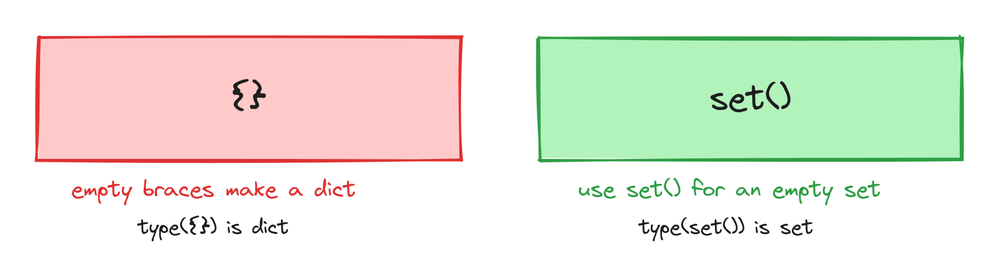
Curly braces mean "set" only when there are items inside them. Empty braces belong to the dictionary, which came first in Python's history. So to make an empty set, always use set(). Once the set has at least one item, {1, 2} is fine.
How sets behave
Two rules shape everything you do with a set: it drops duplicates, and it has no order. Here's each one in code.
Duplicates just disappear
Put the same value in a set more than once and Python silently keeps one copy. There's no error and no warning:
nums = {1, 2, 2, 3, 3, 3}
print(nums)
# Output: {1, 2, 3}
This is the whole point of a set, and it's why sets are the fastest way to remove duplicates from a list. We'll use it for that later. For now, just know that a set can never hold two equal items.
No order and no index
A list lets you ask for my_list[0]. A set does not. There are no positions, so there's nothing to number. Try it and Python stops you:
s = {10, 20, 30}
print(s[0])
# TypeError: 'set' object is not subscriptable
You cannot index, slice, or sort a set in place. If you need the items in order, turn the set into a list first, or wrap it in sorted(), which gives back a sorted list. This is also why I keep using sorted() around set prints in this lesson: the order Python shows a set is not guaranteed to stay the same, so sorting makes every output predictable.
Adding items with add and update
Use add() to put one item in:
colors = {"red"}
colors.add("blue")
print(sorted(colors))
# Output: ['blue', 'red']
Use update() to put in several at once. It takes any collection, and it drops duplicates as it goes:
colors = {"red", "blue"}
colors.update(["green", "red"])
print(sorted(colors))
# Output: ['blue', 'green', 'red']
The extra "red" in the update did nothing, because it was already there.
Removing items, and the remove versus discard difference
You have three ways to take an item out. The difference matters when the item isn't there.
remove() deletes an item, but raises a KeyError if it's missing:
letters = {"a", "b", "c"}
letters.remove("a")
print(sorted(letters))
# Output: ['b', 'c']

letters.remove("z")
# KeyError: 'z'
discard() does the same, but stays quiet when the item is missing. No error:
letters = {"b", "c"}
letters.discard("z")
print(sorted(letters))
# Output: ['b', 'c']
Use discard() when you're not sure the item is in the set. Use remove() only when a missing item is a real bug you want to hear about. The last method, pop(), removes one item and gives it back to you. Since a set has no order, you don't get to choose which one:
s = {1, 2, 3}
x = s.pop()
print(type(x))
# Output: <class 'int'>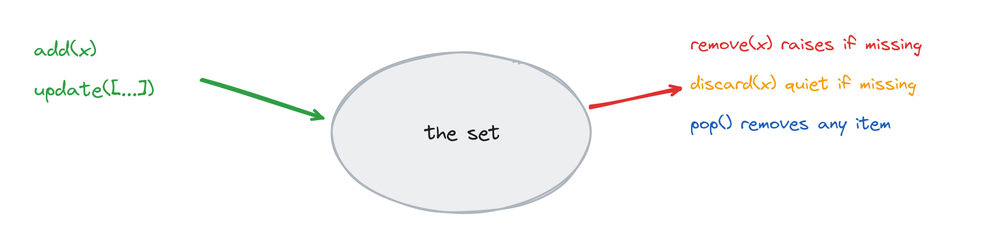
Checking if an item is in a set
The in keyword tells you whether an item is in a set. It gives back True or False:
fruit = {"apple", "banana", "mango"}
print("apple" in fruit)
# Output: True

print("grape" in fruit)
# Output: False
This is what sets are really for. Checking in on a set is fast, and it stays fast even when the set holds millions of items. The same check on a list gets slower as the list grows, because a list has to look through its items one by one. A set uses a smarter method under the hood, so it jumps almost straight to the answer. When your job is "does this item exist here?", a set is the tool. That True or False answer is a boolean.
Set maths, union, intersection, and more
Sets can do the same operations you learned in school with overlapping circles. Each one has an operator symbol and a matching method. I'll sort every result so the printed output is exact.
Union gives every item from both sets, with duplicates merged. Use | or .union():
a = {1, 2, 3, 4}
b = {3, 4, 5, 6}

print(sorted(a | b))
# Output: [1, 2, 3, 4, 5, 6]

print(sorted(a.union(b)))
# Output: [1, 2, 3, 4, 5, 6]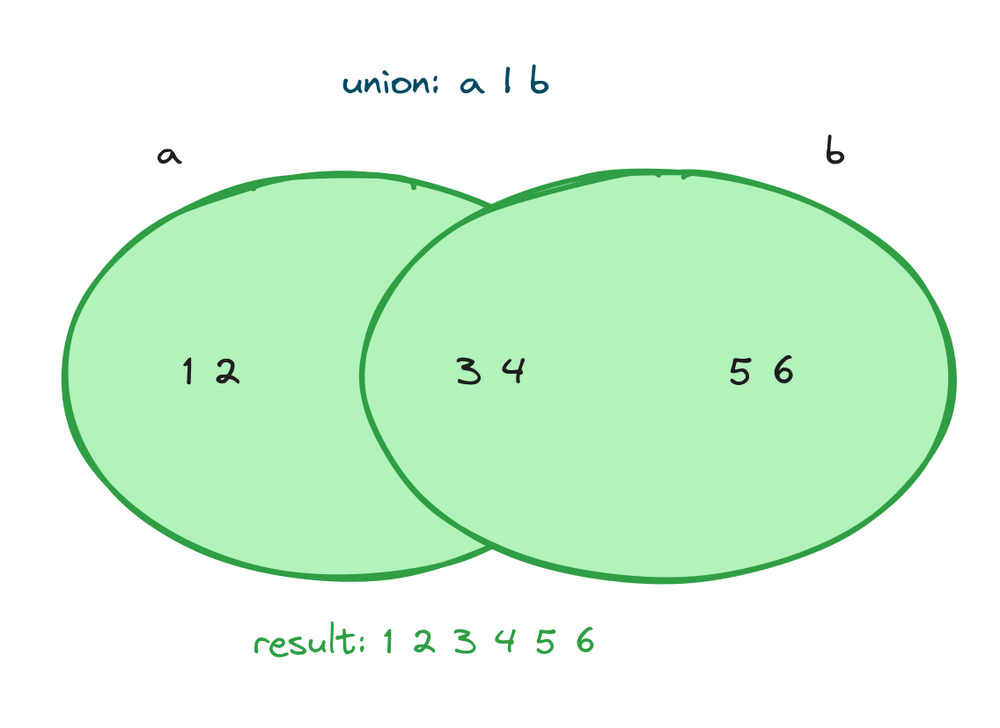
Intersection gives only the items in both sets. Use & or .intersection():
print(sorted(a & b))
# Output: [3, 4]

print(sorted(a.intersection(b)))
# Output: [3, 4]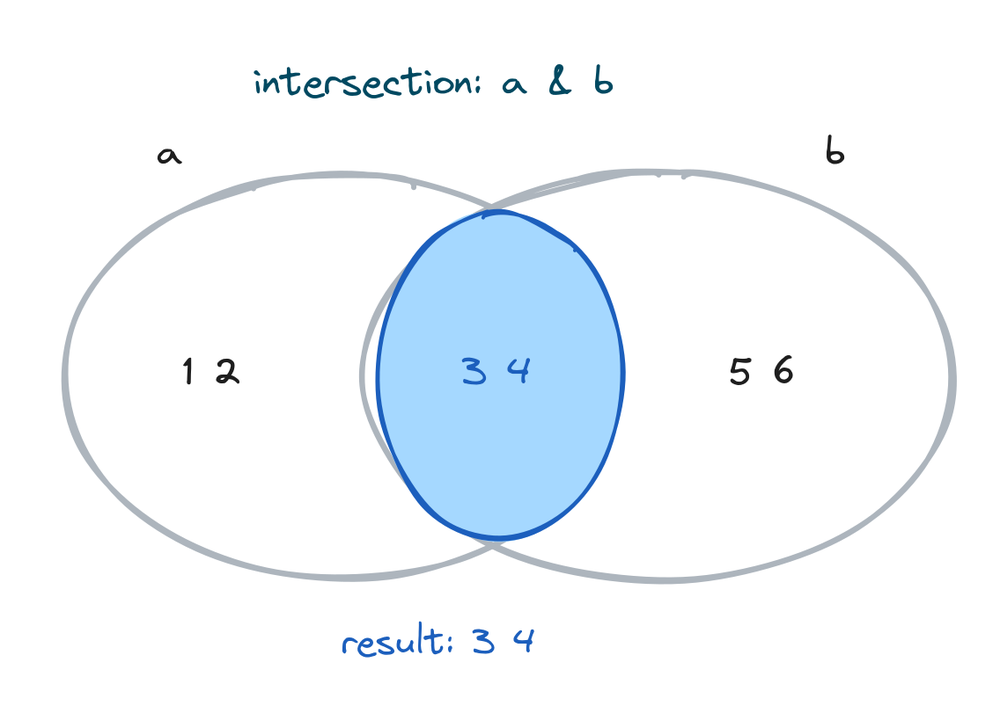
Difference gives the items in the first set but not the second. Use - or .difference():
print(sorted(a - b))
# Output: [1, 2]

print(sorted(a.difference(b)))
# Output: [1, 2]
Symmetric difference gives the items in one set or the other, but not in both. Use ^ or .symmetric_difference():
print(sorted(a ^ b))
# Output: [1, 2, 5, 6]

print(sorted(a.symmetric_difference(b)))
# Output: [1, 2, 5, 6]
The operator form is shorter, so most people use |, &, -, and ^. The method form reads more clearly when you're new, and it accepts any collection, not just another set.
Subset and superset checks
You can ask whether one set fits inside another. <= means "is a subset of" (all my items are in the other set). >= means "is a superset of" (I contain all of the other set's items):
small = {1, 2}
big = {1, 2, 3, 4}

print(small <= big)
# Output: True

print(small.issubset(big))
# Output: True

print(big >= small)
# Output: True

print(big.issuperset(small))
# Output: True
These are handy for checks like "does this user have all the required permissions?" You put the required permissions in one set and the user's permissions in another, then test with <=.
Removing duplicates from a list
This is the most common real use of a set. Wrap a list in set() to drop the repeats, then wrap that in list() to get a list back:
items = ["a", "b", "a", "c", "b"]
unique = list(set(items))
print(len(unique))
# Output: 3
One catch. Because a set has no order, list(set(items)) may not keep the original order. That's fine when you only need the unique values and don't care about order. But if order matters, use dict.fromkeys() instead. A dictionary keeps its keys in insertion order, so this keeps the first time each item appeared:
items = ["python", "web", "python", "data", "web"]
print(list(dict.fromkeys(items)))
# Output: ['python', 'web', 'data']
Use list(set(x)) when order doesn't matter, and list(dict.fromkeys(x)) when it does.
What can go in a set
A set can only hold items that don't change, like numbers, strings, and tuples. It cannot hold a list, because a list can change. Python needs each item to stay fixed so it can track duplicates, and a changeable item breaks that. Try to put a list in and you get an error:
bad = {[1, 2]}
# TypeError: unhashable type: 'list'
The word "unhashable" is Python's way of saying "this item can change, so I can't store it in a set." A tuple works, because a tuple cannot change:
points = {(1, 2), (3, 4)}
print(len(points))
# Output: 2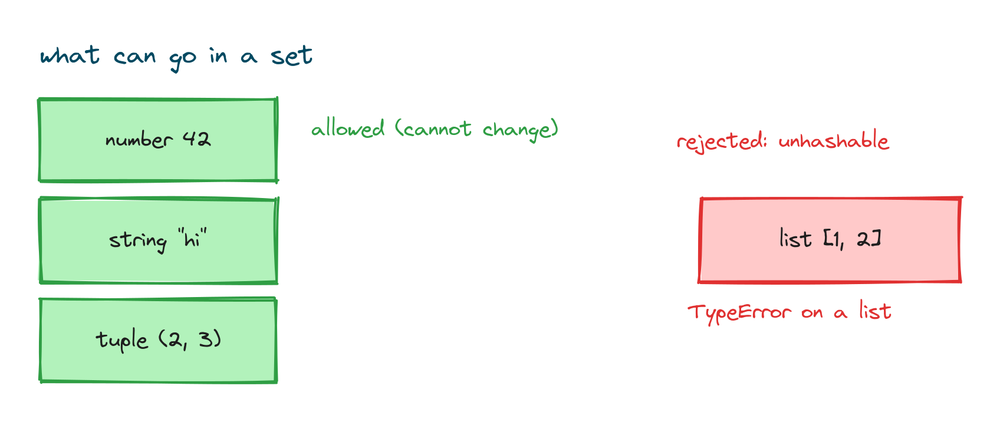
If you're unsure which values can change, the Python data types lesson lays them out.
A frozen set you can't change
A frozenset is a set that cannot change after you make it. You build one with frozenset(), and after that you can't add or remove items, which lets you use a frozenset itself as an item inside another set.
fs = frozenset([1, 2, 3])
print(fs)
# Output: frozenset({1, 2, 3})
Practice exercises
Try each one before you look at the solution. Everything you need is above.
Count unique visitors
Given a list of visitor names with repeats, print how many are unique.
# Solution
visitors = ["ann", "bob", "ann", "cara", "bob", "ann"]
print(len(set(visitors)))
# Output: 3
Find items in both lists
Two shopping lists share some items. Print the items on both, sorted.
# Solution
monday = {"milk", "eggs", "bread"}
tuesday = {"eggs", "butter", "bread"}
print(sorted(monday & tuesday))
# Output: ['bread', 'eggs']
Find what is only in the first list
Print the items on Monday's list but not Tuesday's.
# Solution
monday = {"milk", "eggs", "bread"}
tuesday = {"eggs", "butter", "bread"}
print(sorted(monday - tuesday))
# Output: ['milk']
Check membership
Given a set of allowed roles, check if "admin" is allowed.
# Solution
allowed = {"admin", "editor"}
print("admin" in allowed)
# Output: True
Remove duplicates but keep order
Given a list of tags with repeats, print the unique tags in the order they first appeared.
# Solution
tags = ["python", "web", "python", "data", "web"]
print(list(dict.fromkeys(tags)))
# Output: ['python', 'web', 'data']
Common mistakes
- Thinking {} makes an empty set. It makes an empty dictionary. Use
set()for an empty set. - Expecting order or indexing. A set has no positions, so
s[0]raisesTypeError. Usesorted(s)to get an ordered list. - Using remove on an item that might be gone.
remove()raisesKeyErrorwhen the item is missing. Usediscard()if you're not sure it's there. - Putting a list inside a set. Lists can change, so they're unhashable. Use a tuple if you need a small group of values as one item.
- Expecting a set to keep the first occurrence order.
list(set(x))can reorder items. Uselist(dict.fromkeys(x))when order matters.
Frequently asked questions
What is a set in Python?
A set is a collection that holds only unique items and keeps no order. You make one with curly braces around items, like {1, 2, 3}, or with the set() function.
How do I make an empty set?
Use set(). You can't use {}, because empty curly braces make an empty dictionary instead.
Do sets keep order in Python?
No. A set has no order and no index positions, so you can't ask for the first item. If you need order, use sorted(s) to get a sorted list, or list(s).
How do I remove duplicates from a list?
Wrap the list in set(), then in list(): list(set(items)). If you need to keep the original order, use list(dict.fromkeys(items)) instead.
What is the difference between remove and discard?
Both delete an item from a set. remove() raises a KeyError if the item isn't there. discard() does nothing in that case. Use discard() when you're not sure the item exists.
How do I find items common to two sets?
Use intersection with a & b or a.intersection(b). It gives back a set of the items in both.
What is a frozenset?
A frozenset is a set that can't change after you create it. You build one with frozenset(). Because it can't change, you can use it as an item inside another set.
Can a set hold a list?
No. A set can only hold items that don't change, so a list raises TypeError: unhashable type: 'list'. Use a tuple instead if you need a group of values as one item.
Key takeaways
- A set holds only unique items and keeps no order. Make one with
{1, 2, 3}orset(). - Empty braces
{}make a dictionary, not a set. Useset()for an empty set. - A set has no index, so
s[0]fails. Usesorted(s)when you need order. - Add with
add()andupdate(). Remove withdiscard()(safe) orremove()(raises on missing), andpop()takes an arbitrary item. - Testing membership with
inis fast, which is the main reason to use a set. - Set maths uses
|,&,-, and^for union, intersection, difference, and symmetric difference. list(set(x))drops duplicates but may reorder;list(dict.fromkeys(x))keeps order.
Those symbols |, &, ^, and - aren't unique to sets. They're the same characters Python uses for bitwise work on integers, and the same - you use for subtraction. Seeing one symbol do different jobs depending on what sits beside it is worth a closer look, so the Python operators lesson is a good place to go next.