

 By Kaustubh Saini
You've made a list of names, and now you need to add one more. Or remove one. Or sort them. Python lists come with built-in tools for all of this, and they're called methods. You call a method by putting a dot after the list, like names.append("Sam").
A list method is an action a list can do to itself. There are 11 of them, and this lesson walks through every one with a runnable example. We'll add and remove items, find things, sort, reverse, and copy. Near the end there's one trap that catches almost every beginner, so read to the bottom.
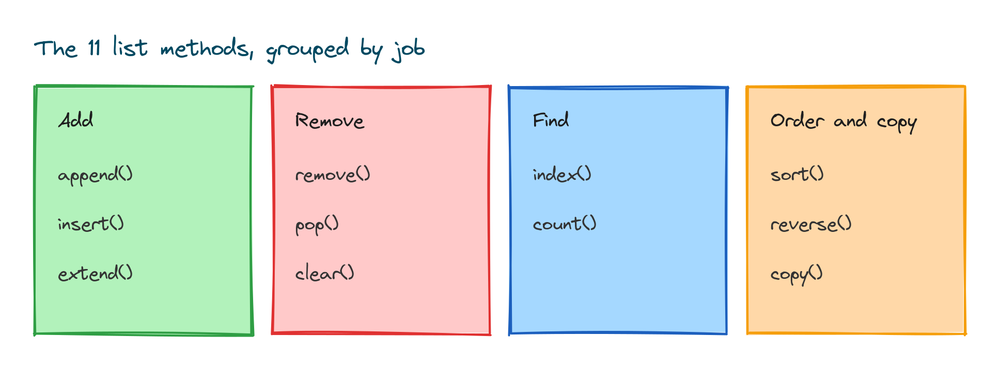
All 11 list methods at a glance
Here's the full set. Each does one job. Skim the table now, then read the sections below for how each one behaves and where people slip up.
| Method | What it does |
|---|---|
append(x) | Add one item to the end |
insert(i, x) | Add one item at position i |
extend(items) | Add each item from another list |
remove(x) | Delete the first item equal to x |
pop(i) | Remove and return the item at i (last if no i) |
clear() | Remove every item |
index(x) | Return the position of the first x |
count(x) | Return how many times x appears |
sort() | Sort the list in place |
reverse() | Flip the order in place |
copy() | Return a separate copy of the list |
Adding items with append, insert, and extend
Three methods add items, and they differ in where the item goes and how many you add. append() puts one item at the end:
fruits = ["apple", "banana"]
fruits.append("cherry")
print(fruits)
# Output: ['apple', 'banana', 'cherry']
insert() puts one item at a position you pick. The first number is the index, the second is the item:
nums = [1, 2, 4]
nums.insert(2, 3)
print(nums)
# Output: [1, 2, 3, 4]
extend() is different. It takes a list and adds each item from it, one by one:
a = [1, 2, 3]
a.extend([4, 5])
print(a)
# Output: [1, 2, 3, 4, 5]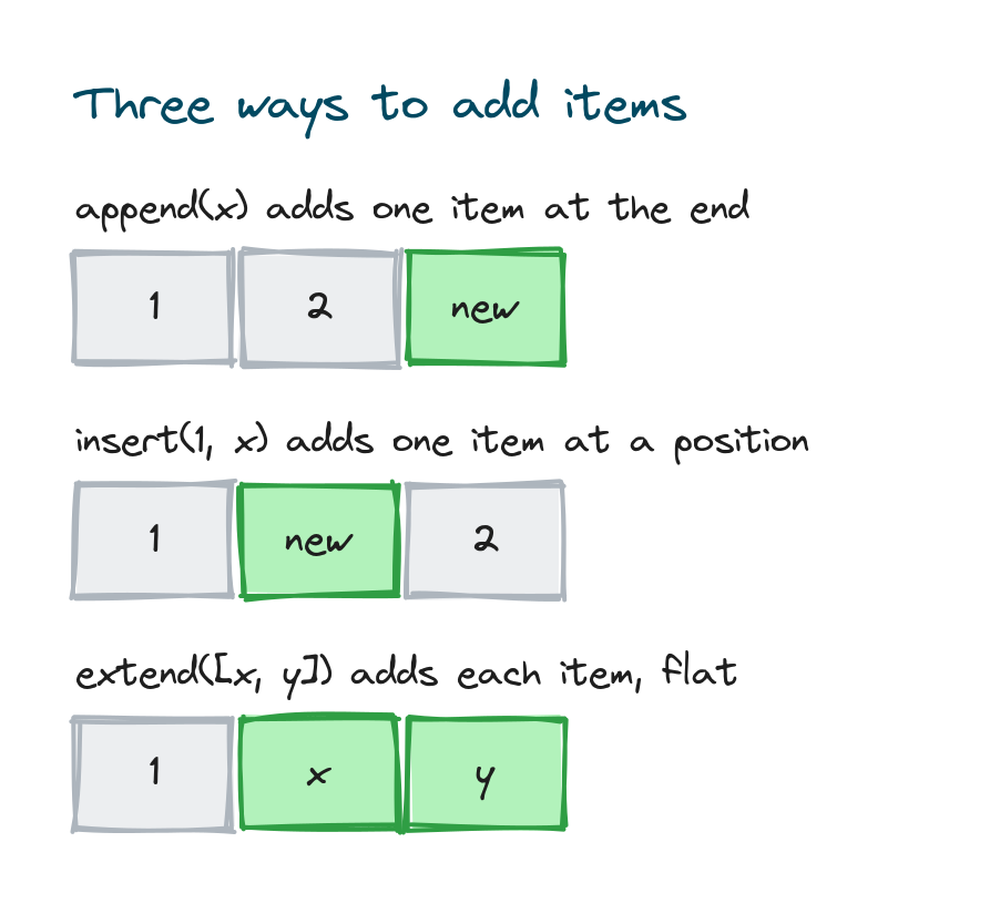
The append versus extend trap
Here's where people get stuck. If you pass a list to append(), it puts the whole list inside as a single item. You get a list within a list:
x = [1, 2, 3]
x.append([4, 5])
print(x)
# Output: [1, 2, 3, [4, 5]]
Now x has four items, and the last one is [4, 5]. That's usually not what you want. Use extend() when you want the items pulled out and added flat:
y = [1, 2, 3]
y.extend([4, 5])
print(y)
# Output: [1, 2, 3, 4, 5]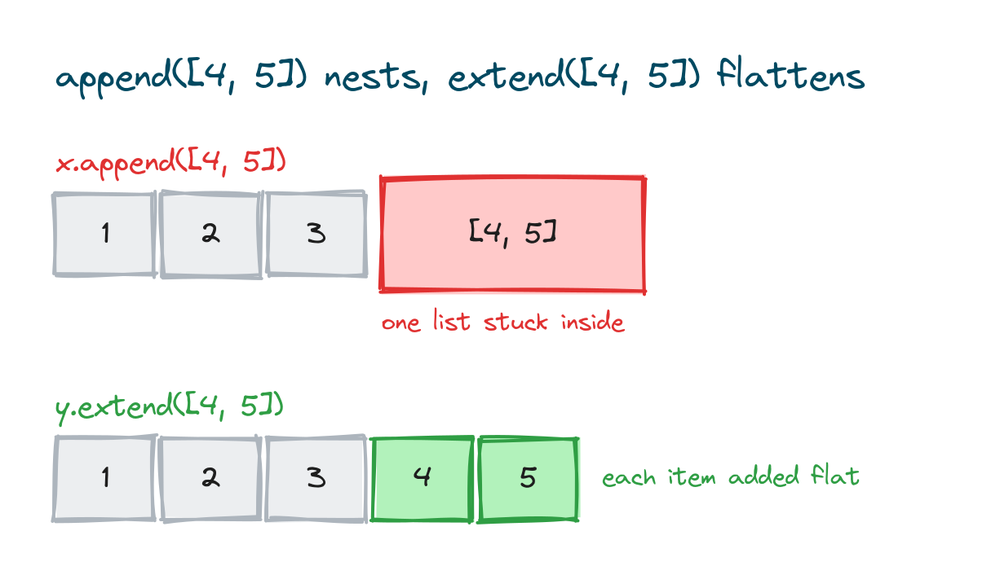
Rule of thumb: use append() for one item, extend() to join two lists.
Removing items with remove, pop, and clear
Three methods take items out, and they pick the item in different ways. remove() deletes by value. You give it the item, not the position:
colors = ["red", "green", "blue", "green"]
colors.remove("green")
print(colors)
# Output: ['red', 'blue', 'green']
Note it removed only the first "green". The second one stays. pop() deletes by position, and it hands the item back to you. With no number, it takes the last item:
nums = [10, 20, 30, 40]
last = nums.pop()
print(last)
print(nums)
# Output: 40
# Output: [10, 20, 30]
Give pop() an index to remove a specific spot:
nums = [10, 20, 30, 40]
second = nums.pop(1)
print(second)
print(nums)
# Output: 20
# Output: [10, 30, 40]
clear() empties the list completely:
data = [1, 2, 3]
data.clear()
print(data)
# Output: []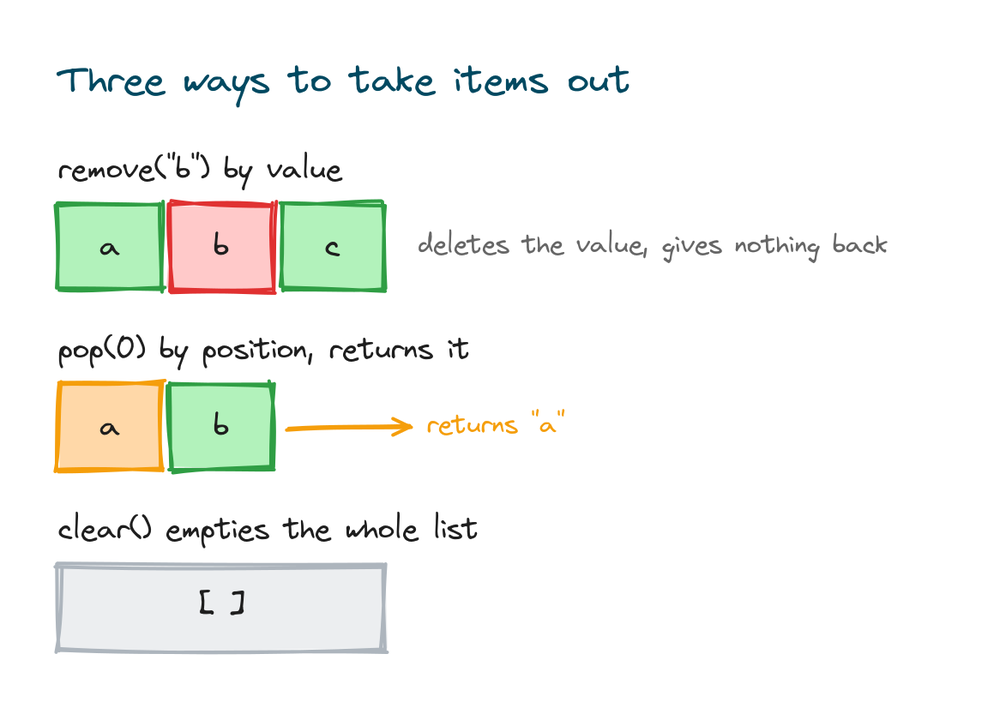
The del statement
Python also has del, but it's a statement, not a method. It deletes by position, and unlike pop(), it doesn't give the item back. It can also delete a range with slicing:
letters = ["a", "b", "c", "d"]
del letters[1]
print(letters)
# Output: ['a', 'c', 'd']

del letters[0:2]
print(letters)
# Output: ['d']
Use del when you want to drop an item and don't need its value. Use pop() when you do want the value.
When remove can't find the item
If you call remove() with a value that isn't there, Python stops with an error:
letters = ["a", "b"]
letters.remove("z")
# ValueError: list.remove(x): x not in list
To stay safe, check first with in, which is the next section.
Finding items with index, count, and in
index() tells you where an item sits. It returns the position of the first match:
pets = ["cat", "dog", "fish", "dog"]
print(pets.index("dog"))
# Output: 1
count() tells you how many times an item appears:
pets = ["cat", "dog", "fish", "dog"]
print(pets.count("dog"))
# Output: 2
The keyword in checks whether an item is there at all. It gives back True or False, so it works well in an if:
pets = ["cat", "dog", "fish"]
print("fish" in pets)
print("bird" in pets)
# Output: True
# Output: False
Use in before index() or remove(), because both of those raise an error when the item is missing:
pets = ["cat", "dog"]
pets.index("bird")
# ValueError: 'bird' is not in list
The True and False that in returns are Python booleans, the values behind every yes or no test.
Sorting a list with sort
sort() arranges the list in order. By default it goes from small to large:
nums = [3, 1, 4, 1, 5, 9, 2]
nums.sort()
print(nums)
# Output: [1, 1, 2, 3, 4, 5, 9]
Add reverse=True to sort from large to small:
nums = [3, 1, 4, 1, 5, 9, 2]
nums.sort(reverse=True)
print(nums)
# Output: [9, 5, 4, 3, 2, 1, 1]
Text sorts alphabetically the same way. You can also sort by a rule instead of the value itself. Pass key=len to sort by length:
words = ["banana", "kiwi", "cherry"]
words.sort(key=len)
print(words)
# Output: ['kiwi', 'banana', 'cherry']
The shortest word comes first because len measures each word and sorts by that number.
sort versus sorted
There are two ways to sort in Python, and the difference matters. sort() is a method that changes the list itself. sorted() is a function that leaves the original alone and gives you a new list:
original = [3, 1, 2]
new_list = sorted(original)
print(new_list)
print(original)
# Output: [1, 2, 3]
# Output: [3, 1, 2]
Use sort() when you don't need the original order back. Use sorted() when you want to keep the original. Both accept reverse=True and key.
You can't sort mixed types
Python can compare numbers with numbers and text with text, but not numbers with text. Try to sort a list that mixes them and you get an error:
mixed = [3, "apple", 1]
mixed.sort()
# TypeError: '<' not supported between instances of 'str' and 'int'
Python has no way to decide whether the string "apple" is bigger or smaller than the number 3, so it stops. Keep a list to one type when you plan to sort it.
Reversing a list
reverse() flips the order of the list in place. It doesn't sort, it just turns the list back to front:
nums = [1, 2, 3, 4]
nums.reverse()
print(nums)
# Output: [4, 3, 2, 1]
There's a second way to flip a list: slicing with [::-1]. This makes a new reversed list and leaves the original alone:
original = [1, 2, 3, 4]
backward = original[::-1]
print(backward)
print(original)
# Output: [4, 3, 2, 1]
# Output: [1, 2, 3, 4]
So the choice is the same as sort versus sorted. Use reverse() to change the list, use [::-1] to keep it and get a new one. If you want the list in reverse sorted order, that's a different job: sorted(nums, reverse=True) sorts and flips in one step, while reverse() alone only flips whatever order is already there. To learn more about the [::-1] pattern, see Python string slicing, which works the same way on lists.
Copying a list the right way
This one surprises people. Writing b = a does not make a copy. It makes a second name for the same list. Change one and you change both:
a = [1, 2, 3]
b = a
b.append(4)
print(a)
# Output: [1, 2, 3, 4]
Even though you added to b, the list a changed too, because they're the same list. To get a real, separate copy, use copy():
c = [1, 2, 3]
d = c.copy()
d.append(4)
print(c)
print(d)
# Output: [1, 2, 3]
# Output: [1, 2, 3, 4]
Now c and d are two different lists, so changing one leaves the other alone. Use copy() whenever you want to change a list but keep the original safe.
One warning. copy() makes a shallow copy, which means the outer list is new but any lists inside it are still shared. For a list of plain numbers or text this doesn't matter. For a list that holds other lists, look up copy.deepcopy() when you need every level separate.
Lists that can't change
None of these methods exist on a tuple. A tuple looks like a list but uses round brackets, and once you make it, you can't add, remove, or sort it. That's the point of a tuple: it holds a fixed group of values that should never change, like a date of birth. If you need to change the contents, use a list. If the group should stay fixed, use a tuple.
point = (3, 4)
point.append(5)
# AttributeError: 'tuple' object has no attribute 'append'
Most list methods return None
This is the trap that trips up almost everyone. Methods that change a list in place, like sort(), reverse(), append(), and remove(), do their work and return None. They do not return the new list:
scores = [3, 1, 2]
result = scores.sort()
print(result)
# Output: None
The list scores did get sorted. But sort() handed back None, so result is None, not the sorted list. Now watch the mistake this leads to:
mylist = [3, 1, 2]
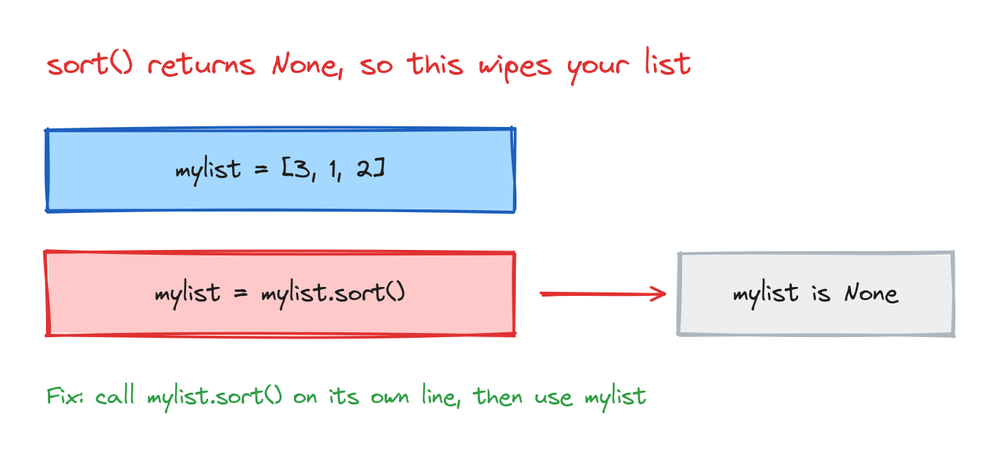
mylist = mylist.sort()
print(mylist)
# Output: None
Writing mylist = mylist.sort() destroys your list. The sort happens, but then you overwrite mylist with the None that sort() returned. Your data is gone. Call mylist.sort() on its own line, and never assign its result to anything.
Chaining these methods doesn't work
Because these methods return None, you can't chain them. Trying to call one method right after another fails:
result = [3, 1, 2].sort().reverse()
# AttributeError: 'NoneType' object has no attribute 'reverse'
After sort() runs, you're left with None, and None has no reverse() method. Put each call on its own line instead. The methods that do return a value, pop(), index(), count(), and copy(), give you back something useful, so those are the only ones you assign.
This is where lists and strings behave in opposite ways. Python string methods like upper() always return a new string and leave the original alone, so name = name.upper() is correct there. With list methods that change the list in place, the same pattern breaks. It helps to remember which kind you're calling.
Practice exercises
Try each one yourself before you open the solution. Everything you need is above.
Add a name to the end
Start with two names and add a third to the end of the list.
# Solution
names = ["Asha", "Ravi"]
names.append("Meera")
print(names)
# Output: ['Asha', 'Ravi', 'Meera']
Remove every 2 from a list
remove() only deletes the first match. Delete all of them.
# Solution
nums = [1, 2, 2, 3, 2, 4]
while 2 in nums:
    nums.remove(2)
print(nums)
# Output: [1, 3, 4]
Sort words by length
Sort a list of words from shortest to longest.
# Solution
words = ["python", "go", "java", "c"]
words.sort(key=len)
print(words)
# Output: ['c', 'go', 'java', 'python']
Find the second largest number
Sort a copy from large to small, then pick the second item.
# Solution
nums = [10, 5, 8, 20, 3]
ordered = sorted(nums, reverse=True)
print(ordered[1])
# Output: 10
Make a safe backup
Copy a list, then change the original. The copy should stay the same.
# Solution
original = [1, 2, 3]
backup = original.copy()
original.append(4)
print(backup)
# Output: [1, 2, 3]
Common mistakes
- Using
append()to join two lists.append([4, 5])nests the whole list as one item. Useextend([4, 5])to add the items flat. - Writing
x = x.sort().sort()returnsNone, so this wipes out your list. Callx.sort()on its own line. - Calling
remove()on a missing item. It raisesValueError. Check withif item in listfirst. - Thinking
b = acopies the list. It makes a second name for the same list. Usea.copy()for a real copy. - Trying to sort mixed types. A list of numbers and text raises
TypeError. Keep one type when you sort. - Chaining in-place methods.
list.sort().reverse()fails becausesort()returnsNone. Use separate lines.
Frequently asked questions
What is the difference between append and extend?
append() adds its argument as a single item, so append([4, 5]) gives you a nested list [..., [4, 5]]. extend() adds each item from its argument one at a time, so extend([4, 5]) gives you [..., 4, 5]. Use append for one item, extend to join two lists.
How do I sort a list in descending order?
Pass reverse=True. Use mylist.sort(reverse=True) to change the list, or sorted(mylist, reverse=True) to get a new sorted list and keep the original.
What does pop return?
The item it removed. mylist.pop() removes and returns the last item, and mylist.pop(0) removes and returns the first. This is why pop() is handy for taking items off a list one at a time.
Why does my sort return None?
Because sort() changes the list in place and returns None on purpose. Don't write mylist = mylist.sort(). Call mylist.sort() by itself, then use mylist. If you want a returned list, use sorted(mylist) instead.
How do I remove all occurrences of a value?
remove() only deletes the first match. To delete every match, loop with while value in mylist: mylist.remove(value), or build a new list with a comprehension like [x for x in mylist if x != value].
What is the difference between remove and pop?
remove(x) deletes by value and gives nothing back. pop(i) deletes by position and returns the item. Use remove when you know the value, pop when you know the position and want the item.
How do I copy a list?
Use mylist.copy(), or list(mylist), or mylist[:]. All three make a separate list. Plain assignment b = a does not copy, it makes a second name for the same list.
Does sort work on strings?
Yes. sort() puts strings in alphabetical order, and uppercase letters come before lowercase because of their character codes. Numbers and strings can't be sorted together, though, so keep the list to one type.
Key takeaways
- Lists have 11 methods:
append,insert,extendadd;remove,pop,cleardelete;index,countfind;sort,reverseorder; andcopyduplicates. append()adds one item,extend()adds each item from another list. Passing a list toappend()nests it.remove()deletes by value,pop()deletes by position and returns the item, anddelis a statement that deletes without returning.- Most methods return
None, sox = x.sort()destroys your list. Call them on their own line and don't chain them. sort()andreverse()change the list;sorted()and[::-1]leave it alone and give you a new one.b = ashares one list,a.copy()makes a real copy.
Methods are only part of the story. To see how lists are built, indexed, and sliced from the ground up, and where they fit next to tuples and other collections, read the full guide to Python lists.