

 By Kaustubh Saini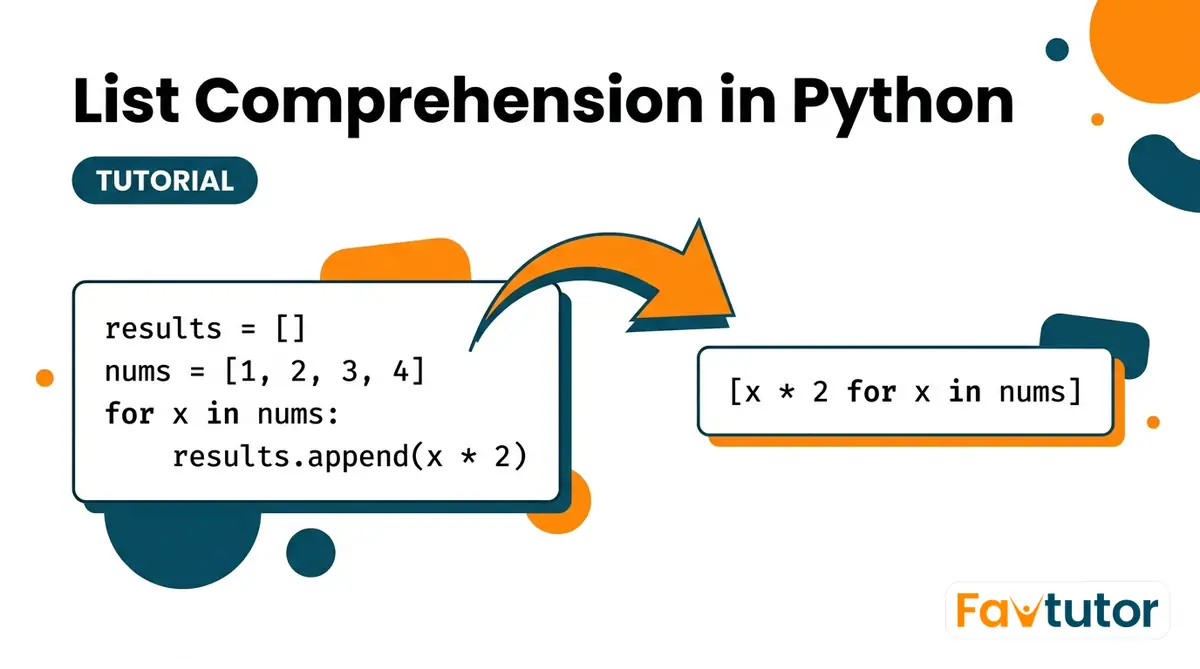
You want a list of squares. So you make an empty list, write a for loop, and append one square at a time. It works, but it takes four lines to say something simple. Python has a shorter way to build a list, and once you learn it you'll use it every day.
A list comprehension builds a new list in one line. You write the value you want, then the loop that feeds it. This lesson starts from the plain loop you already know, then shows the same job as a comprehension. After that we add conditions, transform text, nest loops, and cover when a plain loop is still the better choice.
Building a list with a loop first
Say you want the squares of the numbers 1 to 5. The normal way uses a list and a loop. You start with an empty list and add to it:
squares = []
for n in [1, 2, 3, 4, 5]:
    squares.append(n * n)
print(squares)
# Output: [1, 4, 9, 16, 25]
Read what that does. Make an empty list. Walk through each number. Square it. Add it to the list. That pattern, start empty and append in a loop, is so common that Python has a shorter way to write it. Here is the exact same result as a list comprehension:
squares = [n * n for n in [1, 2, 3, 4, 5]]
print(squares)
# Output: [1, 4, 9, 16, 25]
Same output, one line. The value you want goes first, then the loop that feeds it. No empty list, no .append(). Python creates the list and fills it for you.
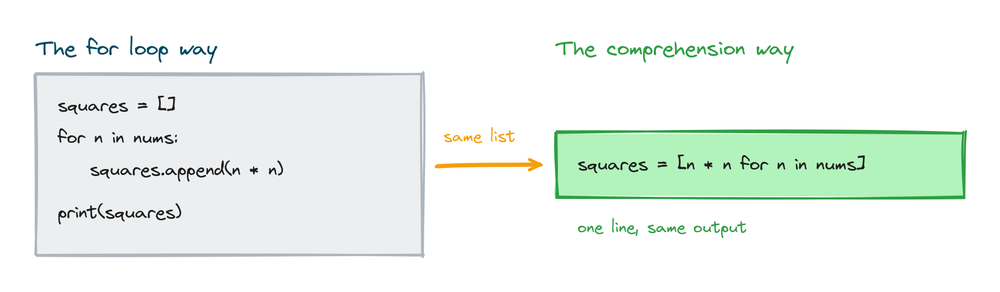
The loop version is not wrong. Both give the same list. The comprehension is just shorter and, once you can read it, clearer.
The parts of a comprehension
Every basic comprehension has the same shape. It sits inside square brackets and has two parts:
[expression for item in iterable]The expression is the value you want in the new list. The item is each element as the loop hands it over. The iterable is what you loop over, like a list or a range. Here is a plain example:
nums = [1, 2, 3, 4]
doubled = [x * 2 for x in nums]
print(doubled)
# Output: [2, 4, 6, 8]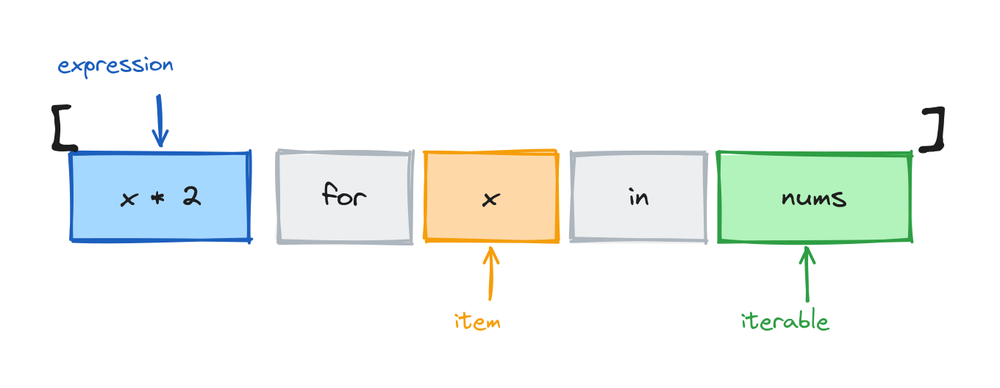
In this one, x * 2 is the expression, x is the item, and nums is the iterable. Python takes each x from nums, works out x * 2, and puts the result in the new list.
How to read one out loud
The order of the words is not the order Python runs them, and that trips up a lot of beginners. To read a comprehension, start in the middle, then go left. Take [x * 2 for x in nums]. Read it as: "for each x in nums, give me x * 2." You read the for part first even though it sits second. The expression on the left is what you collect, and the loop on the right is where the values come from. Once you read a few this way, the shape stops looking backwards.
Adding a condition to filter items
You can add an if at the end to keep only some items. This is a filter. Say you have a mix of numbers and you want the positive ones:
nums = [4, -2, 7, -5, 0, 9]
positives = [x for x in nums if x > 0]
print(positives)
# Output: [4, 7, 9]
The if x > 0 at the end is a gate. Each number is checked. If the test is true, the number goes in the new list. If it is false, the number is skipped. So -2, -5, and 0 never make it through.
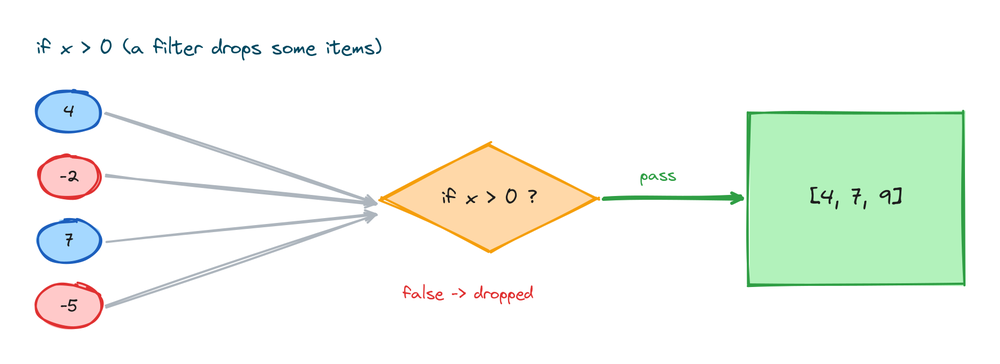
You can filter and transform at the same time. This keeps the even numbers and squares them:
nums = [1, 2, 3, 4, 5, 6]
result = [x * x for x in nums if x % 2 == 0]
print(result)
# Output: [4, 16, 36]
Python checks x % 2 == 0 first. Only the even numbers pass, and then those get squared. The % here is the remainder operator, so x % 2 == 0 is true when a number divides evenly by 2.
Choosing a value with if and else
There is a second kind of if, and it does something different. When you write if and else together, you are not filtering. You are choosing which value to put in for every item. Watch where it goes:
nums = [4, -2, 7, -5]
labels = ["positive" if x > 0 else "negative" for x in nums]
print(labels)
# Output: ['positive', 'negative', 'positive', 'negative']
Every number produces a label. Nothing is skipped. For each x, Python picks "positive" when the test is true and "negative" when it is false.
The position is the whole difference
This is the part people mix up, so look at where each if sits.
- A filter
ifgoes at the end, after the loop:[x for x in nums if x > 0]. It decides whether an item is included. - An
if-elsegoes at the front, before thefor:[a if cond else b for x in nums]. It decides which value each item becomes.
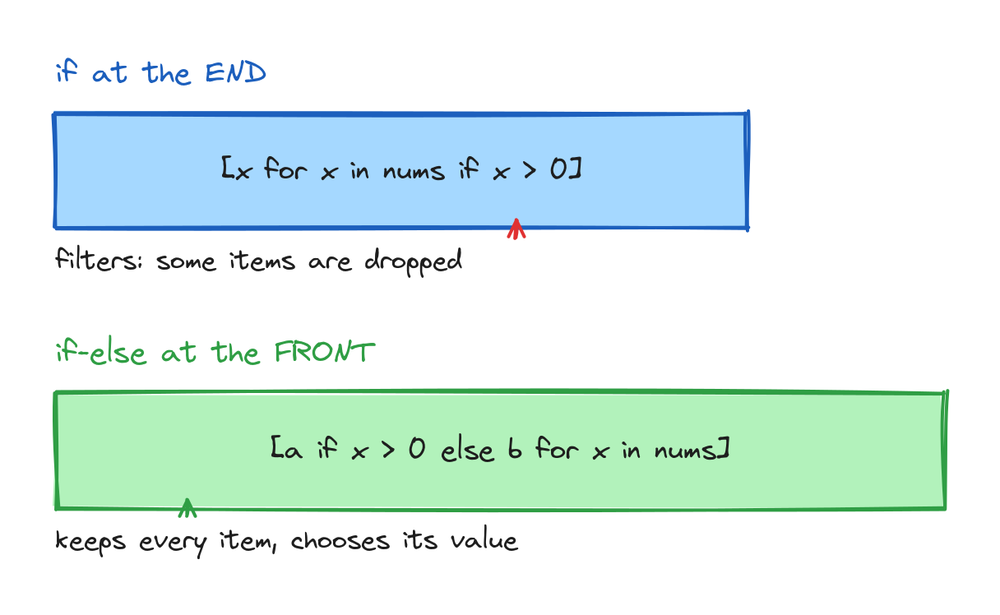
A trailing if drops items. A leading if-else keeps every item and picks its value. If you write if-else at the end, Python raises a SyntaxError, because a filter cannot have an else. Remember it by the job: filter goes last, choose goes first.
Transforming strings
Comprehensions are handy for cleaning and changing text. You can call any string method on each item. Here we uppercase a list of words:
words = ["red", "green", "blue"]
upper = [w.upper() for w in words]
print(upper)
# Output: ['RED', 'GREEN', 'BLUE']
The expression can be anything, including a function call. This gets the length of each word:
words = ["red", "green", "blue"]
lengths = [len(w) for w in words]
print(lengths)
# Output: [3, 5, 4]
A common real job is trimming spaces off messy input. String methods like .strip() fit right in:
raw = ["  hi ", "bye  ", " ok"]
clean = [s.strip() for s in raw]
print(clean)
# Output: ['hi', 'bye', 'ok']
Using range in a comprehension
Often you do not have a list yet, you just want numbers in order. That is what range() is for. range(1, 6) gives the numbers 1, 2, 3, 4, 5, so the stop number is not included. It fits straight into a comprehension:
squares = [n * n for n in range(1, 6)]
print(squares)
# Output: [1, 4, 9, 16, 25]
You can add a filter too. This collects the even numbers from 0 to 10:
evens = [n for n in range(0, 11) if n % 2 == 0]
print(evens)
# Output: [0, 2, 4, 6, 8, 10]
Note range(0, 11) stops at 10, since the end number is left out. Using range() is the usual way to build a list of numbers without typing them all by hand.
Two loops in one comprehension
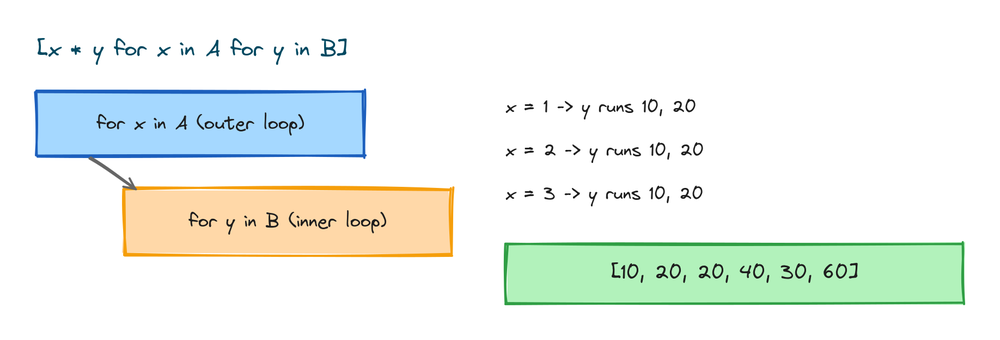
A comprehension can hold more than one for. When you write two, they act like a loop inside a loop. This pairs every item in A with every item in B:
A = [1, 2, 3]
B = [10, 20]
products = [x * y for x in A for y in B]
print(products)
# Output: [10, 20, 20, 40, 30, 60]
The order matters. The first for is the outer loop and the second is the inner one. So x holds 1 while y runs through 10 and 20, then x becomes 2, and so on. It is the same order as writing one loop nested inside the other.
Flattening a nested list
A frequent use of two loops is flattening. You have a list of lists and you want one flat list. The outer for walks the rows, the inner for walks the items in each row:
nested = [[1, 2, 3], [4, 5], [6, 7, 8]]
flat = [num for row in nested for num in row]
print(flat)
# Output: [1, 2, 3, 4, 5, 6, 7, 8]
Read it left to right in loop order: for each row in nested, for each num in that row, keep num. The order of the two for parts matches how you would write the nested loop by hand.
Building a grid
You can also put a comprehension inside another comprehension. This makes a list of lists, which is useful for grids and tables. Here is a 3 by 3 grid of numbers:
grid = [[row * 3 + col for col in range(3)] for row in range(3)]
print(grid)
# Output: [[0, 1, 2], [3, 4, 5], [6, 7, 8]]
The inner comprehension builds one row. The outer one runs it three times, once per row. This is different from the two-loop version above. Two for parts give you one flat list. A comprehension inside a comprehension gives you a list of lists.
When not to use a comprehension
A comprehension is not always the right tool. Use a plain loop instead in these cases.
- When you only want a side effect. If you are just printing each item or writing to a file, use a normal
forloop. A comprehension is for building a list. Making a list you throw away is wasteful and confusing. - When it gets too long to read. If the line has two conditions, a nested loop, and a long expression, it stops being clear. A comprehension that needs a second read is worse than a short loop.
- When you need more than one step per item. If each item needs a few lines of work, a loop with a real body is the honest choice.
The point of a comprehension is that it reads cleanly. The moment it stops reading cleanly, write the loop.
The speed question
A list comprehension is usually a little faster than the same append loop, because Python does the appending in optimized internal code instead of running .append() once per item. The gap is small for short lists and only shows up when you build large ones. Speed is not the main reason to use a comprehension. Readability is. For most programs the time difference is too small to notice. Pick a comprehension because it says the job in one clear line, not because you are chasing speed.
Set and dictionary comprehensions
The same idea works for two other built-in types. You just change the brackets. Use curly braces to build a set, which keeps only unique values. This collects the distinct word lengths:
words = ["hi", "bye", "hi", "ok", "bye"]
unique_lengths = {len(w) for w in words}
print(unique_lengths)
# Output: {2, 3}
Use curly braces with a key: value pair to build a dictionary. This maps each name to its length:
names = ["Asha", "Ravi", "Meera"]
name_lengths = {name: len(name) for name in names}
print(name_lengths)
# Output: {'Asha': 4, 'Ravi': 4, 'Meera': 5}
Both follow the shape you already know. Learn the list version well and these two come almost free.
Practice exercises
Try each one yourself before you open the solution. Everything you need is above.
Squares of the first ten numbers
Build a list of the squares of the numbers 1 to 10 using range().
# Solution
squares = [n * n for n in range(1, 11)]
print(squares)
# Output: [1, 4, 9, 16, 25, 36, 49, 64, 81, 100]
Keep the longer words
From a list of words, keep only the ones with more than three letters.
# Solution
words = ["cat", "elephant", "dog", "tiger", "ox"]
long_words = [w for w in words if len(w) > 3]
print(long_words)
# Output: ['elephant', 'tiger']
Convert temperatures
Turn a list of Fahrenheit temperatures into Celsius, rounded to one decimal.
# Solution
temps_f = [32, 68, 100, 212]
temps_c = [round((f - 32) * 5 / 9, 1) for f in temps_f]
print(temps_c)
# Output: [0.0, 20.0, 37.8, 100.0]
Label even and odd
For each number, produce the word "even" or "odd". This one needs an if-else at the front.
# Solution
nums = [1, 2, 3, 4, 5]
labels = ["even" if n % 2 == 0 else "odd" for n in nums]
print(labels)
# Output: ['odd', 'even', 'odd', 'even', 'odd']
Flatten and filter
From a list of lists, build one flat list that keeps only the positive numbers.
# Solution
matrix = [[1, -2, 3], [-4, 5, -6]]
positives = [n for row in matrix for n in row if n > 0]
print(positives)
# Output: [1, 3, 5]
Common mistakes
- Mixing up the filter if and the if-else. A filter
ifgoes at the end and drops items:[x for x in nums if x > 0]. Anif-elsegoes at the front and picks a value for every item:[a if x > 0 else b for x in nums]. Putting anelseat the end is aSyntaxError. - Changing the list you are looping over. Do not add to or remove from the source list inside a comprehension. Build a new list from the old one and leave the old one alone.
- Writing an unreadable one-liner. Two loops plus two conditions plus a long expression on one line is hard to read. If you have to squint, use a plain loop instead.
- Reusing a variable name from outside. Naming the loop item the same as an existing variable is confusing and easy to misread. Give the item its own clear name.
Frequently asked questions
What is a list comprehension in Python?
It is a short way to build a list in one line. You write the value you want, then a for loop that feeds it, all inside square brackets, like [x * 2 for x in nums]. It replaces the pattern of making an empty list and appending in a loop.
Can a list comprehension have an if?
Yes. A trailing if filters items, so [x for x in nums if x > 0] keeps only the positive ones. The items that fail the test are left out of the new list.
Can it have if and else together?
Yes, but the if-else goes at the front, before the for: [a if x > 0 else b for x in nums]. This keeps every item and chooses a value for each. It does not filter.
Can you nest list comprehensions?
Yes. You can put two for parts in one comprehension to act like nested loops, or put a whole comprehension inside another to build a list of lists. Two for parts give a flat list, and a comprehension inside a comprehension gives a grid.
Is a list comprehension faster than a for loop?
Usually a little faster, because Python builds the list in optimized internal code instead of calling .append() each time. The difference is small and only matters for large lists. Use a comprehension for readability, not speed.
When should I avoid a list comprehension?
Avoid it when you only want a side effect like printing, when the line gets too long to read, or when each item needs several steps of work. In those cases a plain for loop is clearer.
What is the difference between the two if positions?
An if at the end filters, so items can be dropped. An if-else at the front keeps every item and picks its value. Position tells you the job: last means filter, first means choose.
Can I use range in a comprehension?
Yes. range() gives numbers in order, so [n * n for n in range(1, 6)] builds a list of squares. The stop number is not included, so range(1, 6) covers 1 through 5.
Key takeaways
- A list comprehension builds a new list in one line with the shape
[expression for item in iterable]. It replaces the empty-list-and-append loop. - Read one from the middle out: "for each item in the iterable, give me the expression."
- A trailing
iffilters items. A leadingif-elsekeeps every item and chooses its value. The position is the whole difference. - Two
forparts act like nested loops and give a flat list, good for flattening. A comprehension inside a comprehension gives a list of lists, good for grids. - Swap the brackets for a set or dictionary comprehension. Use a plain loop when the line gets long, when you only want a side effect, or when each item needs several steps.
Comprehensions build lists, but sometimes what you really want is a collection with no duplicates and fast membership checks. That is a set, and it has its own short comprehension form. Learn how sets work and when to reach for one in the guide to Python sets.