

 By Kaustubh Saini
Here's a thing that surprises people coming from other languages. Most of them use curly braces to mark where a block of code starts and stops. Python throws that out. Instead it uses indentation, the blank space at the start of a line, to decide which lines belong together. The spacing isn't decoration. It's part of how the program reads.
That single idea is behind a lot of early Python errors, usually an IndentationError staring back at you. So let's walk through how indentation actually works, how much to use, what happens when blocks sit inside other blocks, and the small slips that break things. Each bit has a short example you can run yourself.
What is indentation in Python?
Indentation is just the space at the front of a line. When a few lines share the same indentation under a statement that ends with a colon, Python reads them as one group. We call that group a block, and the whole block runs together as one unit.
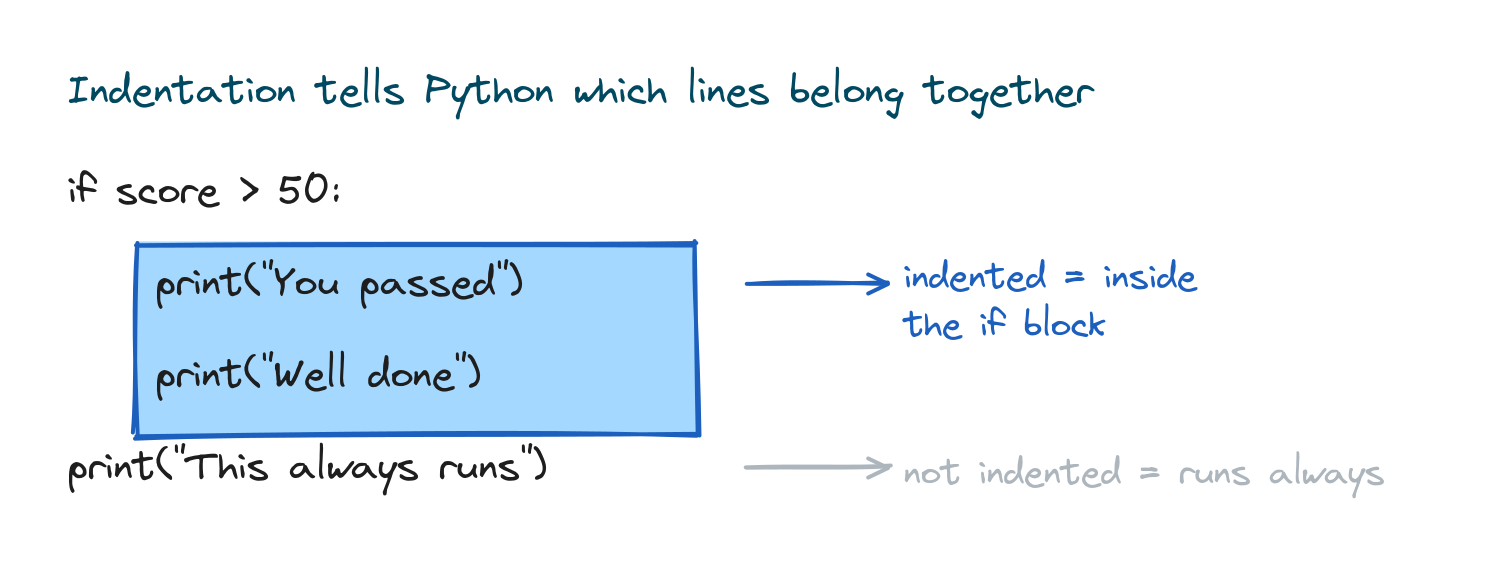
score = 75

if score > 50:
    print("You passed")
    print("Well done")
print("This always runs")
# Output:
# You passed
# Well done
# This always runs
The two indented lines only run when the condition is true, because they sit inside the if. The last line isn't indented, so it lives outside the if and runs no matter what.
Why Python uses indentation instead of braces
In a lot of languages, the layout and the grouping are two separate jobs. Braces handle the grouping, and you indent by hand on top of that just so a human can read it. Python folds those two jobs into one. The indentation you'd write anyway is the grouping. That was a deliberate call, meant to keep code consistent and easy to scan, and it's why most Python ends up looking tidy.
There's a nice payoff too. You can't end up with code that looks like it's inside a block but secretly isn't. What you see is what runs.
How much should you indent?
The community settled on four spaces per level. That's the recommendation in PEP 8, Python's official style guide. Python itself won't force the exact count, but it does insist on consistency. Every line in the same block has to be indented by the same amount.
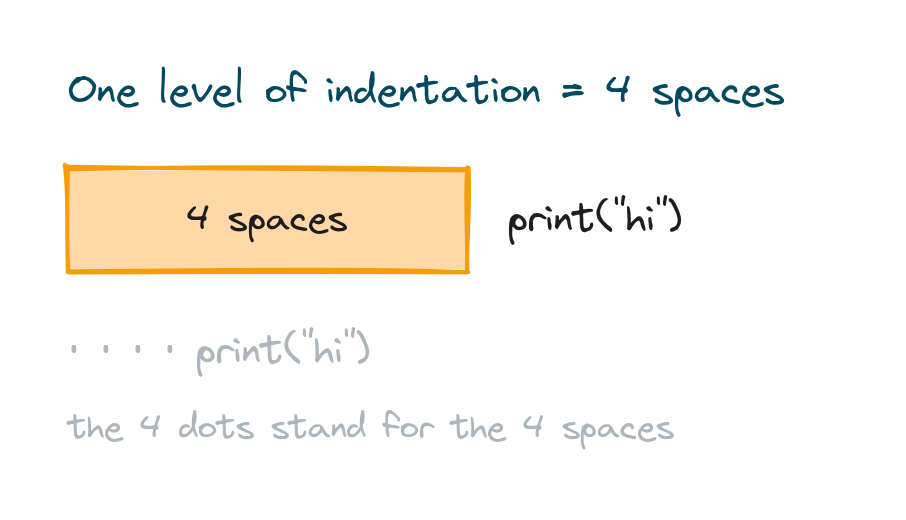
if True:
    print("indented four spaces")
# Output: indented four spaces
Most editors drop in four spaces when you hit Tab, so you almost never type them one at a time. Turn on "insert spaces for tabs" once and the indenting takes care of itself.
Which statements start a block
Any line that ends with a colon opens a block, and the lines after it get indented underneath. You'll see this with if, elif, else, for, while, def for functions, class, try, and a handful of others.
for i in range(3):
    print("Line", i)
# Output:
# Line 0
# Line 1
# Line 2
The colon and the indentation are a team. The colon says a block starts here, and the indentation says these lines are the block. Write the colon but forget to indent the next line, and Python stops and asks you for the block.
Nested blocks and indentation levels
A block can hold another block. Each time you go one level deeper, you indent one more step. That's how you put an if inside a for loop, and the indentation makes the depth obvious at a glance.
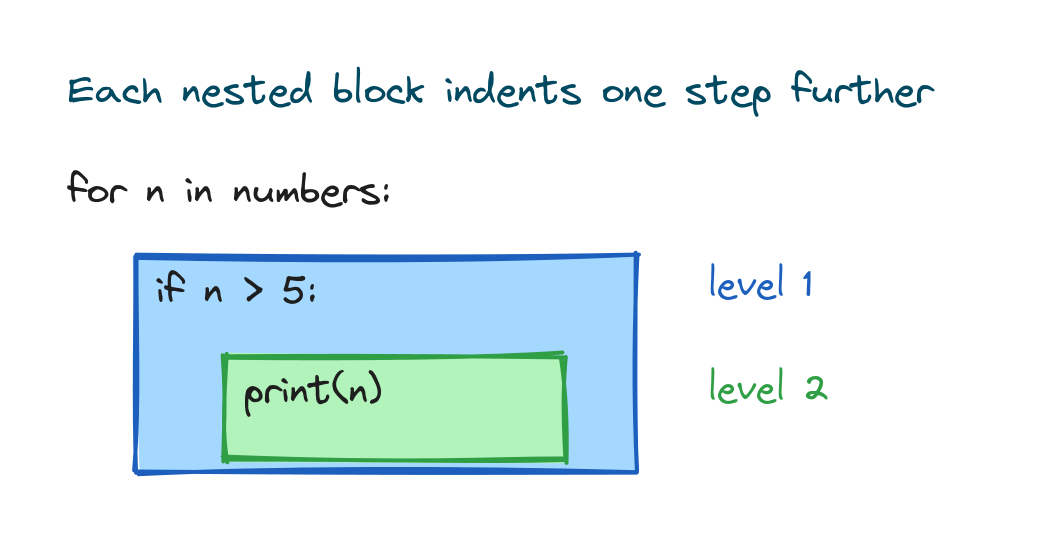
numbers = [4, 7, 10, 3]

for n in numbers:
    if n > 5:
        print(n, "is big")
# Output:
# 7 is big
# 10 is big
That print is two levels in. It's inside the if, which is itself inside the for. Glance at the left edge of each line and you can read exactly how deep it sits.
Tabs versus spaces
You can indent with the Tab character or with spaces, but don't mix the two inside the same block. They look identical on screen, yet they're different characters underneath, so mixing them confuses Python and you get a TabError.
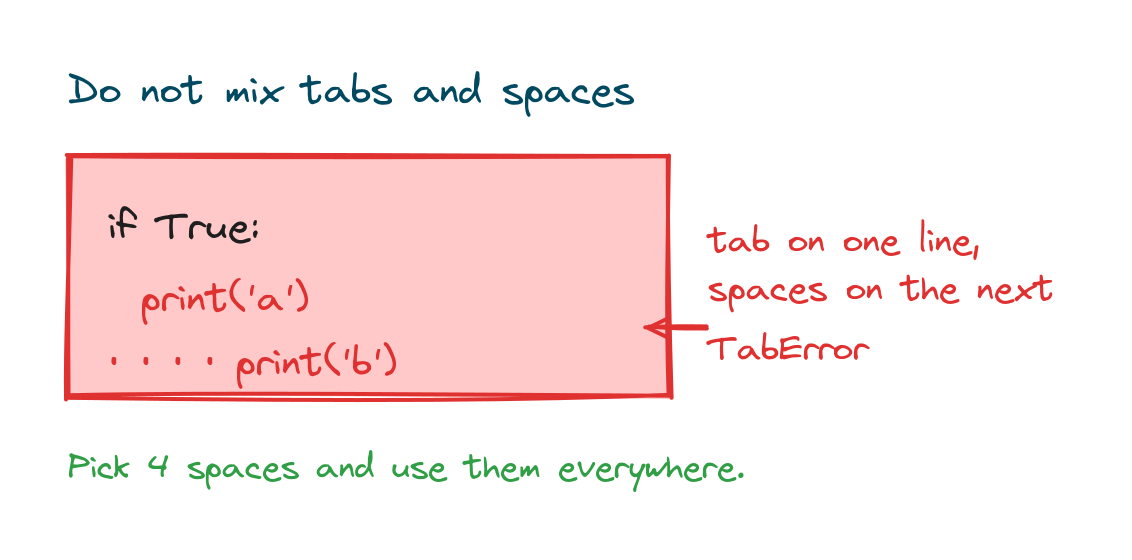
The fix is easy. Pick spaces, four of them, and use them everywhere. Set your editor to turn tabs into spaces and you'll never run into this. If you open a file someone else wrote that mixes both, most editors have a "convert indentation to spaces" command that cleans it up in one go.
The errors you will see, and how to fix them
When the spacing is off, Python raises one of two errors before it runs anything at all.
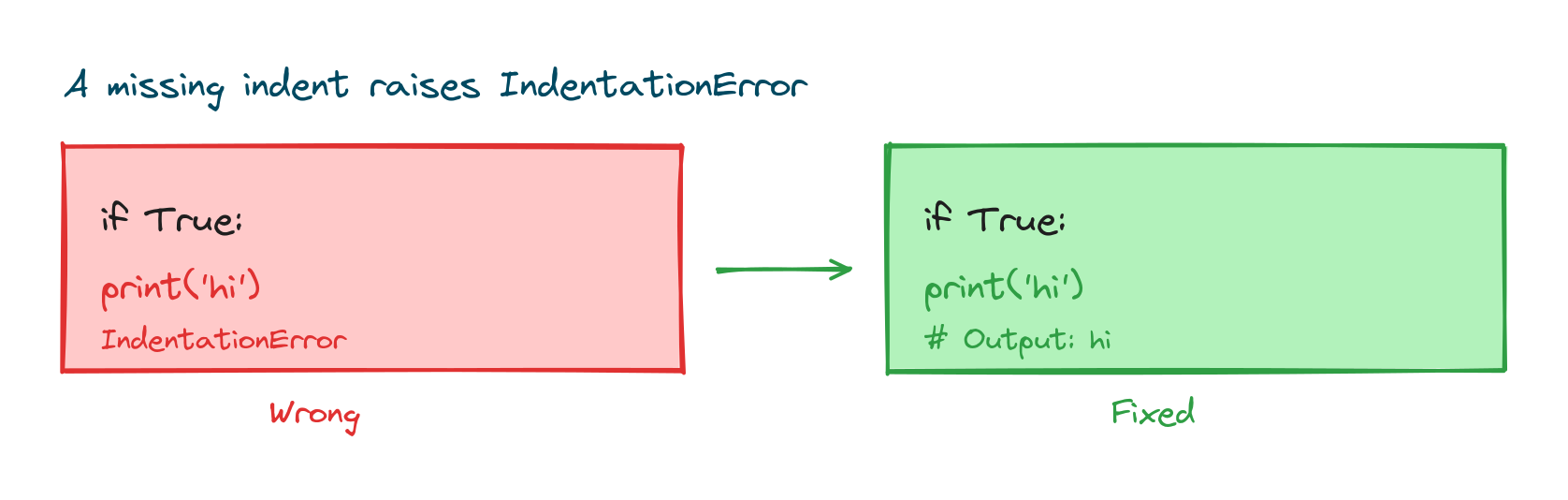
An IndentationError means a line is indented when it shouldn't be, or not indented when it should be:
if True:
print("hi")
# IndentationError: expected an indented block after 'if' statement
The fix is to indent the body of the block:
if True:
    print("hi")
# Output: hi
The other one, TabError, means tabs and spaces got mixed, the same thing we covered above. Both errors stop the program before any output shows up, which is honestly a help. They catch the layout problem early instead of letting it run wrong.
Indentation is about structure, not the prompt
When you read examples online, you'll sometimes see lines that start with >>>. That's the interactive Python prompt, not indentation you're supposed to type. In a normal script you just write the lines and indent the blocks yourself. Don't copy the >>> into a file, or it won't run.
The colon that pairs with every block
Indentation always travels with the colon that opens the block. If you're still getting comfortable with where colons go and how a full line comes together, it helps to keep the broader rules of keywords and identifiers in mind, since the words that open blocks are reserved ones. Here's the pairing in a single example:
name = "Sam"
if name == "Sam":
    print("Hello, Sam")
# Output: Hello, Sam
Blank lines and comments don't count
Blank lines and comments don't affect indentation, so use them freely to give your code room to breathe. A comment can even sit at any indentation without raising an error, because Python ignores everything after the #. If you want the full story on writing notes in your code, see the guide to Python comments.
if True:

    # this comment is fine here
    print("done")
# Output: done
Practice exercises
Type each one and run it. Keep an eye on the left edge of every line.
Make a block run
Write an if that prints "Big" when a number is greater than 100.
# Solution
n = 250
if n > 100:
    print("Big")
# Output: Big
Fix the indentation
This code raises an error. Indent the body so it runs.
# Broken:
# for i in range(2):
# print(i)

# Fixed
for i in range(2):
    print(i)
# Output:
# 0
# 1
Two levels deep
Loop over 1, 2, 3, 4 and print only the even numbers using a nested if.
# Solution
for n in [1, 2, 3, 4]:
    if n % 2 == 0:
        print(n)
# Output:
# 2
# 4
Common mistakes
- Forgetting to indent after a colon. Every line ending in
:needs an indented block under it. - Mixing tabs and spaces. Choose spaces and let your editor insert four per Tab.
- Uneven indentation in one block. All lines in the same block must line up at the same depth.
- Indenting a line that shouldn't be indented. Extra leading space where none is expected also raises
IndentationError. - Copying the
>>>prompt from interactive examples into a script.
Frequently asked questions
How many spaces should I use for indentation in Python?
Four spaces per level. That's the PEP 8 standard, and it's what almost everyone uses. Python will accept other amounts as long as you stay consistent inside a block, but stick with four.
Can I use tabs instead of spaces?
Yes, tabs work. Just don't mix tabs and spaces in the same block or you'll get a TabError. The safe choice is spaces everywhere, with your editor set to insert them when you press Tab.
What is the difference between IndentationError and TabError?
An IndentationError means a line has the wrong amount of leading space, usually a missing or unexpected indent. A TabError means tabs and spaces got mixed in a way Python can't sort out.
Why do I get "expected an indented block"?
That shows up when a line ends with a colon but the next line isn't indented. Add four spaces in front of the body of the block and it's fixed.
Does indentation matter inside brackets?
Not in the same strict way. When code sits inside (), [], or {}, Python lets you wrap and indent it however reads best, because the brackets already mark where it begins and ends. The strict rule is for blocks opened by a colon.
Do blank lines break indentation?
No. Blank lines are ignored, so drop them inside a block to space things out whenever you like.
Key takeaways
- Python uses indentation, not braces, to group lines into blocks.
- The standard is four spaces per level, and every line in a block must match.
- A line ending in a colon opens a block; the indented lines under it are that block.
- Nested blocks indent one extra step per level, which shows the depth clearly.
- Don't mix tabs and spaces, and indent the body after every colon to dodge
IndentationErrorandTabError.
Indentation is the backbone of Python's clean look, and the colon is its constant companion. So the natural next stop is the lesson on Python syntax, where you'll see how lines, tokens, and statements fit together around it.