

 By Kaustubh Saini
Every decision a Python program makes comes down to one question: is this True or is this False? Should the user log in? Is the answer correct? Is the cart empty? Whatever the program is deciding, the answer is always one of these two values.
A boolean is a value that can only be True or False. It's the smallest data type in Python and the one every if statement depends on. This lesson covers where booleans come from, how bool() decides what counts as True, and the handful of rules that stop beginners in their tracks, like why the string "False" is actually True.
What a boolean is
Python has exactly two boolean values, and both start with a capital letter:
print(True)
print(False)
print(type(True))
# Output:
# True
# False
# <class 'bool'>
Write true or false in small letters and Python thinks you mean a variable:
print(true)
# NameError: name 'true' is not defined
The capital letters matter. True and False are keywords, part of the language itself.
Comparisons make booleans
You rarely type True or False yourself. Most booleans come from comparing things:
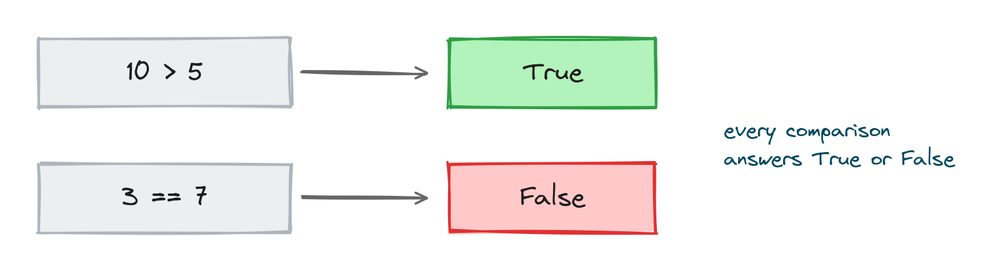
print(10 > 5)
print(3 == 7)
print("cat" != "dog")
# Output:
# True
# False
# True
The six comparison operators are == (equal), != (not equal), >, <, >=, and <=. Each one asks a question and hands back a boolean answer.
You can store that answer in a variable, and the variable name should sound like a yes-or-no question:
age = 20
is_adult = age >= 18
print(is_adult)
# Output: True
Booleans drive if statements
An if statement runs its block when the condition is True and skips it when the condition is False:
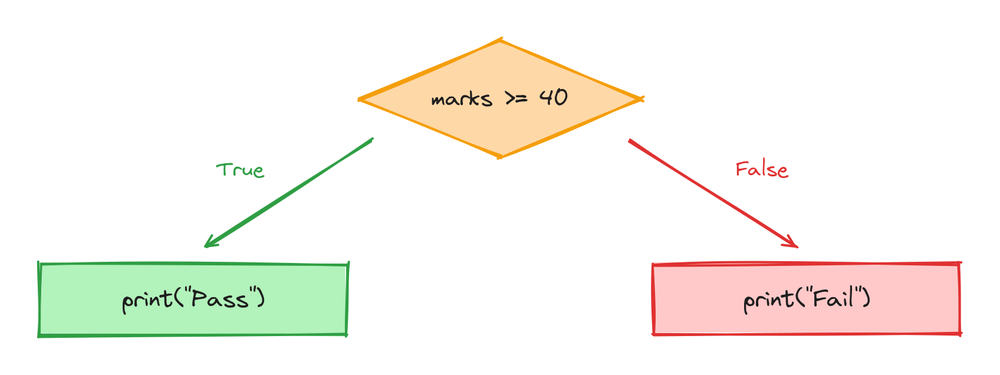
marks = 72

if marks >= 40:
    print("Pass")
else:
    print("Fail")
# Output: Pass
The if statement doesn't care where the boolean came from. A comparison, a variable, a function call, they all work, as long as the result is True or False.
The bool() function
You can turn any value into a boolean with bool():
print(bool("hello"))
print(bool(""))
print(bool(42))
print(bool(0))
# Output:
# True
# False
# True
# False
The rules behind those answers are the subject of the next section, and they're worth learning well, because Python applies them automatically inside every if and while.
Truthy and falsy values
Every value in Python counts as either True or False when a condition needs it. Programmers say the value is "truthy" or "falsy". The falsy list is short: False, None, zero in any form (0, 0.0), and anything empty, like "", [], (), and {}. Everything else is truthy.
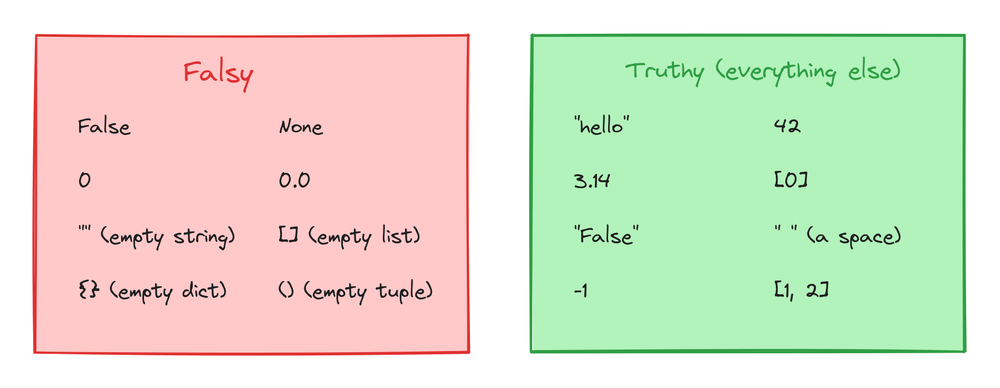
This is why you can test an empty list or string directly, without comparing its length:
cart = []

if cart:
    print("Checkout")
else:
    print("Your cart is empty")
# Output: Your cart is empty
Two results that surprise people:
print(bool("False"))
print(bool([0]))
# Output:
# True
# True
"False" is a string with 5 characters in it, so it's not empty, so it's truthy. And [0] is a list holding one item, so the list itself is truthy, even though the item inside is falsy.
and, or, and not
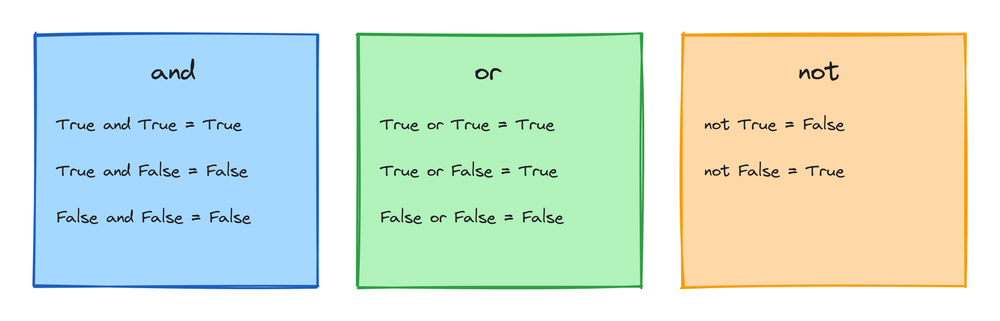
Python combines booleans with three plain English words:
age = 25
has_id = True

print(age >= 18 and has_id)   # both must be True
print(age < 18 or has_id)     # at least one must be True
print(not has_id)             # flips the value
# Output:
# True
# True
# False
and is True only when both sides are True. or is True when at least one side is True. not flips True to False and back.
Using or for a default value
Because empty strings are falsy, or gives you a short way to fall back to a default:
username = ""
name = username or "Guest"
print(name)
# Output: Guest
If username has text, name gets that text. If it's empty, name gets "Guest".
True is 1 and False is 0
Under the surface, Python's booleans are a kind of number. True equals 1 and False equals 0, and they behave that way in maths:
print(True + True)
print(True == 1)
# Output:
# 2
# True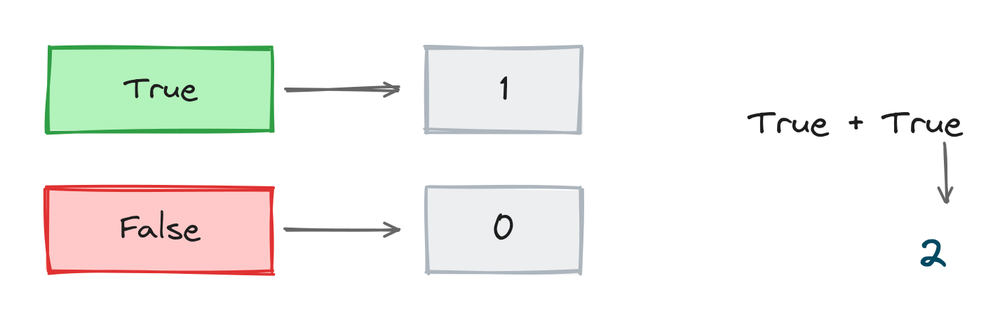
That sounds like trivia, but it's useful: sum() can count how many things are True:
marks = [35, 72, 88, 12, 55]
passed = sum(m >= 40 for m in marks)
print(passed)
# Output: 3
Each comparison is True or False, True counts as 1, and the sum is the number of students who passed.
Functions that return booleans
A lot of built-in tools answer yes-or-no questions, so they return booleans. Some you'll meet early:
print(isinstance(5, int))          # is this value an int?
print("python".startswith("py"))   # does it start with this?
print("42".isdigit())              # is it all digits?
print("a" in "team")               # does it contain this?
# Output:
# True
# True
# True
# True
All of these slot straight into an if statement, which is where they're usually used.
Don't compare to True
A boolean already is the answer, so comparing it to True adds nothing:
is_ready = True

# Works, but says the same thing twice
if is_ready == True:
    print("Go")

# Better
if is_ready:
    print("Go")
# Output:
# Go
# Go
Read if is_ready: out loud: "if is ready". That's the whole point of naming booleans well, the code turns into a sentence.
Practice exercises
Try each one before you look at the solution.
Predict the comparison
Without running it, decide what print(7 >= 7) prints. Then run it.
# Solution
print(7 >= 7)
# Output: True
Check a password length
Store a password in a variable and print a boolean: is it at least 8 characters long?
# Solution
password = "hunter2"
print(len(password) >= 8)
# Output: False
Guess the bool() results
Predict the output of bool("0"), bool(0), and bool(" "), then run them.
# Solution
print(bool("0"), bool(0), bool(" "))
# Output: True False True
Count the even numbers
Use sum() and a comparison to count how many numbers in [3, 8, 10, 7, 2] are even.
# Solution
nums = [3, 8, 10, 7, 2]
print(sum(n % 2 == 0 for n in nums))
# Output: 3
Combine two conditions
A ride needs the rider to be 12 or older and taller than 130 cm. Print a boolean for age 14, height 128.
# Solution
age = 14
height = 128
print(age >= 12 and height > 130)
# Output: False
Common mistakes
- Writing
trueinstead ofTrue. Booleans are capitalized in Python. Small letters give a NameError. - Using
=when you mean==. One equals sign assigns, two compare.if x = 5:is a SyntaxError. - Expecting
bool("False")to be False. Any non-empty string is truthy, whatever it says. This bites hardest with input(), which always returns a string, sobool(input())is True for "0" and "no". - Comparing booleans to True.
if x == True:works but is noise. Writeif x:. - Testing a list's items instead of the list.
[0]is truthy because it contains one item. Emptiness is what counts, not what's inside. - Mixing up
andandor.andneeds both sides True.orneeds only one. Swapping them flips your program's logic.
Frequently asked questions
What is a boolean in Python?
A value that is either True or False. It's Python's yes-or-no type, and it's what if statements and while loops check.
Is True the same as 1 in Python?
For maths and comparisons, yes. True == 1 is True and True + True is 2. The type is still bool, which Python treats as a special kind of int.
Which values count as False in Python?
False, None, zeros (0, 0.0), and empty containers: "", [], (), {}. Every other value counts as True.
What does bool() do?
It converts a value to True or False using the truthy and falsy rules. bool("") is False, bool("hi") is True.
Why is bool("False") True?
Because "False" is a non-empty string. bool() looks at whether the string has characters, not at what the characters say.
Should I write if x == True?
No. if x: does the same job and reads better. Comparing to True only makes sense in rare cases where you must rule out other truthy values.
Can I add booleans together?
Yes. True acts as 1 and False as 0, so sum() over comparisons counts how many are True. It's a common counting trick.
What's the difference between == and is?
== asks "are these values equal?" and is asks "are these the exact same object?". For everyday comparisons, use ==. The main place you'll see is is if x is None:.
Key takeaways
- A boolean is
TrueorFalse, always capitalized. - Comparisons like
==,!=, and>=produce booleans, and if statements consume them. - Falsy values:
False,None, zero, and anything empty. Everything else is truthy, including"False"and[0]. and,or, andnotcombine booleans, andordoubles as a way to set defaults.Trueis 1 andFalseis 0, sosum()can count True results.
Booleans are one of Python's core built-in types, and they make more sense once you've seen where they sit next to numbers, strings, and lists. For that bigger picture, go through Python data types.