

 By Kaustubh Saini
You have a list of words and you want a dictionary that maps each word to its length. The normal way is to make an empty dictionary, write a for loop, and add one key at a time. That's three lines for something simple. Python has a shorter way that does the same job in one line.
A dictionary comprehension builds a new dictionary in a single line, right inside a pair of curly braces. You write the rule for the key and the value, then loop over your data, all in one place. This lesson shows the basic shape, then walks through every common use: building from a list, from two lists, from another dict, filtering items, and swapping keys and values. Every example runs, and the output is shown right below it.
A quick reminder of what a dictionary is
A dictionary stores pairs. Each pair has a key and a value, and you look up the value by its key. You write it with curly braces and colons, like {"tea": 10, "coffee": 25}. Here "tea" and "coffee" are the keys, and 10 and 25 are the values. If dictionaries are new to you, read the Python dictionary lesson first, then come back here.
The basic shape of a dictionary comprehension
A dictionary comprehension has this shape:
{key: value for item in iterable}You read it from the middle out. The for item in iterable part loops over your data, one item at a time. For each item, the key: value part on the left says what pair to add. The curly braces and the colon are what make it a dictionary and not a list.
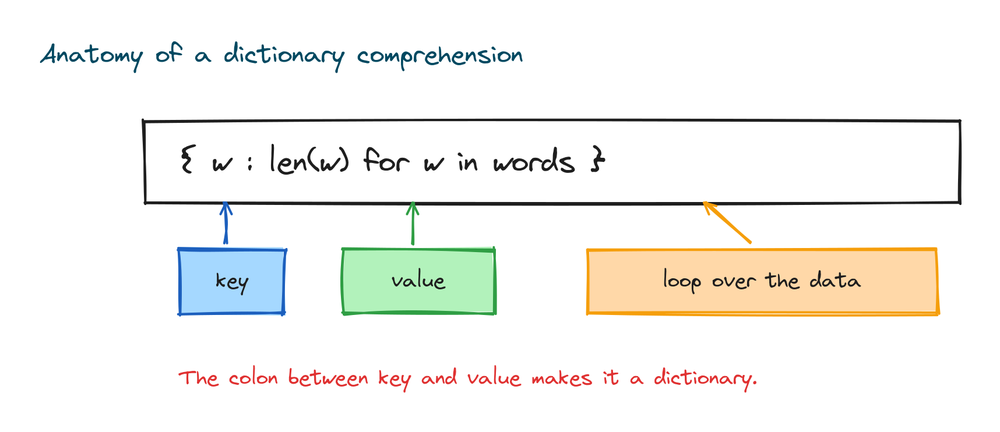
The colon between the key and the value is the important part. Leave it out and you get a different kind of object, a set, not a dictionary. More on that mistake later.
Building a dictionary from a list
Say you have a list of words. You want a dictionary where each word is a key and its length is the value. Here is the loop way first, so you can compare:
words = ["cat", "elephant", "dog"]
lengths = {}
for w in words:
    lengths[w] = len(w)
print(lengths)
# Output: {'cat': 3, 'elephant': 8, 'dog': 3}
Now the same thing as a comprehension:
words = ["cat", "elephant", "dog"]
lengths = {w: len(w) for w in words}
print(lengths)
# Output: {'cat': 3, 'elephant': 8, 'dog': 3}
Same output, one line. The key is w, the word itself. The value is len(w), the length of that word. The dictionary keeps the words in the order they appeared in the list.
Making a lookup table with range()
You do not need an existing list to start. range() gives you a run of numbers, and a comprehension can turn them into a lookup table. Here is a squares table for the numbers 1 to 5:
squares = {n: n * n for n in range(1, 6)}
print(squares)
# Output: {1: 1, 2: 4, 3: 9, 4: 16, 5: 25}
The key is the number and the value is its square. range(1, 6) stops before 6, so you get 1 through 5. This pattern is handy for small tables you check many times later, since a dictionary lookup is fast.
Building a dictionary from two lists with zip()
Often your keys are in one list and your values are in another. zip() pairs them up, one from each list, and the comprehension turns each pair into a key and a value.
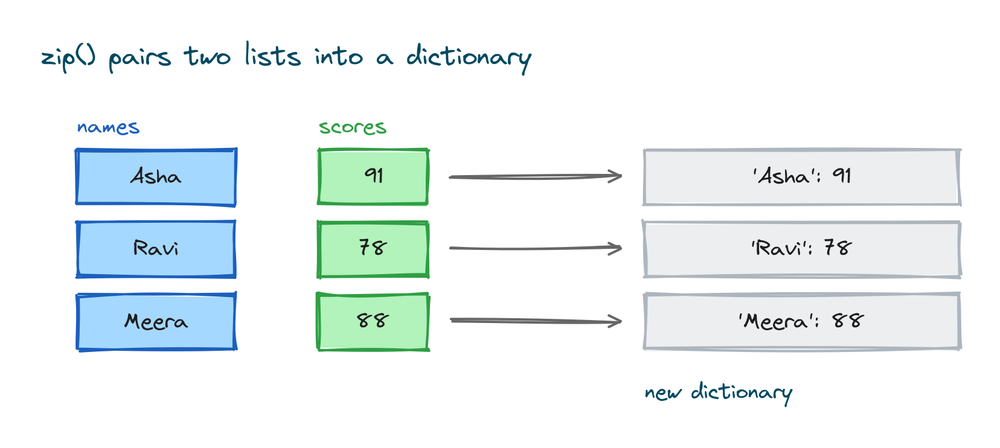
names = ["Asha", "Ravi", "Meera"]
scores = [91, 78, 88]
result = {name: score for name, score in zip(names, scores)}
print(result)
# Output: {'Asha': 91, 'Ravi': 78, 'Meera': 88}
The for name, score in zip(names, scores) part gives you two variables at once: the name from the first list and the score from the second. You then use name as the key and score as the value. If the two lists are different lengths, zip() stops at the shorter one.
Building from another dictionary
You can loop over an existing dictionary and build a new one from it. To get both the key and the value while you loop, call .items() on the dictionary. It hands you each pair as k, v.
prices = {"tea": 10, "coffee": 25, "juice": 40}
doubled = {item: price * 2 for item, price in prices.items()}
print(doubled)
# Output: {'tea': 20, 'coffee': 50, 'juice': 80}
Here item is the old key and price is the old value. The new dictionary keeps the same keys but doubles every value. The original prices dictionary is not touched. A comprehension always makes a new dictionary.
Changing the values as you go
The value side can be any expression, so you can transform each value while you build. A common job is adding tax to a set of prices. Here 18 percent tax is added, and round() keeps the result to two decimals:
prices = {"pen": 10, "book": 50, "bag": 200}
with_tax = {item: round(price * 1.18, 2) for item, price in prices.items()}
print(with_tax)
# Output: {'pen': 11.8, 'book': 59.0, 'bag': 236.0}
The keys stay the same and only the values change. This is the most common reason people reach for a dictionary comprehension: take a dictionary you already have and produce a changed copy.
Filtering with an if at the end
Put an if at the end of the comprehension and it decides which items to keep. If the test is true, the pair goes in. If it is false, the pair is skipped.
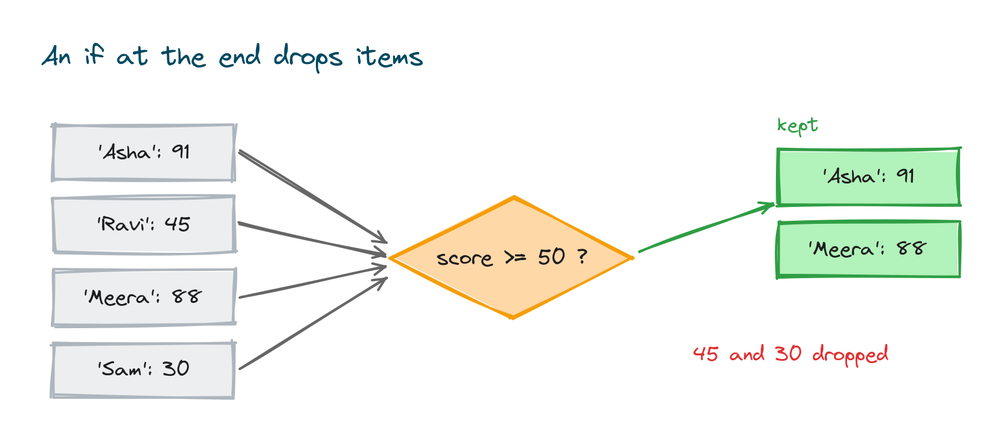
scores = {"Asha": 91, "Ravi": 45, "Meera": 88, "Sam": 30}
passed = {name: score for name, score in scores.items() if score >= 50}
print(passed)
# Output: {'Asha': 91, 'Meera': 88}
Only the students with a score of 50 or more make it into passed. Ravi and Sam are dropped. The if here is a filter, and it always goes at the end, after the for.
Using if else on the value instead of filtering
There is a second place an if can go, and it does a different job. When you write if else at the front, on the value side, you are not filtering. You keep every item, but you pick a different value based on a test.
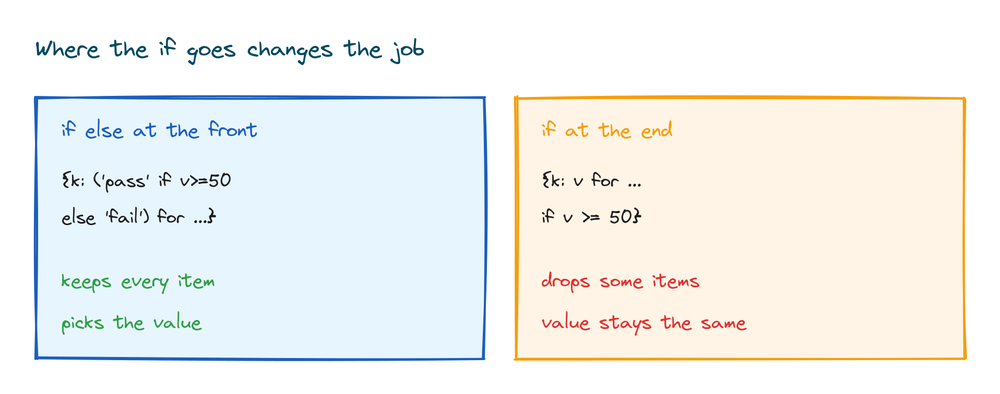
Here is the value-side version. Every student stays, but each gets the label pass or fail:
scores = {"Asha": 91, "Ravi": 45, "Meera": 88}
labels = {name: ("pass" if score >= 50 else "fail") for name, score in scores.items()}
print(labels)
# Output: {'Asha': 'pass', 'Ravi': 'fail', 'Meera': 'pass'}
Compare that with the filter version, where the low scorer is removed entirely:
scores = {"Asha": 91, "Ravi": 45, "Meera": 88}
passed = {name: score for name, score in scores.items() if score >= 50}
print(passed)
# Output: {'Asha': 91, 'Meera': 88}
The rule is simple. An if else at the front changes the value and keeps every item. An if at the end drops items and keeps them unchanged. The position tells you the job. When you see if with no else at the end, it is a filter. When you see if ... else before the for, it is choosing a value.
Swapping keys and values
Say you have a dictionary of countries and their capitals, and you want to look up the country by its capital instead. You can flip every pair with a comprehension. Use the old value as the new key, and the old key as the new value:
capitals = {"India": "Delhi", "Japan": "Tokyo", "France": "Paris"}
by_capital = {city: country for country, city in capitals.items()}
print(by_capital)
# Output: {'Delhi': 'India', 'Tokyo': 'Japan', 'Paris': 'France'}
Now by_capital["Tokyo"] gives you "Japan". One warning: if two different keys had the same value, swapping would make them collide, and you would lose one. This works cleanly only when the values are all unique.
When to use a comprehension and when not to
A comprehension is not doing anything new. It is a shorter way to write a loop that builds a dictionary. Seeing them side by side makes the shape click. Both of these produce the exact same dictionary:
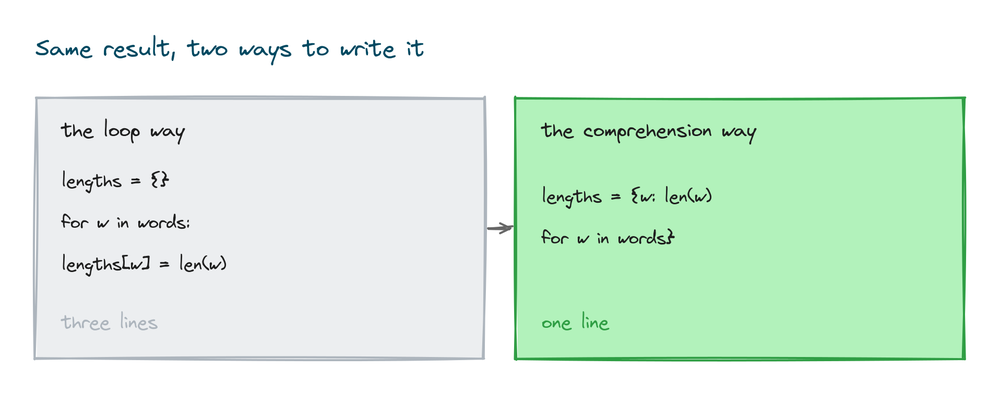
# The loop way
lengths = {}
for w in ["cat", "elephant", "dog"]:
    lengths[w] = len(w)
print(lengths)
# Output: {'cat': 3, 'elephant': 8, 'dog': 3}
# The comprehension way
lengths = {w: len(w) for w in ["cat", "elephant", "dog"]}
print(lengths)
# Output: {'cat': 3, 'elephant': 8, 'dog': 3}The loop version needs an empty dictionary first, then a line to add each key. The comprehension folds all of that into one line. When the logic is short, the comprehension is easier to read. Reach for a plain loop in these cases instead.
- The logic is long. If your key or value rule needs several steps, or an
ifwith many branches, the one line becomes hard to read. A normal loop with real line breaks is clearer. - You need to do more than build the dictionary. If each step also has to print something, call another function, or handle an error, that is a side effect. A comprehension is meant to build a value and nothing else. Put side effects in a loop.
- You are debugging. A loop is easier to step through and add print lines to. Once it works, you can shorten it to a comprehension if it fits on one clear line.
The test is readability. If a person can read your comprehension once and understand it, keep it. If they have to stop and work it out, use a loop.
Set comprehension, a close relative
There is a matching tool for sets. A set comprehension uses the same curly braces but has no colon, because a set stores single values, not pairs. It is useful for collecting the unique results of some calculation.
numbers = [1, 2, 2, 3, 3, 3]
squares = {n * n for n in numbers}
print(squares)
# Output: {1, 4, 9}
The duplicates are gone because a set keeps each value only once. The only visible difference from a dictionary comprehension is the missing key: part before the value. That missing colon is exactly what turns one into the other.
Practice exercises
Try each one yourself before you open the solution. Everything you need is above.
Map words to their length
Given a list of fruits, build a dictionary from each fruit to the number of letters in it.
# Solution
fruits = ["apple", "kiwi", "banana"]
sizes = {fruit: len(fruit) for fruit in fruits}
print(sizes)
# Output: {'apple': 5, 'kiwi': 4, 'banana': 6}
Build from two lists
You have a list of student names and a list of their ages. Pair them into one dictionary.
# Solution
names = ["Sam", "Nina", "Leo"]
ages = [21, 19, 23]
students = {name: age for name, age in zip(names, ages)}
print(students)
# Output: {'Sam': 21, 'Nina': 19, 'Leo': 23}
Keep only the long words
From a dictionary of words and their lengths, keep only the pairs where the length is more than 5.
# Solution
words = {"cat": 3, "elephant": 8, "dog": 3, "hippopotamus": 12}
long_words = {w: n for w, n in words.items() if n > 5}
print(long_words)
# Output: {'elephant': 8, 'hippopotamus': 12}
Uppercase every value
Given a dictionary of settings, make a new one where every value is in capital letters.
# Solution
data = {"name": "asha", "city": "pune"}
upper = {k: v.upper() for k, v in data.items()}
print(upper)
# Output: {'name': 'ASHA', 'city': 'PUNE'}
Label each number
For the numbers 1 to 5, build a dictionary that labels each one even or odd.
# Solution
labels = {n: ("even" if n % 2 == 0 else "odd") for n in range(1, 6)}
print(labels)
# Output: {1: 'odd', 2: 'even', 3: 'odd', 4: 'even', 5: 'odd'}
Common mistakes
- Forgetting the key: value colon. Without the colon,
{x for x in items}is a set comprehension, not a dictionary. There is no error, so you get a set when you wanted a dictionary and wonder why lookups fail. - Duplicate keys silently keep the last one. If two items produce the same key, the second quietly overwrites the first.
{x % 2: x for x in [1, 2, 3, 4]}ends up with only two keys, and you lose data without any warning. - Cramming too much into one line. A comprehension that needs three reads is worse than a plain loop. If it does not fit and read clearly on one line, write the loop instead.
- Changing a dictionary while you loop over it. Do not add or delete keys of the same dictionary you are looping across. Build a new one with the comprehension and leave the original alone.
Frequently asked questions
What is a dictionary comprehension in Python?
It is a short way to build a dictionary in one line. You write a key and value rule inside curly braces, then loop over your data, like {w: len(w) for w in words}. It does the same work as a for loop that fills an empty dictionary.
What is the syntax of a dict comprehension?
The shape is {key: value for item in iterable}. The for part loops over your data, and for each item the key: value part on the left says what pair to add. The colon between key and value is required.
How do I make a dictionary from two lists?
Use zip() to pair them. {k: v for k, v in zip(keys, values)} takes one item from each list and turns it into a key and a value. If the lists are different lengths, it stops at the shorter one.
How do I add an if condition to a dict comprehension?
Put the if at the end, after the for. {k: v for k, v in d.items() if v > 50} keeps only the pairs where the test is true and drops the rest.
What is the difference between if at the end and if else at the front?
An if at the end filters, so it drops items. An if ... else before the for chooses the value and keeps every item. Position tells you the job.
How do I swap the keys and values of a dictionary?
Flip each pair with {v: k for k, v in d.items()}. This works only when the values are all unique, since two equal values would collide and you would lose one.
Is a dict comprehension faster than a for loop?
It is usually a little faster and always shorter, since Python builds the dictionary in one step. The bigger reason to use it is readability when the logic is short. For long logic, a plain loop reads better.
Can keys repeat in a dictionary comprehension?
No. Keys in a dictionary are unique. If your comprehension produces the same key twice, the last one wins and the earlier value is thrown away with no warning.
Key takeaways
- A dictionary comprehension builds a dictionary in one line with the shape
{key: value for item in iterable}. - The colon between key and value is what makes it a dictionary. Drop the colon and you get a set comprehension instead.
- Use
.items()to loop over an existing dictionary, andzip()to pair two lists into one. - An
ifat the end filters items out. Anif elseat the front picks a value and keeps every item. - Skip the comprehension when the logic is long, needs side effects, or reads better as a plain loop.
Once the one line habit clicks for dictionaries, the same idea works for lists, and lists are where most people meet it first. The next step is the Python list comprehension lesson, which uses square brackets and the same for and if pattern you just learned.