

 By Kaustubh Saini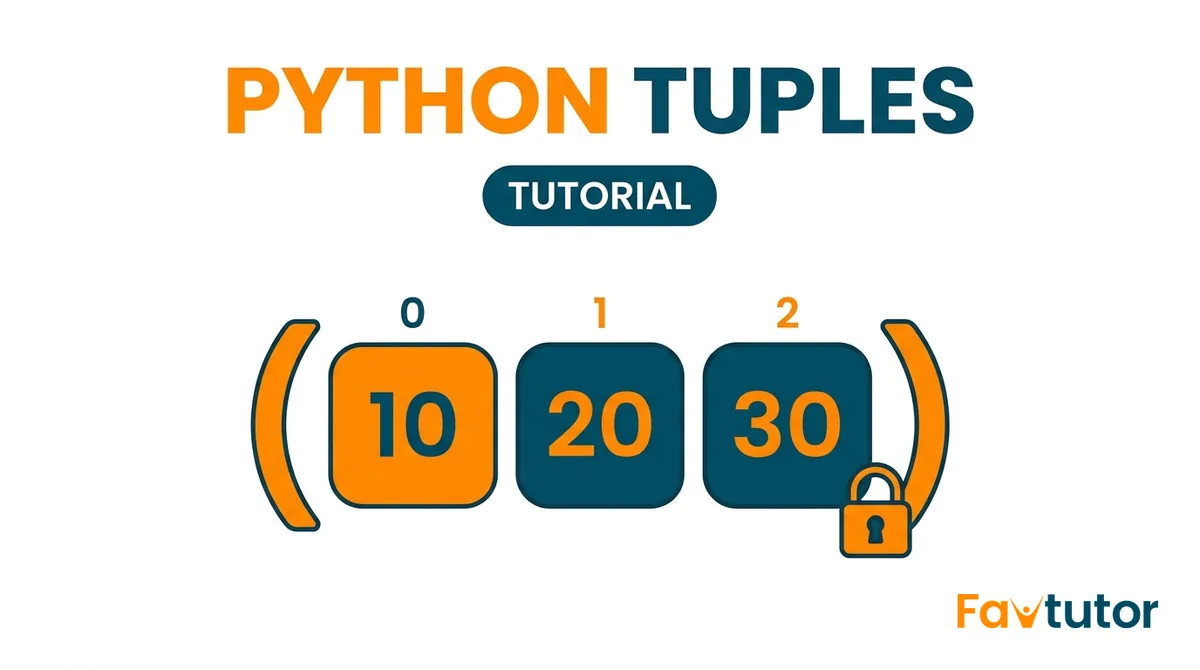
Tuples are one of the first things you meet when you start storing groups of values in Python, and the good news is they are simple. If you can picture a row of boxes that you are not allowed to rearrange, you already understand the idea. This guide starts from zero, shows you a working example for every single point, and by the end you will know exactly when to reach for a tuple instead of a list.
Open a Python shell or an online editor and type the examples as you read. You learn this stuff ten times faster by running it than by reading it.
What is a tuple in Python?
A tuple is an ordered collection of values that you cannot change after you create it. Two words matter there. Ordered means every item has a fixed position, so the first item stays first. Cannot change means once the tuple is built, you cannot add new items, remove items, or replace what is inside. Programmers call this being immutable.
Think of a tuple like the printed date of birth on an ID card. It is a set of values that belong together and are never meant to change. A list, by comparison, is more like a shopping list you keep editing.
Here is the simplest tuple you can make:
colors = ("red", "green", "blue")
print(colors)
# Output: ('red', 'green', 'blue')
You can check the type with the type() function, which is a handy way to confirm what you are working with:
colors = ("red", "green", "blue")
print(type(colors))
# Output: <class 'tuple'>
Tuples can hold any kind of value, and you can even mix types in the same tuple:
person = ("Aman", 21, 5.9, True)
print(person)
# Output: ('Aman', 21, 5.9, True)
A few real examples where a tuple fits naturally: a point on a map as (latitude, longitude), a color as (red, green, blue), or a date as (year, month, day). In each case the values belong together and should not be changed by accident.
How to create a tuple
There is more than one way to build a tuple. Here are all of them, including the one trap that trips up almost every beginner.
1. With round brackets
fruits = ("apple", "banana", "cherry")
numbers = (1, 2, 3, 4, 5)
print(fruits)
print(numbers)
# Output:
# ('apple', 'banana', 'cherry')
# (1, 2, 3, 4, 5)
2. An empty tuple
empty = ()
print(empty)        # Output: ()
print(len(empty))   # Output: 0
3. The single item trap
This one matters. To make a tuple with just one item, you must add a comma after it. Without the comma, Python thinks the brackets are just grouping a value, not making a tuple.
wrong = ("hello")
print(type(wrong))    # Output: <class 'str'>   (just a string!)

right = ("hello",)
print(type(right))    # Output: <class 'tuple'>
So remember: one item needs a trailing comma, like ("hello",).
4. Without any brackets
Brackets are actually optional. If you write values separated by commas, Python builds a tuple for you. This is called tuple packing, and you will see it again later.
scores = 90, 85, 77
print(scores)         # Output: (90, 85, 77)
print(type(scores))   # Output: <class 'tuple'>
5. With the tuple() function
The built in tuple() function turns any sequence, like a list or a string, into a tuple.
from_list = tuple([1, 2, 3])
from_string = tuple("cat")

print(from_list)      # Output: (1, 2, 3)
print(from_string)    # Output: ('c', 'a', 't')
How to access tuple items with indexing
Every item in a tuple has a number called an index that tells you its position. Counting starts at 0, not 1, so the first item is at index 0. You can also count backwards from the end using negative numbers, where -1 is the last item.
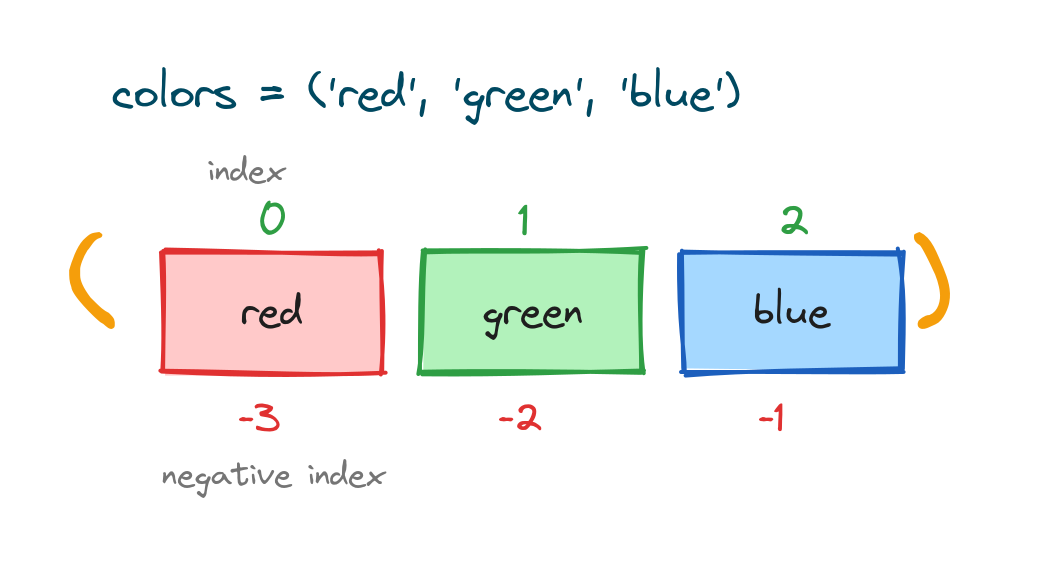
To read an item, put its index in square brackets after the tuple name:
colors = ("red", "green", "blue")

print(colors[0])    # Output: red    (first item)
print(colors[1])    # Output: green
print(colors[2])    # Output: blue   (last item)
Negative indexing is great when you want the last item without counting how many there are:
colors = ("red", "green", "blue")

print(colors[-1])   # Output: blue    (last)
print(colors[-2])   # Output: green
print(colors[-3])   # Output: red     (first)
If you ask for an index that does not exist, Python raises an IndexError. This is a normal beginner mistake, so do not worry when you see it.
colors = ("red", "green", "blue")
print(colors[5])
# IndexError: tuple index out of range
Slicing a tuple
Slicing lets you grab a section of a tuple instead of a single item. You write tuple[start:stop]. Python includes the start index and stops just before the stop index, so the stop item is not included.
![Diagram showing tuple slicing nums[1:4] selecting items 20, 30, 40](https://favtutor.com/resources/images/uploads/python-tuples-slicing.png)
nums = (10, 20, 30, 40, 50)

print(nums[1:4])    # Output: (20, 30, 40)
print(nums[:3])     # Output: (10, 20, 30)   start defaults to 0
print(nums[2:])     # Output: (30, 40, 50)   goes to the end
print(nums[:])      # Output: (10, 20, 30, 40, 50)   a full copy
You can add a third number, the step, to skip items. A step of -1 is a neat trick to reverse a tuple:
nums = (10, 20, 30, 40, 50)

print(nums[::2])    # Output: (10, 30, 50)   every second item
print(nums[::-1])   # Output: (50, 40, 30, 20, 10)   reversed
Why tuples are immutable
Immutable simply means it cannot be changed. If you try to replace an item in a tuple, Python stops you with a clear error.
colors = ("red", "green", "blue")
colors[0] = "yellow"
# TypeError: 'tuple' object does not support item assignment
This might feel like a downside at first, but it is actually why tuples are useful. Because a tuple is locked, you get three real benefits:
- It is safe. Values you do not want changed by mistake stay exactly as you set them.
- It is a little faster. Tuples use less memory and are slightly quicker than lists, which helps with large amounts of data.
- It can be a dictionary key. Only immutable values are allowed as dictionary keys, so tuples work and lists do not.
One detail that surprises people. If a tuple contains a list, that inner list can still be changed. The tuple still points to the same list, but the list itself is free to grow. The rule is about the tuple, not about everything inside it.
data = (1, 2, [3, 4])
data[2].append(5)
print(data)
# Output: (1, 2, [3, 4, 5])
How to change a tuple (the workaround)
So what if you really do need to change a tuple? You convert it to a list, make your edit, then convert it back to a tuple. The diagram below shows the full round trip.
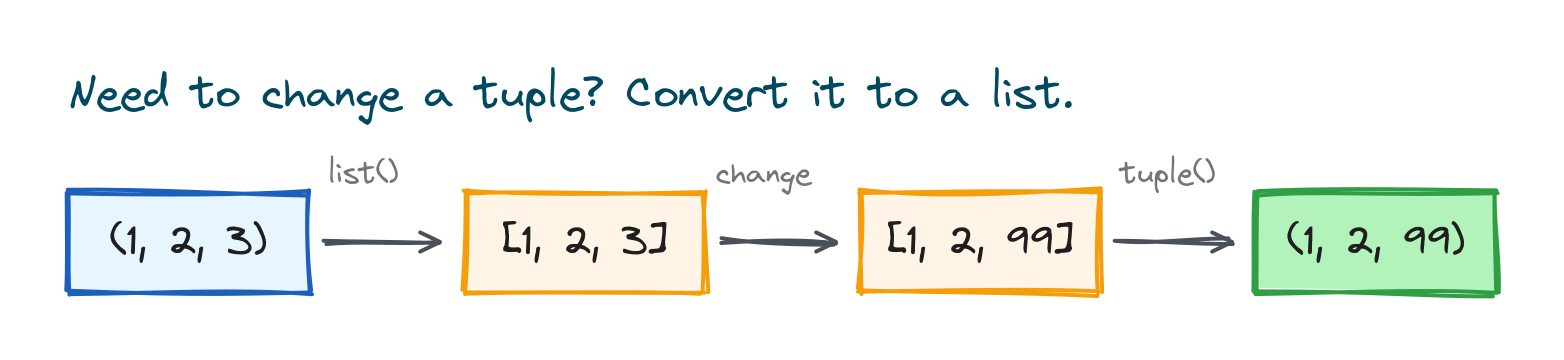
my_tuple = (1, 2, 3)

temp = list(my_tuple)   # turn it into a list
temp[2] = 99            # change what you need
my_tuple = tuple(temp)  # turn it back into a tuple

print(my_tuple)         # Output: (1, 2, 99)
Keep in mind you are not really editing the old tuple. You are building a fresh one. If you find yourself doing this a lot, that is a strong sign you wanted a list in the first place.
Tuple vs list: which should you use?
Tuples and lists look almost the same, so beginners often ask which one to pick. The short rule: use a tuple for data that should stay fixed, and a list for data you expect to change.
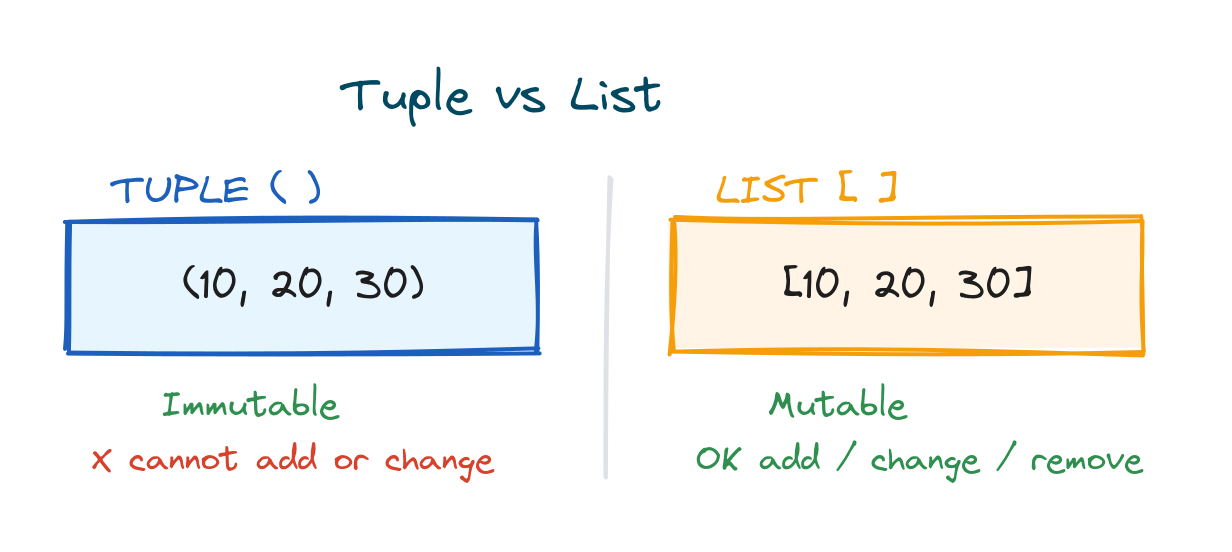
| Feature | Tuple | List |
|---|---|---|
| Brackets | Round ( ) | Square [ ] |
| Can you change it? | No, immutable | Yes, mutable |
| Speed | Slightly faster | Slightly slower |
| Memory used | Less | More |
| Can be a dict key? | Yes | No |
| Best for | Fixed data | Data that grows or changes |
Quick examples to make it stick. Days of the week, the colors of a traffic light, and map coordinates are great as tuples because they never change. A list of tasks, a shopping cart, or scores you keep adding to should be lists.
Tuple packing and unpacking
This is one of the most loved features in Python, and it makes your code shorter and cleaner. Packing is putting several values into one tuple. Unpacking is pulling those values back out into separate variables in a single line.
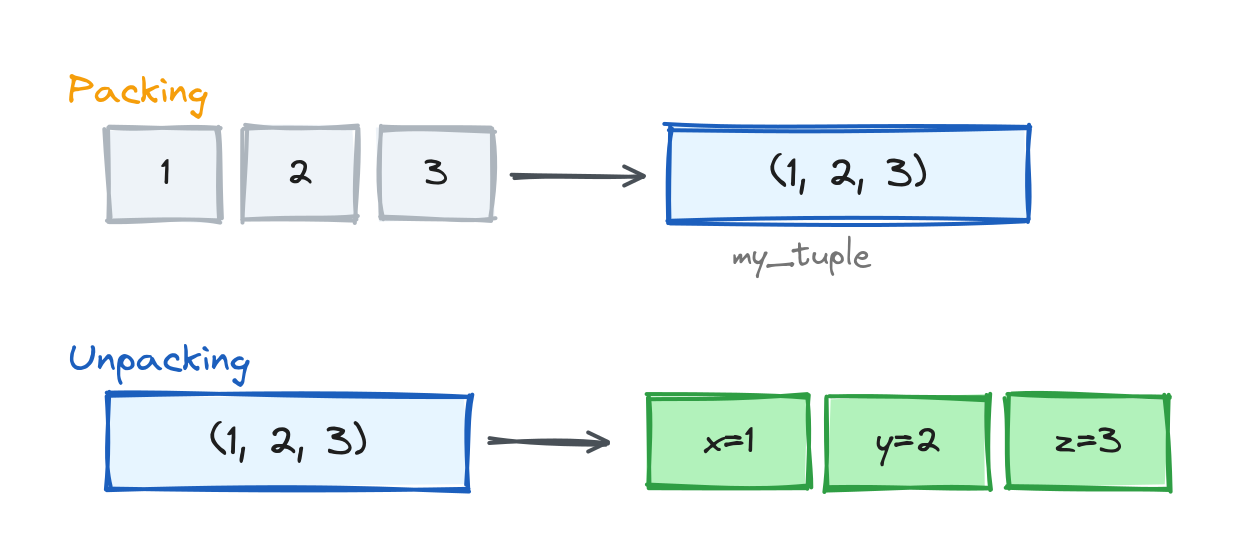
# Packing: three values go into one tuple
my_tuple = 1, 2, 3

# Unpacking: the tuple spreads into three variables
x, y, z = my_tuple

print(x)    # Output: 1
print(y)    # Output: 2
print(z)    # Output: 3
Unpacking gives you the cleanest way to swap two variables, with no temporary variable needed:
a, b = 5, 10
a, b = b, a
print(a, b)    # Output: 10 5
If you do not know how many items there will be, put a star in front of a variable to collect the rest into a list:
first, *rest = (1, 2, 3, 4, 5)
print(first)   # Output: 1
print(rest)    # Output: [2, 3, 4, 5]

*start, last = (1, 2, 3, 4, 5)
print(start)   # Output: [1, 2, 3, 4]
print(last)    # Output: 5
When you only care about some values, use an underscore for the ones you want to ignore. It is a common style that tells readers "I am skipping this on purpose".
point = (4, 0, 9)
x, _, z = point
print(x, z)    # Output: 4 9
Looping through a tuple
Reading every item in a tuple is the same as with a list. The most common way is a for loop:
colors = ("red", "green", "blue")

for color in colors:
    print(color)
# Output:
# red
# green
# blue
When you also need the position of each item, use enumerate(), which gives you the index and the value together:
colors = ("red", "green", "blue")

for index, color in enumerate(colors):
    print(index, color)
# Output:
# 0 red
# 1 green
# 2 blue
You can loop over two tuples at once with zip(), which pairs items by position. This is perfect for things like names and marks:
names = ("Aman", "Riya", "Karan")
marks = (91, 88, 95)

for name, mark in zip(names, marks):
    print(name, "scored", mark)
# Output:
# Aman scored 91
# Riya scored 88
# Karan scored 95
Useful tuple operations
Even though you cannot edit a tuple, there is plenty you can do with one. These operations return new values and leave the original tuple untouched.
a = (1, 2)
b = (3, 4)

print(a + b)        # Output: (1, 2, 3, 4)        join two tuples
print(a * 3)        # Output: (1, 2, 1, 2, 1, 2)  repeat
print(2 in a)       # Output: True                is 2 inside a?
print(5 in a)       # Output: False
print(len(a + b))   # Output: 4                   how many items
For tuples of numbers, these built in functions are very handy:
nums = (12, 5, 8, 21, 3)

print(min(nums))      # Output: 3
print(max(nums))      # Output: 21
print(sum(nums))      # Output: 49
print(sorted(nums))   # Output: [3, 5, 8, 12, 21]  (returns a list)
Notice that sorted() returns a list, not a tuple. If you want a sorted tuple, wrap it: tuple(sorted(nums)).
The count() and index() methods
Because tuples cannot change, they only have two methods, and both are easy.
count() tells you how many times a value appears:
nums = (1, 2, 2, 3, 2)
print(nums.count(2))    # Output: 3
index() gives the position of the first time a value appears:
nums = (1, 2, 2, 3, 2)
print(nums.index(2))    # Output: 1   (the first 2 is at index 1)
print(nums.index(3))    # Output: 3
Nested tuples
A tuple can hold other tuples inside it. This is useful for records or grids, like a list of students with their marks. To reach an inner item, use a second set of square brackets.
students = (
    ("Aman", 91),
    ("Riya", 88),
    ("Karan", 95),
)

print(students[0])        # Output: ('Aman', 91)
print(students[2][0])     # Output: Karan
print(students[1][1])     # Output: 88
You can loop over nested tuples and unpack each inner tuple as you go, which reads almost like English:
for name, mark in students:
    print(name, "got", mark)
# Output:
# Aman got 91
# Riya got 88
# Karan got 95
Converting between tuples, lists, and strings
You will often move data between these three types. Here is the full cheat sheet in one place:
# list  to tuple
print(tuple([1, 2, 3]))      # Output: (1, 2, 3)

# tuple to list
print(list((1, 2, 3)))       # Output: [1, 2, 3]

# string to tuple of characters
print(tuple("hi"))           # Output: ('h', 'i')

# tuple of strings to one string (using join)
print("-".join(("2026", "06", "30")))   # Output: 2026-06-30
Where tuples are used in real code
Tuples are not just an exercise. You will meet them all the time once you start writing real Python.
Returning more than one value from a function
A function can return several values at once as a tuple, and the caller unpacks them. This is everywhere in real code.
def min_and_max(numbers):
    return min(numbers), max(numbers)   # returns a tuple

low, high = min_and_max([4, 9, 1, 7])
print(low)    # Output: 1
print(high)   # Output: 9
Using a tuple as a dictionary key
Because tuples are immutable, you can use them as keys. A common case is mapping a grid cell (row, column) to a value.
board = {
    (0, 0): "X",
    (0, 1): "O",
    (1, 2): "X",
}
print(board[(0, 1)])    # Output: O
Storing fixed settings or constants
WEEKDAYS = ("Mon", "Tue", "Wed", "Thu", "Fri")
print(WEEKDAYS[0])      # Output: Mon
# No one can accidentally add "Funday" to this.
Practice exercises
Try each one yourself before opening the solution. Typing them out is where the learning happens.
Exercise 1: Get the last item
Create a tuple fruits = ("apple", "banana", "cherry", "mango") and print the last item without counting how many there are.
# Solution
fruits = ("apple", "banana", "cherry", "mango")
print(fruits[-1])     # Output: mango
Exercise 2: Count an item
Given marks = (5, 8, 5, 9, 5, 2), print how many times 5 appears.
# Solution
marks = (5, 8, 5, 9, 5, 2)
print(marks.count(5))   # Output: 3
Exercise 3: Swap two values
Set a = "first" and b = "second", then swap them in one line and print both.
# Solution
a = "first"
b = "second"
a, b = b, a
print(a, b)    # Output: second first
Exercise 4: Slice the middle
From nums = (10, 20, 30, 40, 50, 60), print only (30, 40) using slicing.
# Solution
nums = (10, 20, 30, 40, 50, 60)
print(nums[2:4])   # Output: (30, 40)
Exercise 5: Change one value
You have colors = ("red", "green", "blue"). Change "green" to "yellow" and print the result. Remember, tuples are immutable, so you will need the list workaround.
# Solution
colors = ("red", "green", "blue")
temp = list(colors)
temp[1] = "yellow"
colors = tuple(temp)
print(colors)    # Output: ('red', 'yellow', 'blue')
Common mistakes to avoid
- Forgetting the comma in a one item tuple.
(5)is just the number 5. Write(5,)to get a tuple. - Trying to edit a tuple directly.
my_tuple[0] = 9raises aTypeError. Convert to a list first if you must change it. - Mixing up brackets. Round brackets make tuples, square brackets make lists. The bracket changes the type.
- Unpacking the wrong number of variables. The count on the left must match the number of items, or you get a
ValueError. - Expecting append or remove to work. Tuples have no
append()orremove(). They only havecount()andindex().
Frequently asked questions
Can a tuple be changed after it is created?
No. A tuple is immutable, so you cannot add, remove, or replace its items. To change the contents, convert it to a list, edit the list, then convert it back with tuple().
What is the main difference between a tuple and a list?
A list is mutable and uses square brackets, while a tuple is immutable and uses round brackets. Use a list for data that changes and a tuple for data that should stay fixed.
Are tuples faster than lists?
Yes, slightly. Tuples use less memory and are a little quicker to create and read, which can matter when you work with large amounts of fixed data.
Can a tuple contain a list?
Yes. A tuple can hold any type, including a list. The tuple itself stays fixed, but a list stored inside it can still be changed.
How do I make a tuple with only one item?
Add a trailing comma, like ("hello",) or (5,). Without the comma you get a string or a number, not a tuple.
How do I convert a list to a tuple?
Pass the list to the tuple() function. For example, tuple([1, 2, 3]) gives (1, 2, 3).
Key takeaways
- A tuple is an ordered collection that cannot be changed after you create it.
- Build one with round brackets, and never forget the trailing comma for a single item.
- Read items with indexing, and grab sections with slicing, just like lists.
- To change a tuple, convert it to a list, edit it, and convert it back.
- Packing and unpacking make your code shorter and easier to read.
- Choose a tuple for fixed data and a list for data that changes.
That is everything a beginner needs to use tuples with confidence. The best next step is to open an editor and redo the five exercises from memory. Once tuples feel natural, sets and dictionaries will be much easier, because they build on the same ideas.