

 By Kaustubh Saini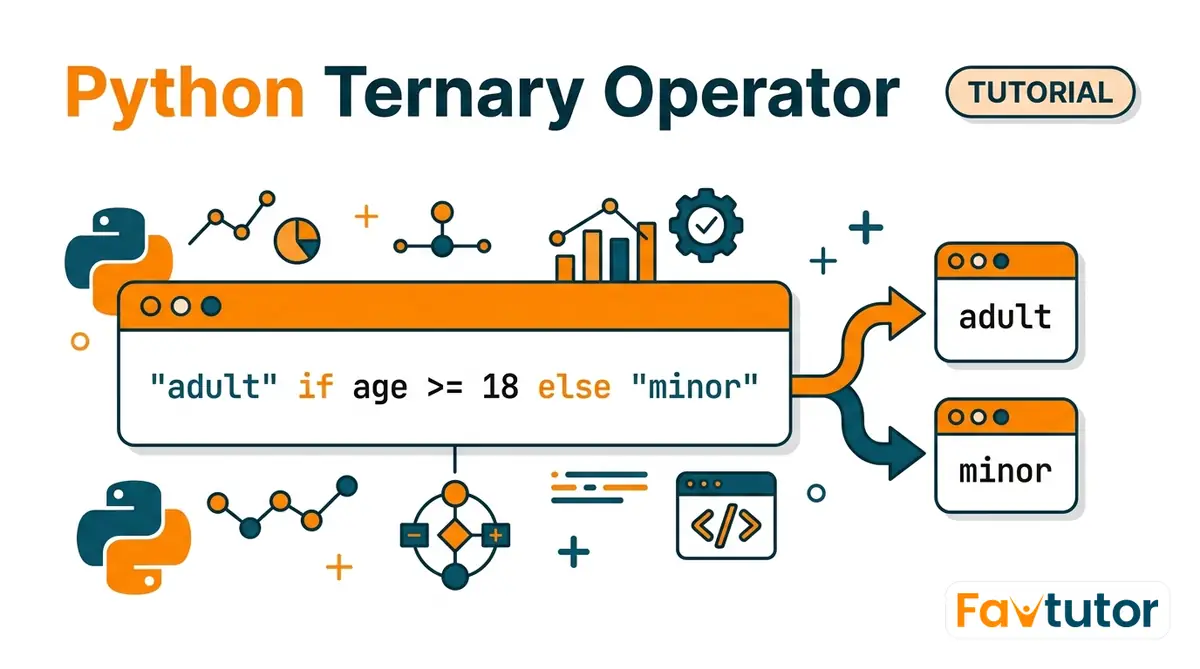
You want to set a label based on one condition. Maybe a user is an adult or a minor, a number is even or odd, a score is a pass or a fail. You write a four-line if/else just to pick one of two values, and it feels like too much code for such a small choice.
The Python ternary operator lets you pick between two values on a single line. It reads almost like English: "adult" if age >= 18 else "minor". This lesson shows the exact syntax, how it differs from the C-style version you may have seen, where it helps, where it hurts, and when a plain if/else is still the better choice.
What the ternary operator is
A ternary operator picks one of two values based on a condition. Python calls it a conditional expression. Most people call it the ternary operator because it works on three parts: a condition, a value for when the condition is true, and a value for when it is false.
Here it is next to the long version. Both do the same thing:
age = 20

# the long way
if age >= 18:
    status = "adult"
else:
    status = "minor"
print(status)
# Output: adult

# the short way
status = "adult" if age >= 18 else "minor"
print(status)
# Output: adult
The second version is one line. It is an expression, which means it produces a value. That is the key point. A normal if statement runs code but does not give back a value you can store. A conditional expression gives back one value, so you can put it straight into a variable.
The exact syntax
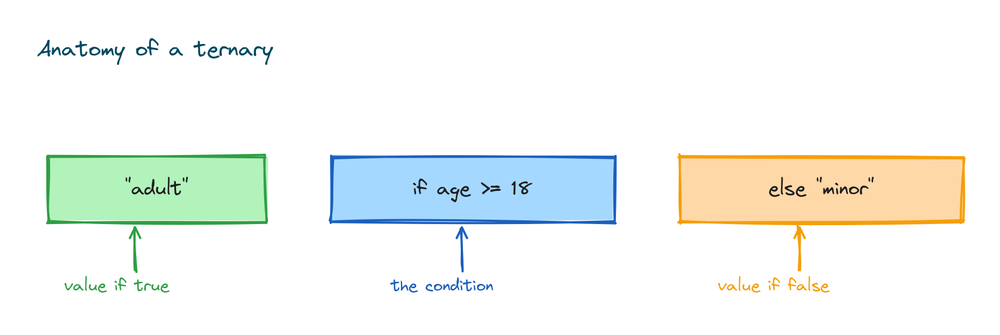
The pattern has three slots:
value_if_true if condition else value_if_falsePython checks the condition first. If it is true, the whole thing becomes value_if_true. If it is false, it becomes value_if_false. Read it left to right and it sounds like a sentence: give me this value, if the condition holds, otherwise give me that value.
n = 7
label = "even" if n % 2 == 0 else "odd"
print(label)
# Output: odd
The condition n % 2 == 0 is false, so Python skips the first value and uses the second one, "odd". All three slots can be any expression: a number, a string, a function call, or a bit of maths.
How the order differs from other languages
If you have written C, Java, JavaScript, or PHP, you know the ternary as condition ? value_if_true : value_if_false. The condition comes first there. Python puts the condition in the middle.
Here is the same choice in both styles:
# C style (not valid Python):
# result = a > b ? "a wins" : "b wins";

# Python:
a = 10
b = 20
result = "a wins" if a > b else "b wins"
print(result)
# Output: b wins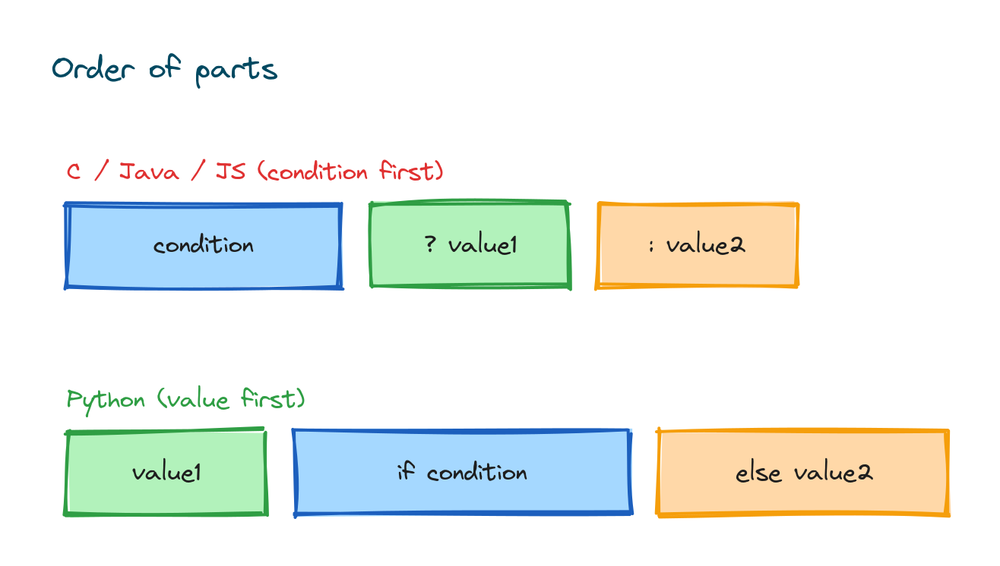
Python has no ? or : ternary. If you type a > b ? x : y you get a SyntaxError. The value comes first, then if, then the condition, then else, then the other value. It takes a day to get used to if you come from another language.
Assigning a value with it
The most common use is putting the result into a variable. You saw that above. It works for any type of value:
a, b = 5, 9
bigger = a if a > b else b
print(bigger)
# Output: 9
You can also use it to give a default when a value is empty. An empty string is treated as false, so this picks "guest" when the name is blank:
name = ""
display = name if name else "Anonymous"
print(display)
# Output: Anonymous
This ties into how Python treats truth values. Empty strings, zero, empty lists, and None all count as false. If you want to learn which values are true and which are false, read the lesson on Python booleans.
Using it inside f-strings and function calls
A conditional expression can go anywhere a value can go. That is what makes it handy. You can drop it right inside an f-string:
score = 45
print(f"You {'passed' if score >= 40 else 'failed'}")
# Output: You passed
Note the single quotes inside the braces because the f-string uses double quotes on the outside. If you are new to this style of text, the Python string formatting lesson covers f-strings in full.
You can also use it as an argument to a function, so you pick what to pass in on the spot:
def greet(name):
    return f"Hi {name}"

user = ""
print(greet(user if user else "guest"))
# Output: Hi guest
And it fits inside a list comprehension, where you build a new list and label each item as you go:
nums = [1, 2, 3, 4, 5]
labels = ["even" if x % 2 == 0 else "odd" for x in nums]
print(labels)
# Output: ['odd', 'even', 'odd', 'even', 'odd']
Python runs only one side
Python does not run both values. It checks the condition, then runs only the side it needs. The other side is never touched. This matters when a value comes from a function that does real work or could fail.
def loud():
    print("loud ran")
    return "LOUD"

def soft():
    print("soft ran")
    return "soft"

x = loud() if True else soft()
print(x)
# Output:
# loud ran
# LOUD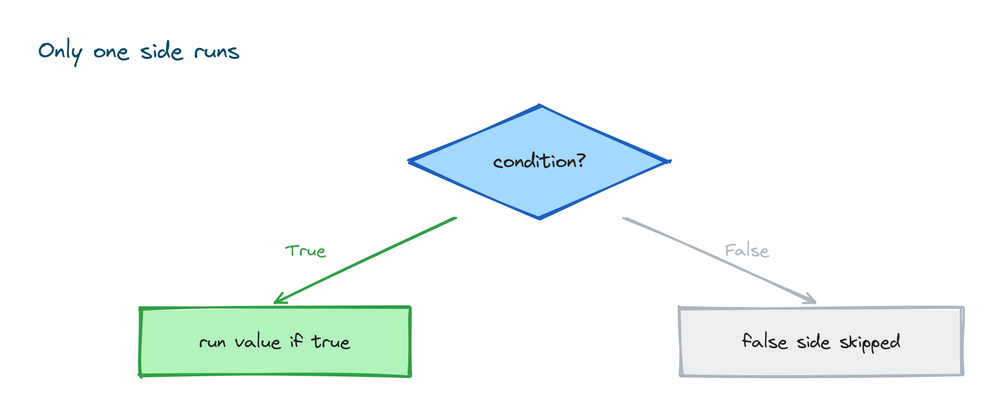
Notice that soft ran never printed. Since the condition was true, Python called loud() and ignored soft() completely. This is called short-circuit behavior, and it lets you write a safe guard on one line:
def safe_divide(x, y):
    return x / y if y != 0 else 0

print(safe_divide(10, 2))
# Output: 5.0
print(safe_divide(10, 0))
# Output: 0
When y is 0, Python never runs x / y, so you avoid the ZeroDivisionError. The division only happens on the side that gets picked.
Chaining more than two choices
You can join ternary operators to handle more than two outcomes. Python reads them from left to right, and the first true condition wins:
marks = 82
grade = "A" if marks >= 80 else "B" if marks >= 60 else "C"
print(grade)
# Output: A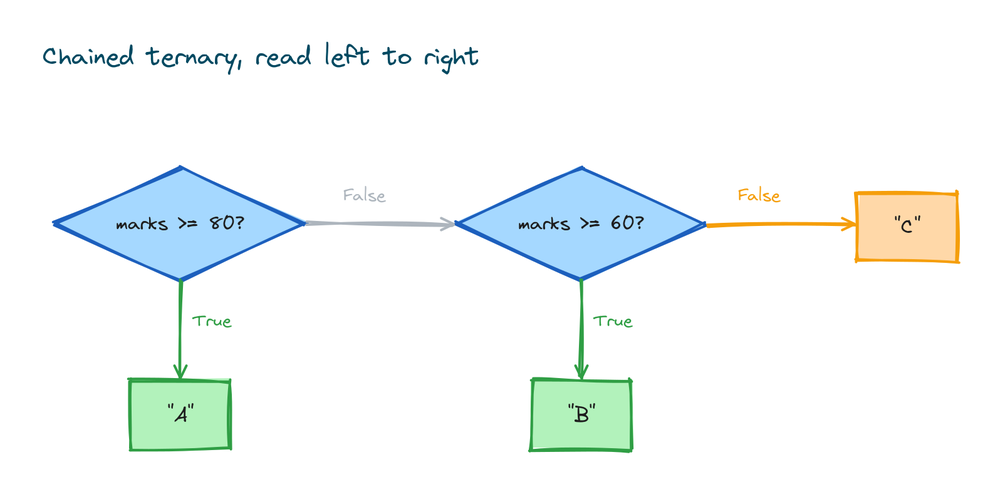
You can read that as: use "A" if marks are 80 or more, otherwise use "B" if marks are 60 or more, otherwise use "C". It works, but it gets hard to read fast. Two conditions is about the limit for most people. Once you need three or more branches, use a normal if/elif/else instead. The extra lines are worth it because anyone reading your code can follow them:
marks = 82
if marks >= 80:
    grade = "A"
elif marks >= 60:
    grade = "B"
else:
    grade = "C"
print(grade)
# Output: A
Both give the same answer. The chained ternary saves lines. The if/elif/else saves the next person from a headache. Pick clarity.
The older and or trick
Before the ternary was added, people faked it with and and or. You still see this in old code. The most common form uses or to supply a default:
name = ""
result = name or "guest"
print(result)
# Output: guest
When name is empty, Python treats it as false and uses the value after or. This looks clean, but it has a trap. It fails when a real value happens to be falsy, like 0 or an empty string that you actually want to keep:
count = 0
value = count or 10
print(value)
# Output: 10
Here you wanted value to be 0, because 0 is a real count. But or saw 0 as false and jumped to 10. The ternary does not have this problem because you write the exact condition you mean:
count = 0
value = count if count is not None else 10
print(value)
# Output: 0
Now the check is count is not None, so 0 passes through fine. This is why the ternary replaced the and/or trick. It says what you mean, and it does not get fooled by falsy values. Use the ternary for this. You will only meet the and/or version in older code.
When a plain if else is better
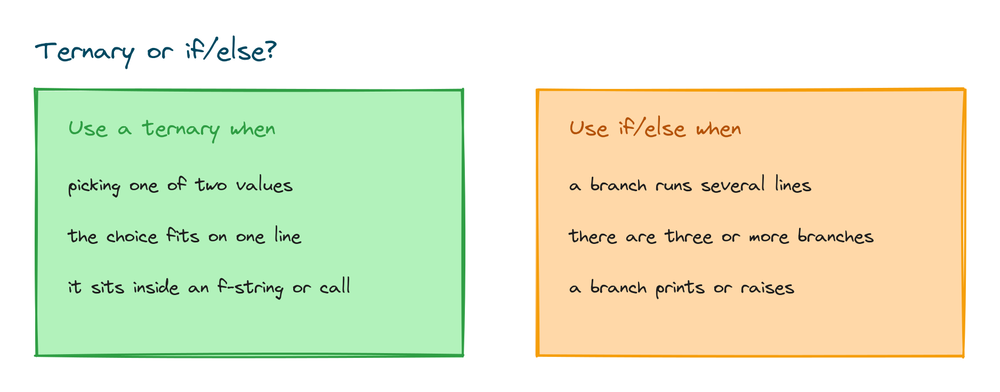
The ternary is not always the right tool. Reach for a normal if/else in these cases:
- When you need to run more than one line of code in a branch. The ternary can only choose a value, not run several statements.
- When you have three or more branches. A chain of ternaries is harder to read than
if/elif/else. - When the condition or the values are long. A ternary that runs off the side of the screen helps no one.
- When a branch needs to do something, like print, log, or raise an error, rather than produce a value.
Here is a case where the ternary is the wrong choice, because each branch does real work:
temperature = 35

# good use of if/else: each branch does more than pick a value
if temperature > 30:
    print("It is hot.")
    print("Drink water.")
else:
    print("It is fine.")
# Output:
# It is hot.
# Drink water.
Use the ternary when you are picking one value out of two. Use if/else when you are running different code. That single rule keeps your code clean.
Practice exercises
Try each one before you look at the solution. Everything you need is above.
Check if a number is positive
Given a number, print "positive" if it is greater than 0, otherwise print "not positive".
# Solution
number = 7
print("positive" if number > 0 else "not positive")
# Output: positive
Label the weather
Given a temperature, print "hot" if it is above 30, otherwise print "cool".
# Solution
temperature = 35
print("hot" if temperature > 30 else "cool")
# Output: hot
Give a default name
Given a username that might be empty, set the display name to the username, or "Anonymous" if it is blank.
# Solution
username = ""
display = username if username else "Anonymous"
print(display)
# Output: Anonymous
Set a senior fare
The fare is free (0) for anyone 65 or older, otherwise it is 50.
# Solution
age = 70
fare = 0 if age >= 65 else 50
print(fare)
# Output: 0
Grade with a chain
Use a chained ternary to print "A" for 80 and up, "B" for 60 and up, and "C" below that. Then decide if you would keep it or switch to if/elif/else.
# Solution
marks = 82
grade = "A" if marks >= 80 else "B" if marks >= 60 else "C"
print(grade)
# Output: A
# For real code, if/elif/else here is easier to read.
Common mistakes
- Using the C-style syntax.
a > b ? x : yis not valid Python. You getSyntaxError: expected 'else' after 'if' expression. Writex if a > b else yinstead. - Forgetting the else. A ternary must have an
else.x = 5 if a > braises aSyntaxError. The false side is required. - Chaining too many. Three or more ternaries in a row become unreadable. Switch to
if/elif/elseonce you pass two branches. - Using and/or for defaults with falsy values.
count or 10returns 10 whencountis 0, which is often a bug. Write the real condition with a ternary. - Trying to run statements in a branch. A ternary picks a value. You cannot put a
print()loop or a raise inside one and expect it to act like a fullifblock.
Frequently asked questions
What is the ternary operator in Python?
It is a one line way to choose between two values based on a condition. The form is value_if_true if condition else value_if_false. Python calls it a conditional expression.
Does Python have a ? : operator like C or Java?
No. Python uses words instead of symbols. Write x if condition else y, not condition ? x : y. The value comes before the condition.
Can a Python ternary have no else?
No. The else part is required. Without it you get a SyntaxError. If you only want to act when a condition is true, use a normal if statement.
Can I nest or chain ternary operators?
Yes. You can write "A" if x >= 80 else "B" if x >= 60 else "C". Python reads it left to right. But once you have three or more branches, an if/elif/else is easier to read.
What is the difference between a ternary and an if statement?
A ternary is an expression, so it produces a value you can store or pass. An if statement runs code but does not return a value. Use the ternary to pick a value, use if to run different code.
Is the ternary operator faster than if else?
The speed is about the same. The ternary is shorter to type and read for a simple choice, not faster in any way that matters. Pick it for clarity, not speed.
Can I use a ternary inside an f-string?
Yes. Put it inside the braces, like f"You {'passed' if score >= 40 else 'failed'}". Use single quotes inside if the f-string uses double quotes on the outside.
Why use a ternary instead of the or trick?
The or trick, like x or default, breaks when x is a real but falsy value such as 0 or an empty string. A ternary lets you write the exact condition, so it does not get fooled.
Key takeaways
- The Python ternary operator picks one of two values on a single line with the form
value_if_true if condition else value_if_false. - The order is different from C-style languages. Python puts the value first and the condition in the middle, and it has no
? :version. - Python runs only the side it picks, so the ternary is safe for guards like avoiding division by zero.
- You can drop it into f-strings, function calls, and list comprehensions, anywhere a value fits.
- Chaining works but gets hard to read past two branches. Use
if/elif/elsefor three or more, and for any branch that runs code instead of picking a value. - The ternary replaced the old
and/ordefault trick because it does not break on falsy values like 0.
The ternary is really a compact form of a decision, so it helps to be solid on what counts as true and false in the first place. If a condition ever behaves in a way you did not expect, the fix usually starts with understanding truth values, which is exactly what the guide on Python operators and comparisons will make clear.