

 By Kaustubh Saini
You have the string "2026-07-01" and you only want the year. Or you have a filename and want it without the .pdf at the end. Cutting a piece out of a string is one of the most common jobs in Python, and the tool for it is called slicing.
A slice takes a part of a string using the pattern text[start:stop]. The rules are short, but two of them surprise beginners: the stop position is not included, and counting starts at zero. This lesson walks through every rule with examples you can run, then shows the patterns you'll use in real programs.
What slicing means
Every character in a string has a position, and positions start at 0. You can picture the string as a row of numbered boxes:
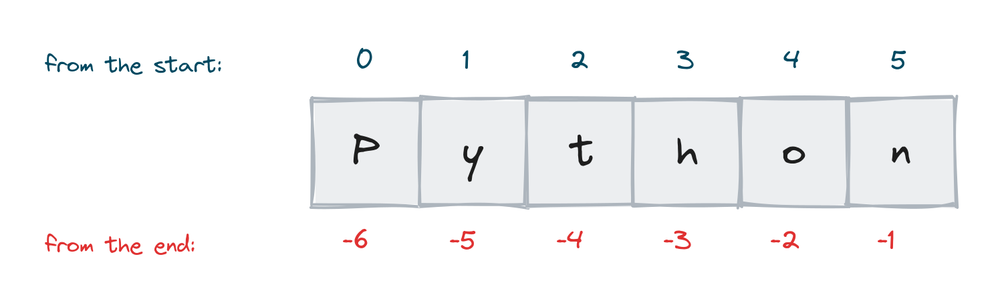
One position in square brackets gives you one character. Two positions with a colon give you a slice, a piece of the string:
word = "Python"
print(word[0])
print(word[1:4])
# Output:
# P
# yth
word[1:4] means "start at position 1, stop before position 4". You get the characters at positions 1, 2, and 3. The result is a new string.
Here's the date example from the intro:
date = "2026-07-01"
print(date[:4])
print(date[5:7])
print(date[8:])
# Output:
# 2026
# 07
# 01
The stop position is not included
This is the rule that trips people on day one, so it gets its own section. The slice stops just before the stop position, not at it.
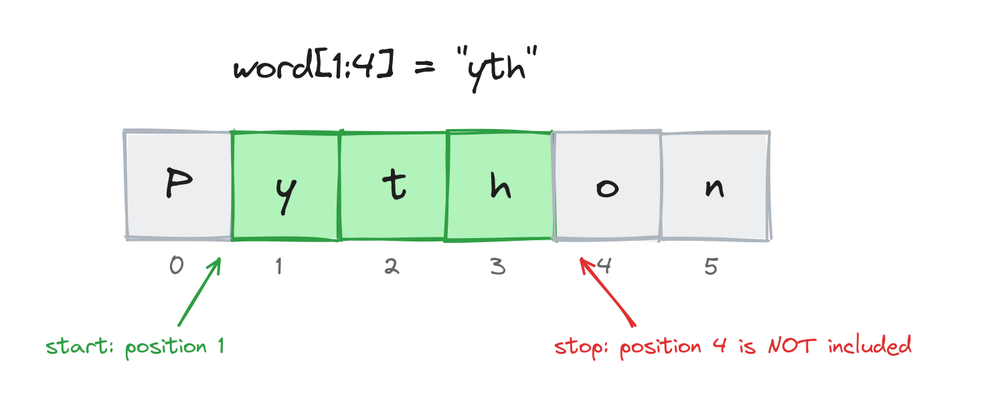
word = "Python"
print(word[0:4])
# Output: Pyth
Position 4 holds "o", and it's not in the result. There's a reason Python works this way: the length of the slice is simply stop minus start. word[0:4] has 4 characters. It also means two slices that share a number fit together with nothing missing and nothing doubled:
word = "Python"
print(word[:3] + word[3:])
# Output: Python
Leaving out start or stop
Both numbers are optional. Leave out the start and the slice begins at the start of the string. Leave out the stop and it runs to the end:
word = "Python"
print(word[:2])    # from the start
print(word[2:])    # to the end
print(word[:])     # the whole string
# Output:
# Py
# thon
# Python
You read word[:2] as "the first 2 characters" and word[2:] as "everything from position 2". These two shortcuts cover most slices you'll ever write.
Negative positions
A negative position counts from the end. -1 is the last character, -2 the one before it, and so on. This is the clean way to take or drop characters at the end:
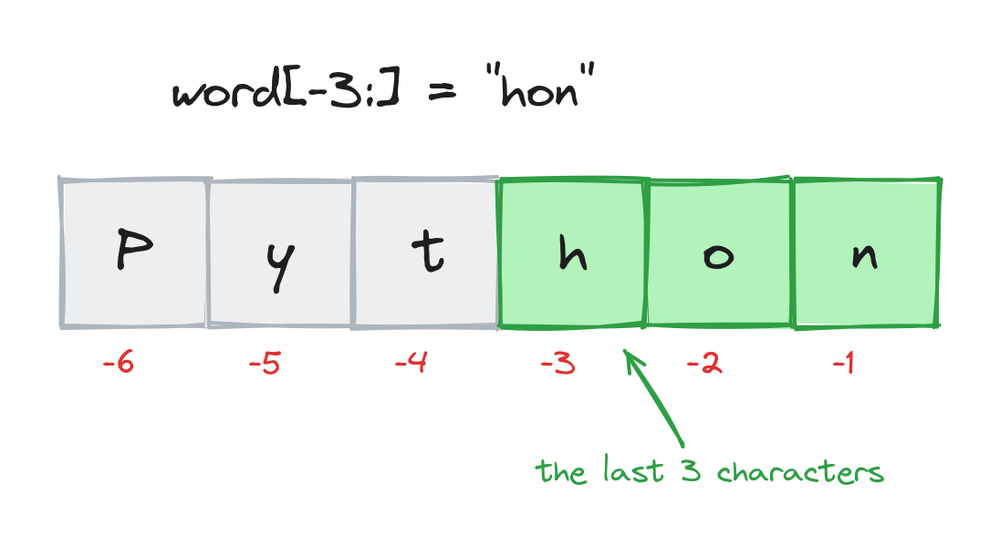
word = "Python"
print(word[-1])     # last character
print(word[-3:])    # last 3 characters
print(word[:-2])    # everything except the last 2
# Output:
# n
# hon
# Pyth
text[-n:] gives the last n characters, and text[:-n] drops the last n. Those two patterns are worth memorizing. A real example, showing only the end of a card number:
card = "4321987612345678"
print("**** " + card[-4:])
# Output: **** 5678
The step value
A slice takes a third number: text[start:stop:step]. The step is how far to jump after each character. The default is 1. With a step of 2, you get every second character:
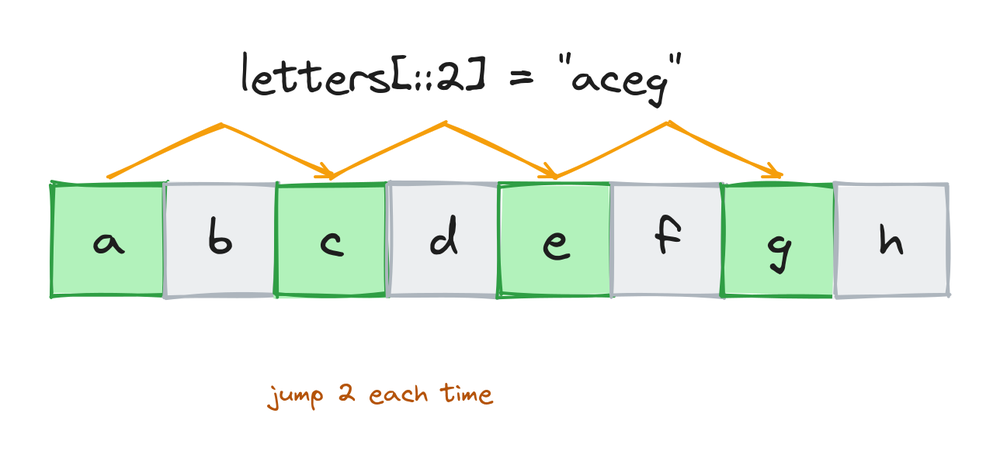
letters = "abcdefgh"
print(letters[::2])
print(letters[1:7:2])
# Output:
# aceg
# bdf
Reversing a string
A step of -1 walks backwards, and with both ends left out, that reverses the whole string:
word = "Python"
print(word[::-1])
# Output: nohtyP
[::-1] looks strange the first time, but it's the standard way to reverse a string in Python. You'll see it in a lot of code, and it's a common interview question.
Reversing also gives you a one-line palindrome check, a word that reads the same both ways:
word = "level"
print(word == word[::-1])
# Output: True

word = "python"
print(word == word[::-1])
# Output: False
Slices never crash
Ask for a single position that doesn't exist and Python raises an error. Ask for a slice that runs past the end and Python quietly gives you what's there:
pet = "cat"
print(pet[1:100])
print(pet[10:])
# Output:
# at
# (an empty string)
pet = "cat"
print(pet[10])
# IndexError: string index out of range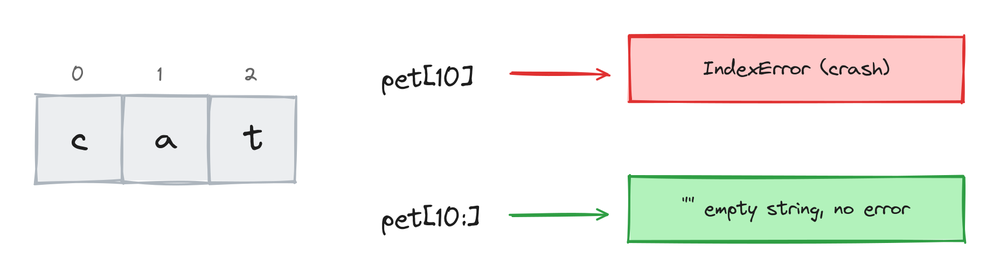
So pet[10] crashes, but pet[10:] is just an empty string. This makes slices safe to use on strings whose length you don't know yet.
Slicing gives you a new string
Strings in Python can't be changed after they're created. A slice never edits the original, it builds a new string:
word = "Python"
short = word[:2]
print(short)
print(word)
# Output:
# Py
# Python
For the same reason, you can't assign into a string, with or without a slice:
word = "python"
word[0] = "P"
# TypeError: 'str' object does not support item assignment
If you want a changed version, build a new string, for example "P" + word[1:].
Naming a slice with slice()
The built-in slice() function creates a slice you can store in a variable and reuse. It's handy when the same positions appear in many places, because the name explains what the numbers mean:
last4 = slice(-4, None)
print("4321987612345678"[last4])
print("9876543210123456"[last4])
# Output:
# 5678
# 3456
None stands for a missing number, so slice(-4, None) means [-4:].
Slicing works on lists and tuples too
Everything above works the same on any ordered sequence. Lists and tuples follow the same rules:
marks = [45, 67, 89, 72, 58]
print(marks[1:4])
print(marks[::-1])
# Output:
# [67, 89, 72]
# [58, 72, 89, 67, 45]
Learn slicing once on strings and you get it free everywhere else.
Everyday slicing patterns
These are the slices you'll actually type at work:
date = "2026-07-01"
year = date[:4]                 # first n characters
print(year)
# Output: 2026

filename = "report.pdf"
name = filename[:-4]            # drop a known ending
print(name)
# Output: report

phone = "+91 9876543210"
country = phone[:3]             # a fixed-width prefix
print(country)
# Output: +91

pin = "110001"
print(pin[-2:])                 # last n characters
# Output: 01
The start and stop don't have to be typed numbers. Any expression that gives an integer works, so you can find a position first and slice from it:
email = "[email protected]"
at = email.find("@")
print(email[:at])
print(email[at + 1:])
# Output:
# asha
# favtutor.com
Here find("@") returns the position of the @ sign, and the slices use it. This is how you cut strings whose layout isn't fixed.
One honest note: slicing fits when the positions are fixed, like a date in a known format. When the text moves around a lot, string methods like split() are often the simpler tool. Both are worth knowing.
Practice exercises
Try each one before you look at the solution.
Get the first three characters
Print the first 3 characters of "favtutor".
# Solution
site = "favtutor"
print(site[:3])
# Output: fav
Take the last two
Print the last 2 characters of "slicing".
# Solution
word = "slicing"
print(word[-2:])
# Output: ng
Reverse a word
Print "stressed" backwards.
# Solution
word = "stressed"
print(word[::-1])
# Output: desserts
Every second letter
Print every second character of "abcdefgh", starting from the first.
# Solution
letters = "abcdefgh"
print(letters[::2])
# Output: aceg
Pull the month out
From "2026-07-01", print only the month.
# Solution
date = "2026-07-01"
print(date[5:7])
# Output: 07
Common mistakes
- Expecting the stop position to be included.
word[0:4]gives positions 0 to 3. If you're one character short, this is almost always why. - Forgetting that counting starts at 0. The first character is
word[0], notword[1]. - Mixing up
[-n:]and[:-n]. The first keeps the last n characters. The second removes them. - Trying to change a string through a slice.
word[0] = "P"is a TypeError. Strings can't be edited, so build a new one instead. - Writing
word[len(word)]to get the last character. That position doesn't exist and raises an IndexError. Useword[-1]. - Using a slice where
split()is simpler. If the text moves around, like a name that can be any length, slicing by fixed numbers will break.
Frequently asked questions
What does [::-1] do in Python?
It returns the string (or list) reversed. It's a slice with no start, no stop, and a step of -1, so it walks the whole thing backwards.
Is the stop index included in a Python slice?
No. text[1:4] gives the characters at positions 1, 2, and 3. The character at position 4 is left out.
How do I get the last n characters of a string?
Use a negative start with no stop: text[-n:]. For example, "python"[-3:] is "hon".
What happens if a slice goes past the end of the string?
Nothing bad. You get whatever characters exist, or an empty string. Only single-position indexing, like text[100], raises an IndexError.
Does slicing change the original string?
No. A slice always returns a new string. The original stays exactly as it was, because strings in Python can't be changed.
What is the step in a slice?
The third number: text[start:stop:step]. It's how far Python jumps after each character. 2 takes every second character, and -1 goes backwards.
What's the difference between indexing and slicing?
Indexing (text[2]) returns one character and crashes if the position doesn't exist. Slicing (text[2:5]) returns a string, and it never crashes over positions.
Can I slice a list the same way?
Yes. Lists, tuples, and other ordered sequences use the same [start:stop:step] rules. [10, 20, 30, 40][1:3] is [20, 30].
Key takeaways
- A slice is
text[start:stop]: it begins at start and stops just before stop. - Missing numbers have defaults:
[:n]is the first n characters,[n:]is the rest,[:]is the whole string. - Negative positions count from the end:
[-n:]keeps the last n,[:-n]drops the last n. - The step is the third number, and
[::-1]reverses the string. - Slices past the end return a short or empty string instead of an error, and every slice is a new string, because strings can't be changed.
Once you've cut the right piece out of a string, the next step is usually to print it nicely, with rounding, padding, or alignment. That's exactly what Python string formatting covers.