
Cluely is an AI meeting assistant for Mac and Windows. It listens to your call, takes a screenshot of your screen when you ask, and shows an AI answer in a small floating window. It also writes meeting notes and follow-up emails.
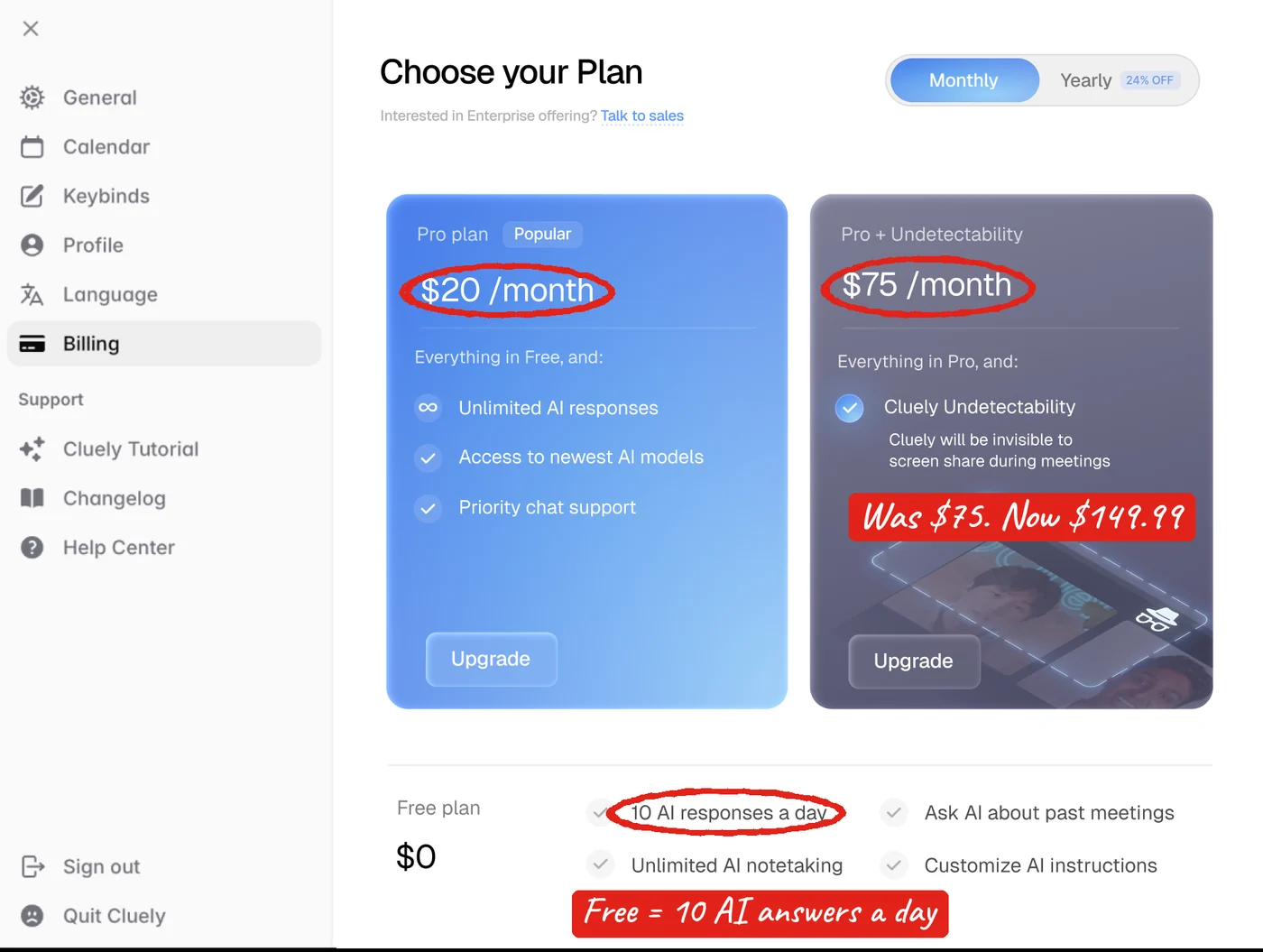
- Free plan: yes, but capped (Cluely's own upgrade screen showed 10 AI answers a day).
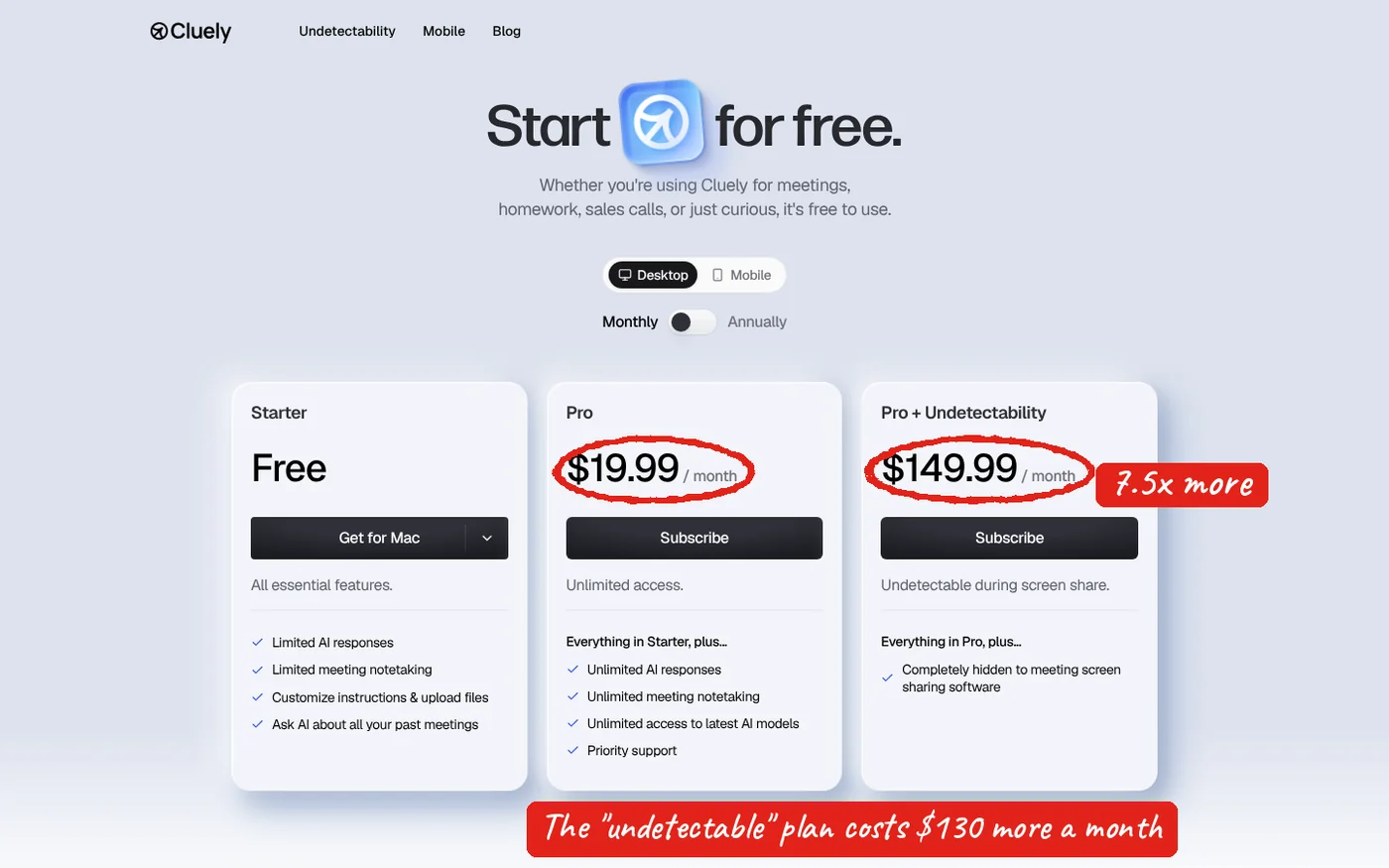
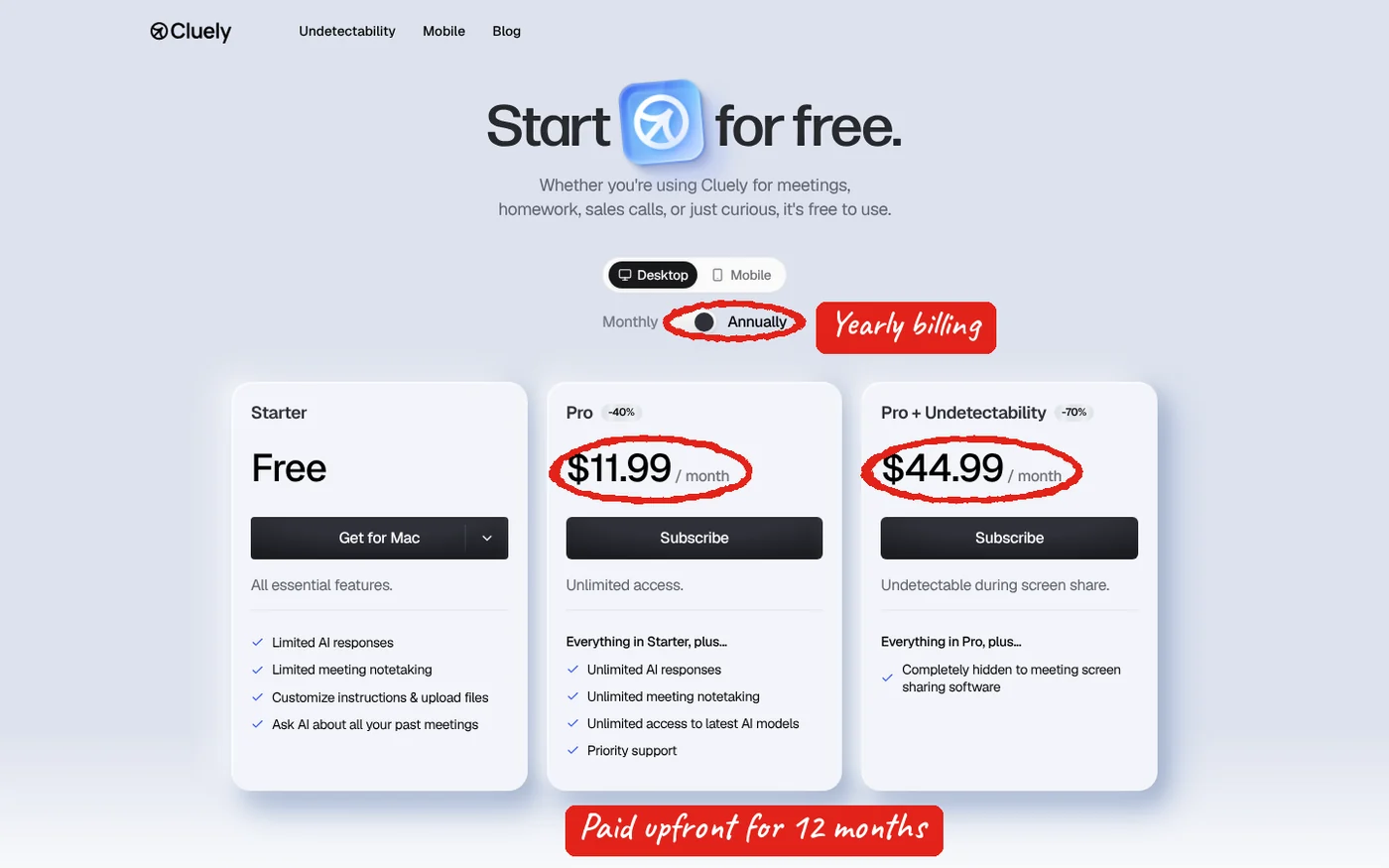
- Pro: $19.99/month, or $11.99/month if you pay yearly.
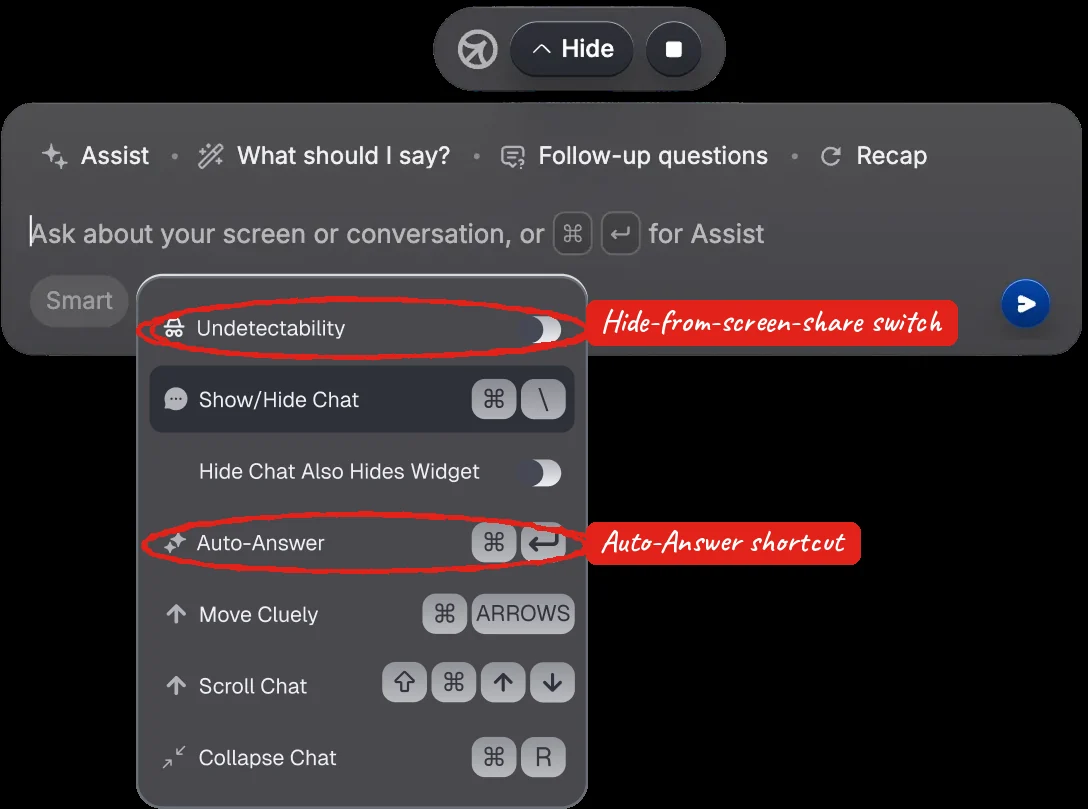
- Pro + Undetectability: $149.99/month, or $44.99/month yearly. This is the only plan that hides Cluely from screen share.
- Worth it? For live meeting notes, maybe. For interviews and exams, no: it gets caught in several common setups and Cluely will not refund interview use.
Please note: FavTutor does not endorse Cluely or any tool that is used to hide AI help during job interviews, exams or proctored tests. Using AI this way usually goes against the rules of employers, schools and testing companies, and it can get you disqualified, rejected or banned. This guide only explains what Cluely does, what it costs and its risks, so you can make an informed choice. We are not paid by Cluely or any company mentioned here.
What is Cluely AI?
Cluely is an AI assistant that sits on top of your screen during calls. While you are on Zoom, Google Meet or Teams, it records the conversation. When you need help, you press Ctrl + Enter (Windows) or Cmd + Enter (Mac). Cluely grabs a screenshot of your screen, reads the transcript so far, and shows you an answer.
Unlike Otter or Fireflies, it does not join the meeting as a bot, so nobody sees a "Cluely Notetaker" in the participant list. That, plus an optional "undetectable" mode, is why it became famous (and controversial) as an interview helper in 2025. Today Cluely markets itself as a meeting notetaker for sales, support and client calls.
How Cluely works and its main features
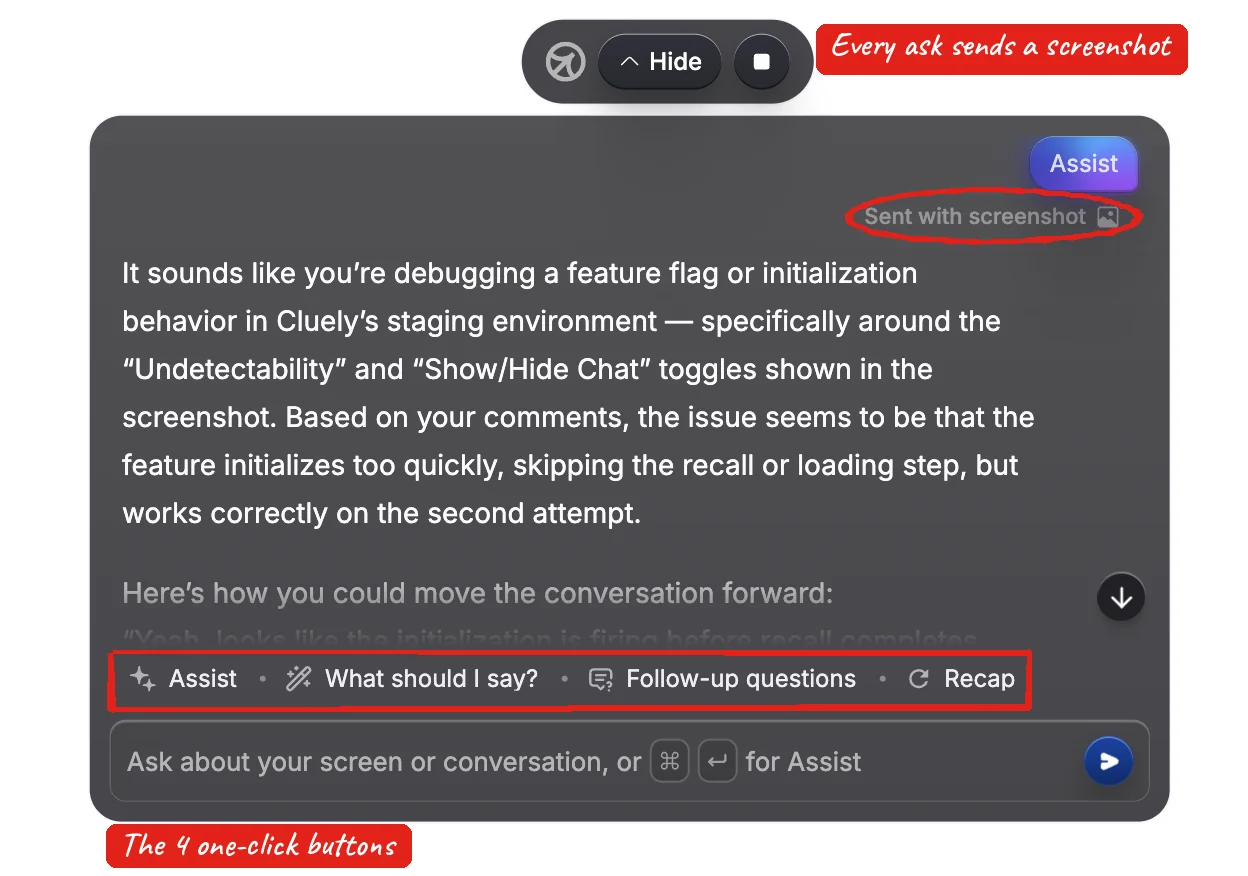
Once you start a session, Cluely shows a small bar on your screen. Here is what each part does, in plain words:
| Button | What it does | Use it when |
|---|---|---|
| Assist (Ctrl/Cmd + Enter) | Reads the call and your screen and jumps in with general help | You are stuck or lost in the discussion |
| What should I say? | Gives you short lines you can say right now | You know you need to reply but not how |
| Follow-up questions | Suggests smart questions to ask next | Sales and discovery calls |
| Recap | Summarises what has happened so far | You joined late or zoned out |
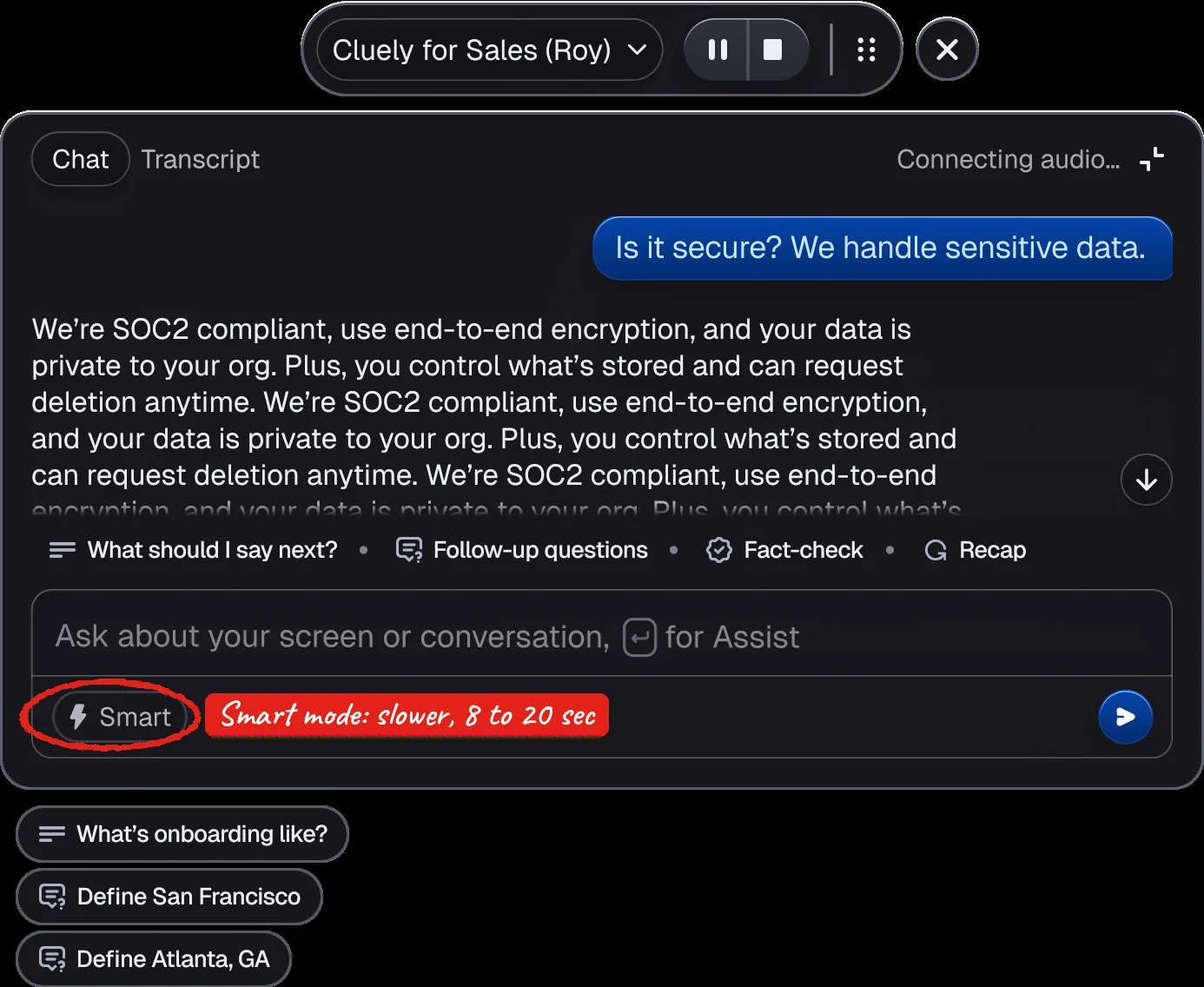
| Smart | Slower mode with web search and deeper reasoning (about 8 to 20 seconds) | Fact checks, numbers, code |
Meeting notes, next steps and follow-up emails
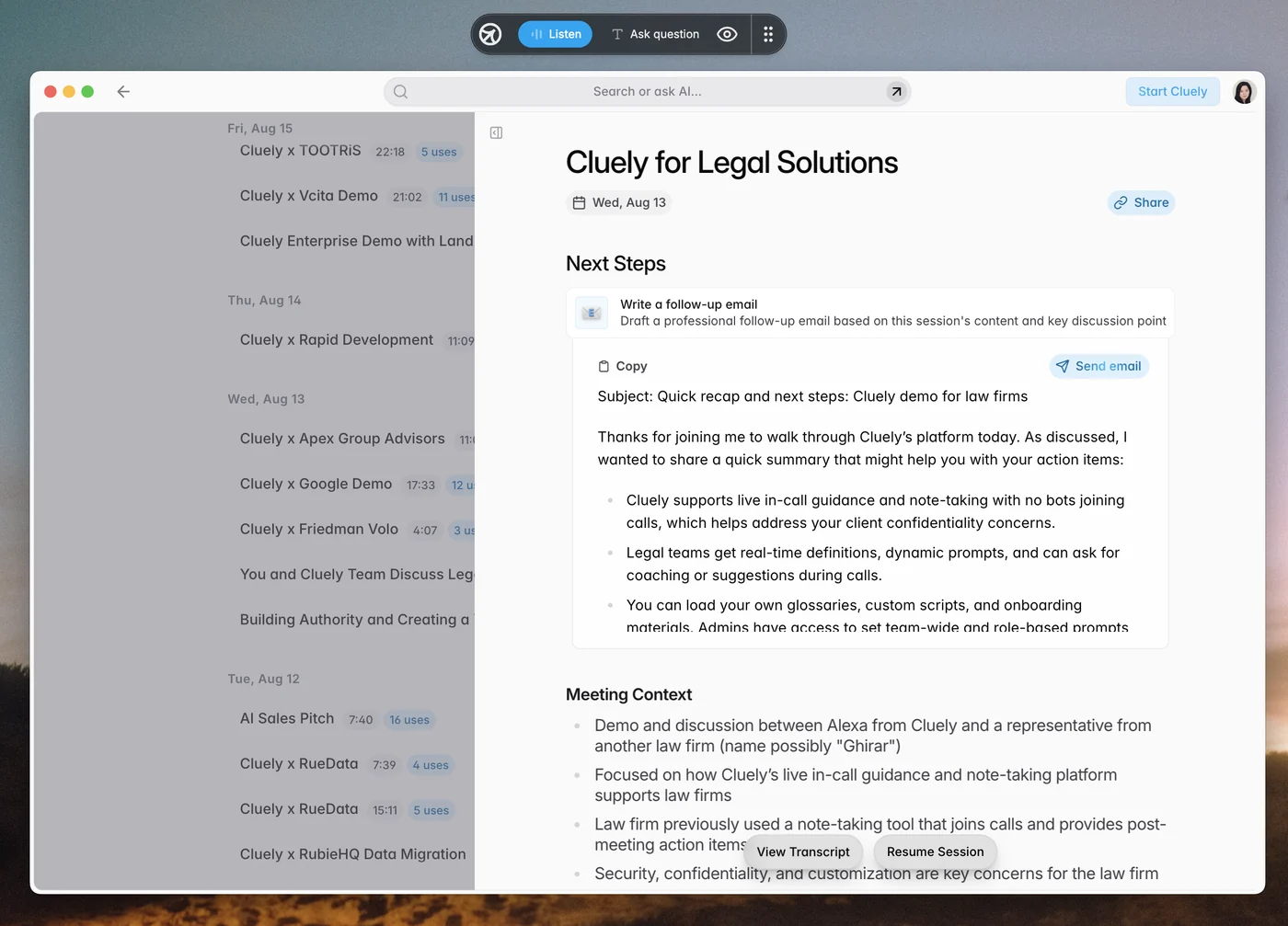
When the meeting ends, Cluely saves it on a dashboard with an AI summary, "Next Steps", the full transcript, and a ready-to-send follow-up email. If you connect Google Calendar (the only calendar it supports), it also pings you before meetings and when it detects a Zoom call.

Modes for your resume or sales script
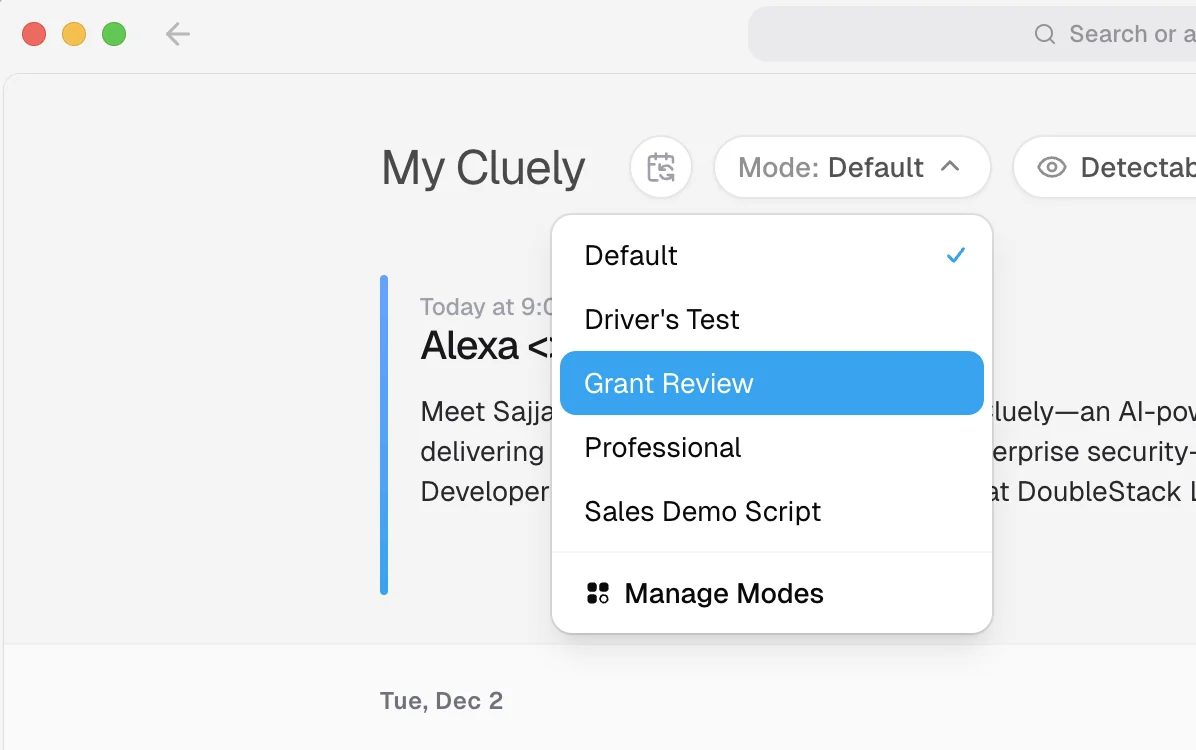
"Modes" let you save different setups, for example one with your sales script and one with your resume. Free users can upload up to 3 files (PDF, DOCX, TXT). Pro is unlimited.
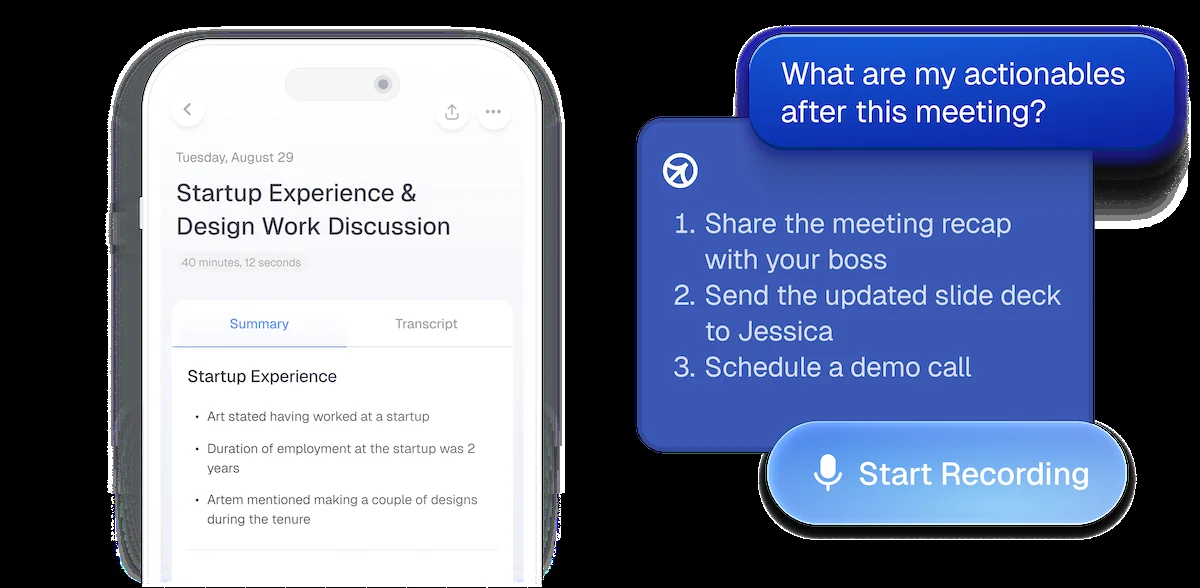
Mobile app for iPhone
There is also an iPhone app (iOS 14+) that records in-person meetings and lets you chat with the notes. It does not work on phone calls or mobile video calls yet, and it is billed separately.
Cluely pricing plans in 2026
Cluely has three desktop plans and a separate mobile plan. These are the prices on Cluely's pricing page on October 6, 2026:
| Plan | Monthly | Billed yearly | Yearly total | What you get |
|---|---|---|---|---|
| Starter | Free | Free | $0 | Limited AI answers and notes, 3 files |
| Pro | $19.99 | $11.99/mo | $143.88 | Unlimited answers and notes, GPT-5 and Claude 4 models |
| Pro + Undetectability | $149.99 | $44.99/mo | $539.88 | Pro, plus hidden from screen share |
| Mobile | $8/week | $144/year | $144 | iPhone app only |
Why the undetectable plan now costs twice as much
Here is something most reviews miss. Cluely only split "undetectability" into its own plan on October 22, 2025. Its in-app upgrade screen from that time showed Pro at $20/month and Pro + Undetectability at $75/month. Today the same plan is $149.99/month, about double, while Pro stayed at roughly $20.
Is Cluely free? What the Starter plan includes
Yes, Cluely has a free Starter plan, but it is a trial in practice. According to Cluely's help center, the free plan includes:
- A limited number of AI chat answers per day (the in-app screen showed 10 a day). The limit resets every 24 hours.
- A limited number of meeting notes.
- Meeting summaries and AI-drafted follow-up emails (these do not use up your AI answers).
- Up to 3 uploaded files.
- No undetectability. On the free plan, Cluely shows up in screen shares.
Ten answers is enough to test it on one or two calls. It is not enough to rely on in a full day of meetings.
Monthly vs yearly cost calculator
Pick a plan and how long you need it. This uses Cluely's current US dollar prices.
Monthly: $19.99 / $149.99 per month. Yearly: $143.88 / $539.88 paid upfront. Cluely does not give pro-rated refunds, so a yearly plan cancelled early is still fully paid.
Rule of thumb: for Pro, yearly wins if you will use it 8 months or more. For Pro + Undetectability, yearly wins from month 4. If you only need it for a short job hunt or one project, pay monthly and cancel.
Prices are charged in US dollars. If you pay from India or another country, your bank converts the amount and may add a foreign transaction fee.
Refund policy and billing traps
This is where most angry Cluely reviews come from. From Cluely's own billing and refund pages:
- Refunds are only for "it does not work on my computer", and only within 24 hours.
- No refund if you forgot to cancel, if you change plans, or if it "works but did not meet expectations".
- No refund for interview or detection use cases. Cluely's refund page says these belong to its separate product, Interview Coder.
- No pro-rated refunds. Cancelling ends Pro features right away.
- You cannot switch yearly to monthly during a paid year, or upgrade monthly to yearly mid-period.
- Watch for fakes. A site called cluelyai.com (purple logo, $15/month or $80/year) is not Cluely. Real charges show as CLUELY, INC (see Cluely's impersonator warning).
Can Cluely be detected on Zoom, Teams or proctored exams?
Short answer: yes, often. Here is the practical version.
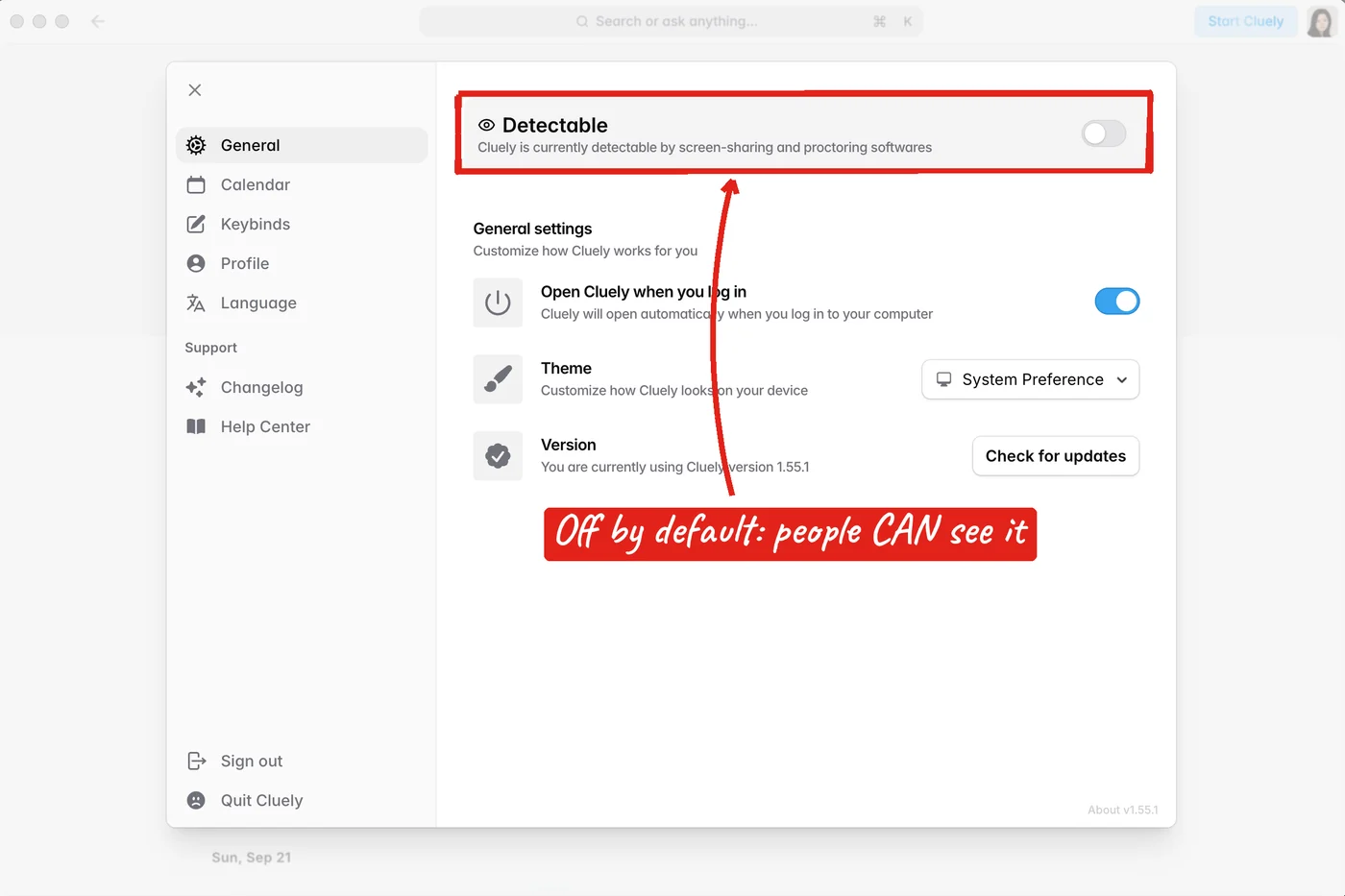
1. By default, everyone can see it. Hiding only works on the $149.99 plan, and only after you switch it on. Cluely's own settings screen says it plainly when it is off: "Cluely is currently detectable by screen-sharing and proctoring softwares".
2. Even on the paid plan, Cluely lists cases where it shows up:
| Situation | Seen? |
|---|---|
| Proctoring software: Proctorio, Honorlock, Respondus LockDown Browser, Examity, Mercer Mettl, PSI Bridge, Proctor360, ProctorExam, Meazure Learning | Yes, detected |
| Desktop exam apps like Pearson VUE (OnVUE) | Yes, cannot bypass |
| Zoom or Microsoft Teams with "share entire screen" | Yes, visible |
| Zoom on default settings | Not hidden by default |
| Windows 10, or laptops older than about 2022/2023 | Yes, hiding does not work |
| Clicking inside Cluely while a browser test is open | Can be logged |
| Google Meet, Webex, Slack calls (window share, supported laptop) | Hidden, Cluely claims |
3. People notice. No setting hides a pause before every answer, eyes reading off to the side, or a perfect answer you cannot explain when someone asks "why?". Smart mode's 8 to 20 second wait makes this worse.
Employers have noticed too. Some now ask candidates to pan their camera or wave a hand in front of their face mid-interview, as we covered in AI interview cheating has employers asking candidates to wave at the camera.
Cluely reviews from real users
We read every Cluely review on Trustpilot (all 22), the iPhone app's App Store reviews, and Reddit threads about Cluely. The picture splits in two.
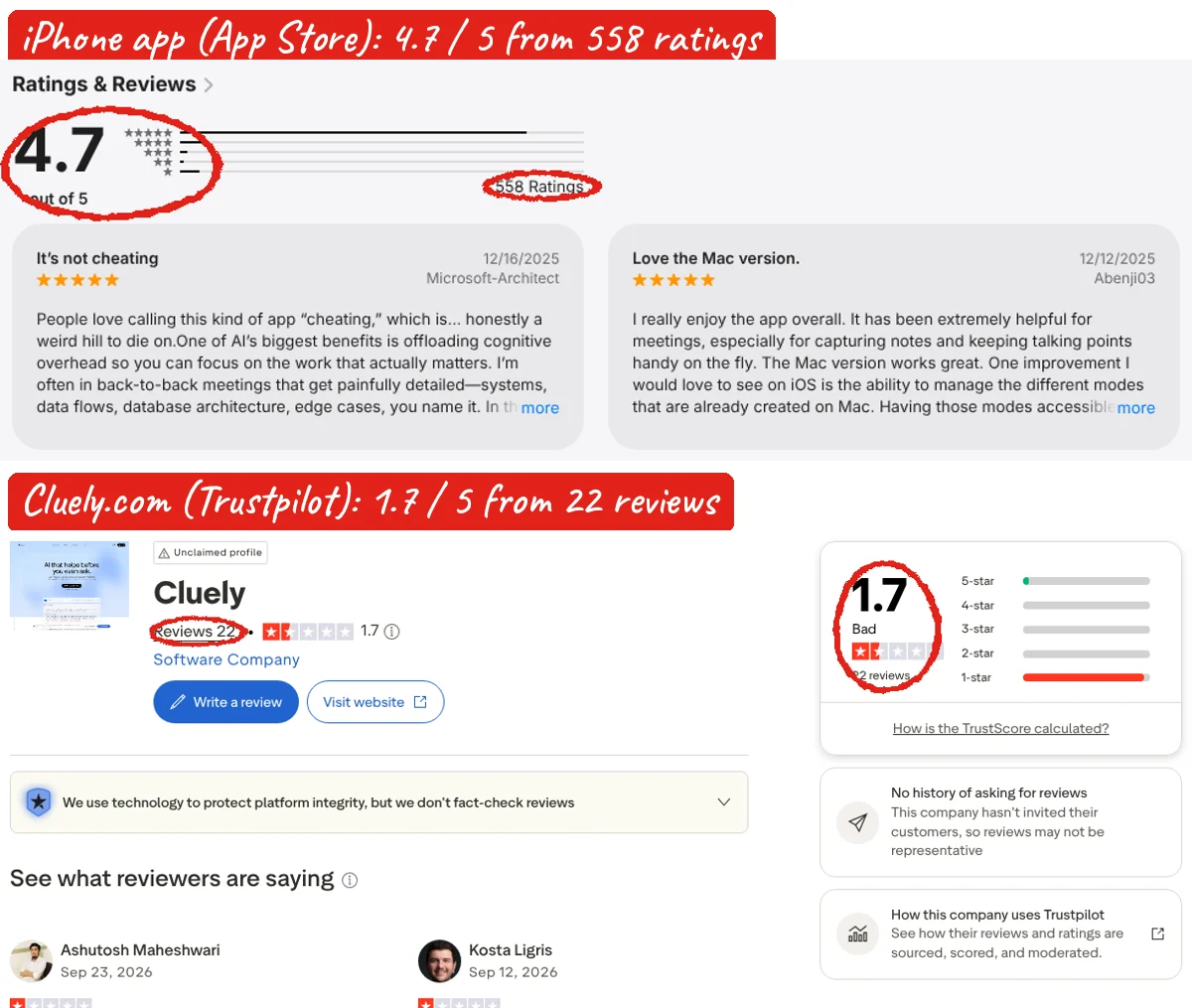
Why so different? App Store reviewers are mostly people using Cluely as a meeting notetaker, and they are happy. Trustpilot reviewers are mostly people who had a payment problem. Neither platform verifies reviews, and Trustpilot notes that Cluely has never invited customers to review, so the page may not be representative.
What users like
"Extremely helpful for meetings, especially for capturing notes and keeping talking points handy on the fly. The Mac version works great."
Abenji03, App Store, 5 stars, Dec 2025
"I can literally ask the AI mid-meeting what someone said 5 minutes ago. Game changer for my sales calls."
App Store reviewer, 5 stars
"Decently impressed for the price... but plenty of room to improve."
Reddit user, r/Cluely, on the $20/month plan
Most common complaints
We sorted all 22 Trustpilot reviews by what they complain about (one review can mention more than one thing):
"I clicked 'Upgrade to yearly' and was immediately charged approximately $500 (~£390) with no confirmation screen."
Tushar, UK, Trustpilot, 1 star, Mar 2026
"Selected one month trial ... they default to annual."
Kosta L., US, Trustpilot, 1 star, Sep 2026
"A transcription tool that dies mid-conversation is worse than not having one at all."
Emmanuel C., US, Trustpilot, 1 star, Mar 2026
"Their 'customer support' is just an unhelpful AI bot that provides no actual resolution."
Vincent, Kenya, Trustpilot, 1 star, Apr 2026
"Deleting it was only possible by manually using Activity Monitor on my Mac and force-quitting about seven separate processes."
Deborah R., Trustpilot, 1 star, Oct 2025
"Cluely is a bit buggy, sometimes it straight up won't work when you need it."
Reddit user, r/leetcode
Is it worth it in 2026?
No meeting bot, live answers, good notes. Pro at $11.99/mo (yearly) is fair if you live in calls.
Notes are handy, but 10 answers a day runs out fast and exams with proctoring will catch it.
$149.99/mo to hide it, gets caught in common setups, and no refund for interview use.
Pros
- Does not join calls as a bot
- Four quick buttons cover most needs
- Strong notes, next steps and follow-up emails
- Works with Zoom, Meet, Teams, Webex, Slack
- Free plan to test
Cons
- Hiding costs 7.5x the Pro plan, and doubled in a year
- Strict refund rules
- Screenshots your screen with every question
- No Windows 10, Google Calendar only
- Not supported with VPNs or external webcams
Our take: Cluely is a decent live meeting assistant with a very expensive "hide me" add-on. If you want notes and quick help on work calls, try the free plan, then Pro. If you want it for interviews, the price, the refund rules and the detection risk all point the other way. Practising with an AI mock interview tool is cheaper and safer. Compare options in our Parakeet AI review and our list of AI mock interview tools.
System requirements for Windows, Mac and iPhone
| What Cluely needs | |
|---|---|
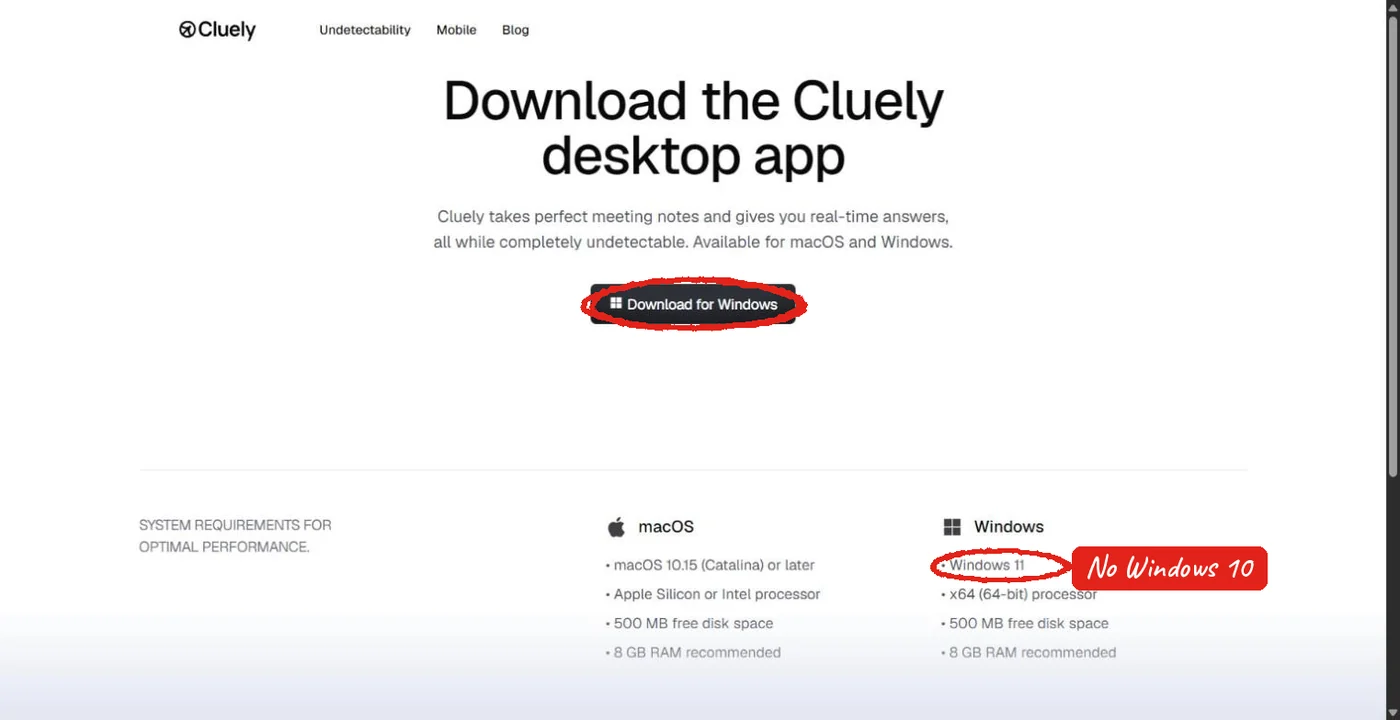
| Windows | Windows 11 (Home or Pro), 64-bit. Windows 10 is not supported. |
| Mac | The help center says macOS Ventura 13 or later (the download page lists 10.15, so go with 13+) |
| Hardware | 8 GB RAM recommended, laptops from about 2022 onward work best |
| Not supported | External webcams, custom gaming graphics cards, international VPNs |
| iPhone app | iOS 14 or later |
Who owns Cluely?
Cluely, Inc. is a New York startup founded in 2025 by Roy Lee (CEO), Neel Shanmugam (COO) and Alex Chen (CTO). It has raised $20.3 million, including a $15 million round led by Andreessen Horowitz. Lee and Shanmugam previously built Interview Coder, a coding-interview helper that the company still runs separately.
Frequently asked questions
What is Cluely used for?
Live help during video calls: answers to questions, suggested replies, recaps, meeting notes and follow-up emails. Cluely markets it for sales, support, client calls and lectures.
Is Cluely free to use?
Yes, the Starter plan is free with a daily cap on AI answers (shown as 10 a day in the app) that resets every 24 hours, plus limited notes. Pro is $19.99/month or $11.99/month billed yearly.
How much does Cluely cost per month?
Pro costs $19.99/month ($11.99 billed yearly). Pro + Undetectability costs $149.99/month ($44.99 billed yearly). The iPhone app is $8/week or $144/year.
Can Cluely see my screen?
Yes. Each time you ask for help, Cluely sends one screenshot of your screen along with the call transcript to its AI models. Close anything private before you use it.
Can Zoom detect Cluely?
Zoom shows Cluely if you share your entire screen, and Cluely is not hidden on Zoom's default settings. On the free and Pro plans it is visible in any screen share.
Does Cluely give refunds?
Only within 24 hours and only if it does not work on your computer. No refunds for forgetting to cancel, plan changes, unmet expectations or interview use.
Does Cluely work on Windows 10?
No. Cluely supports Windows 11 only. It may open on Windows 10 but audio, screen and hiding features are not supported.
Is cluelyai.com the same as Cluely?
No. Cluely's help center calls cluelyai.com an impersonator. The real site is cluely.com and real charges appear as CLUELY, INC.
What do users say about Cluely?
The iPhone app has 4.7/5 from 558 App Store ratings, mostly from people using it for meeting notes. Cluely.com has 1.7/5 from 22 Trustpilot reviews, and 16 of those 22 complain about charges, refunds or cancelling.
Who is the CEO of Cluely?
Chungin "Roy" Lee, who co-founded Cluely in 2025 with Neel Shanmugam and Alex Chen.