If you have been job hunting in 2026, you have probably seen the ads. A little green parrot promises to sit quietly on your screen during a live interview, listen to every question, and hand you a polished answer in a couple of seconds. No studying, no nerves, no blank moments. Parakeet AI is one of the most talked about tools in this space, and it says more than 1.5 million people have used it.
So we spent time with it, read its pricing pages line by line, and pulled real reviews from Trustpilot and Blind rather than the glowing quotes on its own site. This review is written for someone deciding whether to actually pay for it. We will cover what Parakeet AI does, what it costs, what real users say, and the two things the marketing quietly skips: it is not truly undetectable, and using it during a real interview can cost you the job. We are not sponsored by Parakeet AI or by any tool we mention.
Updated September 18, 2026: what has changed since our July review
Parakeet AI shipped its biggest update since we first tested it, and several things in our original review are now out of date. The short version:
- It is no longer just an interview tool. The site now calls itself a "real-time AI call assistant" and pitches sales calls, client meetings and online exams alongside interviews.
- A whole second product appeared. A "Prepare" suite now bundles Mock Interviews, a Resume Maker, AI Headshots and a Question Bank, sold on its own plan.
- The free trial got much better. It was one 10 minute session. It is now 10 sessions of up to 10 minutes each, plus one free mock interview.
- The credit system was rebuilt. Credits now bill in 30 minute halves and extend automatically mid call, which fixes the freeze-at-credit-expiry failure that dominated our original review.
- The yearly price dropped by a third, from $599.90 to $399.90. The $599.90 figure is now the lifetime plan.
- The Trustpilot score jumped from 2.9 to 4.4 — and we found a reason for that which is worth knowing before you trust it.
- The company changed its public position on cheating, and will now blacklist itself from any employer that asks.
Our rating stays at 3.2 out of 5. The product genuinely improved, but the two things that decide whether you should use it — detection risk and reliability under pressure — have not been fixed, and one reader reported being flagged the day before this update.
Before we start, one honest note
There is a real difference between using AI to prepare for interviews and using it to cheat during a live one. Practicing with AI is smart and completely fair. Feeding yourself hidden answers during the real thing is a different choice, with real consequences we cover in detail below. We will be straight with you about both.
What is Parakeet AI?
Parakeet AI is a real time call assistant that listens to your conversation, transcribes each question, and shows an AI written answer on a hidden overlay within a few seconds. It runs in your browser or as a desktop app, and it works alongside video and coding platforms like Zoom, Google Meet, Microsoft Teams, Webex, HackerRank, and Coderpad. The company behind it is listed as ParakeetAI d.o.o., though its Trustpilot profile now gives its location as the United States.
September 2026 update: it has stopped calling itself an interview tool. When we first reviewed it, the homepage headline was "#1 AI Interview Assistant." It now reads "Your Real-Time AI Call Assistant," and the pitch covers "interviews, sales calls, client meetings, or any conversation where freezing up isn't an option." The interview use case is still there, but it is no longer the whole product. I think that change is deliberate, because employers have spent the last year cracking down on exactly the use it used to advertise.
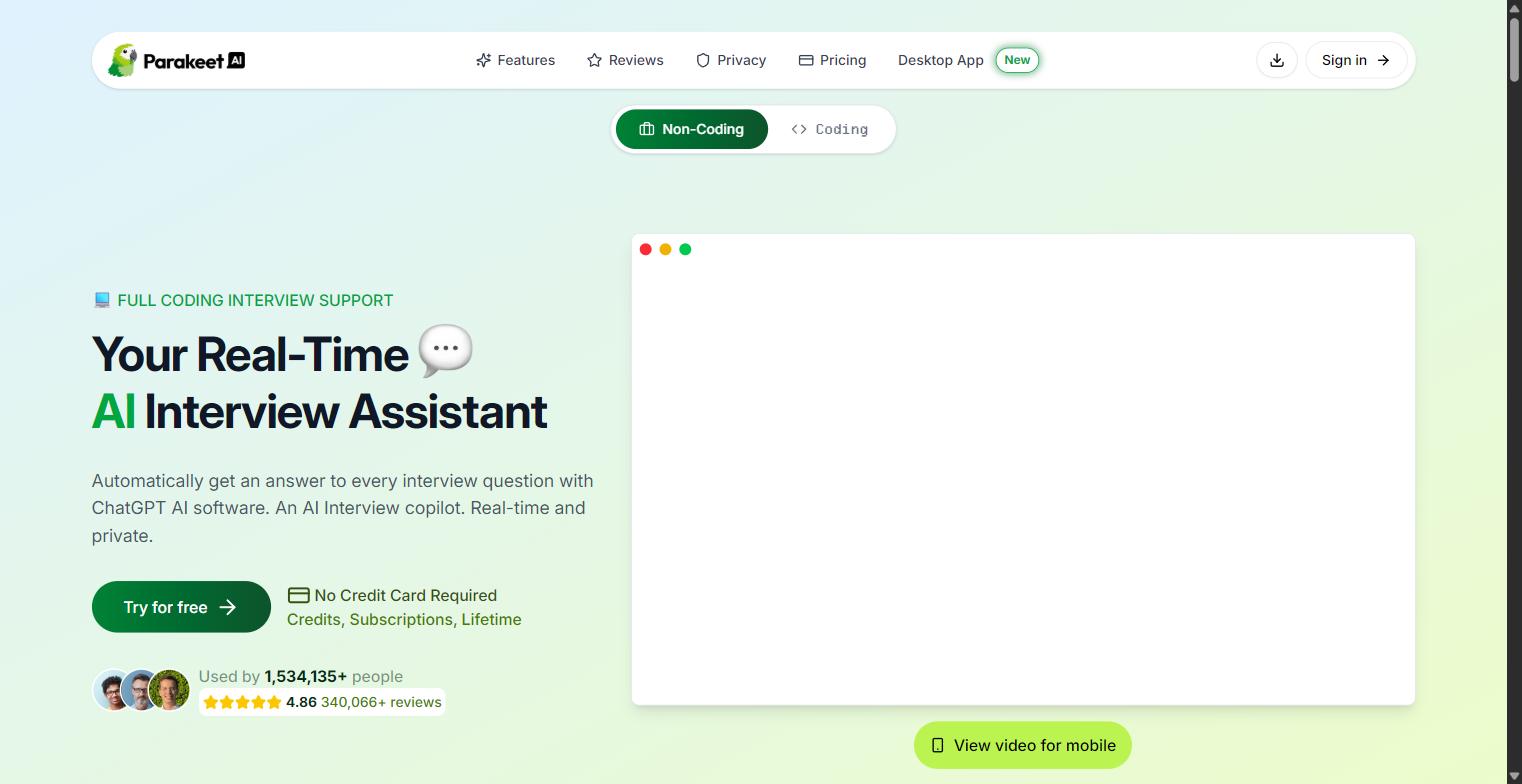
You pick the AI model for each session. In July the dropdown offered GPT-5, GPT-4.1 and Claude 4.0 Sonnet; Google's Gemini models have since been added, and the FAQ now describes the choice as "several Gemini, GPT, and Claude models" with a fast default pre-selected. You can upload your resume and other documents so the answers match your background. For coding rounds, it can take a screenshot of a LeetCode or HackerRank problem and return a breakdown with pseudocode, complexity, and edge cases. After the call, it writes up notes with key points and action items.
Two practical constraints are worth knowing before you buy, because neither is obvious from the marketing. In the browser, only desktop Chrome is supported for live sessions, so Safari, Firefox and Edge users need the Windows or macOS desktop app. And there is still no native mobile app despite the app-store listings you may find in search results: the official FAQ says a native app is "on its way to the App Store and Google Play" but is not downloadable yet, and points you to the mobile web version instead. Anything calling itself a Parakeet AI mobile app today is not theirs.
The new "Prepare" suite
The second big change since July is that Parakeet is no longer one product. A Prepare section now sits alongside the call assistant, with four tools:
- Mock Interviews — practise out loud against an AI interviewer that answers back, then read the transcript. Your first mock is free.
- Resume Maker — builds a resume targeted at a specific role, with LinkedIn and job-posting import.
- Headshots — turns one photo into studio-style headshots for LinkedIn.
- Question Bank — marked "coming soon," a searchable set of questions real candidates were asked, company by company, ranked by frequency.
Every one of these is a preparation tool, and nobody can be disqualified for using a preparation tool. The mock interview mode is the one we would actually point a reader toward: you practise out loud against an AI interviewer, then read the transcript and see how you did. Until now, the safe way to use Parakeet AI was to ignore most of what it sold you. Now it is a supported mode with a free trial attached.
In plain terms, it is an interview copilot with a practice suite bolted on. The pitch is that you never have to be caught off guard again, because the answer is always sitting right there on your screen. That pitch is also where most of the debate around this tool begins.
The quick verdict
If you want the short version before the deep dive, here is where we landed after testing and research.
- What it is good atFast, fairly accurate transcription, a clean interface, model choice across Gemini, GPT and Claude, and pay as you go credits that never expire. The generous new free trial and the free mock interview make it genuinely cheap to evaluate.
- What it struggles withReliability under pressure. Users still report answers freezing, the tool overwriting a correct answer, and coding help that loops on old errors. A September reviewer described it "tripping badly" thirty minutes into an interview.
- The claim to distrust"100% undetectable." It is not. A reviewer on 17 September 2026 reported proctoring software flagging their screen share, the in-house invisibility board had not been re-checked for 29 days, and a fixed pause before polished answers is a human tell no software fixes.
- The score to distrustThe 4.4 on Trustpilot. Parakeet's own FAQ confirms it hands out free credits to users who post a review, and the recent five-star entries arrive in bursts of one-line praise from single-review accounts.
- The honest recommendationUse the Prepare suite and the mock interviews, which carry no risk at all. Using the live overlay to feed yourself answers in a real interview is a reputation risk we still do not recommend.
How Parakeet AI works
The flow is simple, which is part of the appeal. You start a session in the browser or open the desktop app, pick your language and your AI model, and paste in any extra context like the job description. The app listens to your system audio, so it hears the interviewer even through headphones.
When the interviewer asks something, Parakeet transcribes it and generates an answer on an overlay that, in theory, only you can see. There is an auto answer mode that fires on its own when it thinks a new question was asked, and a manual mode where you press a button. For coding, you trigger an "analyze screen" action that reads the problem on your screen and writes a solution.
You also now choose a session mode when you start: "interview," which feeds your uploaded CV into the answers, or "regular call" for meetings, which does not. A mock mode sits beside both, where the AI plays the interviewer instead of helping you answer one. And the app can now auto-detect a Google Meet or Teams call starting and offer to join, so you are not fumbling with setup while someone waits.
It sounds smooth on paper. In practice, several users describe friction at the exact moments that matter, and we get into that in the reviews section. The single most useful thing to understand up front is the credit model, which was rebuilt since our first review and is now the best-improved part of the product. More on that next.
Key features at a glance
Here is what you actually get, based on the current feature set on the official site.
| Feature | What it does |
|---|---|
| Real time answers | Transcribes each question and shows an AI answer on a hidden overlay in about 2 to 4 seconds. |
| Model choice | Pick from several Gemini, GPT and Claude models per session. Gemini was added after July 2026. |
| Coding support | Screenshots a LeetCode or HackerRank problem and returns pseudocode, complexity, and edge cases. |
| Resume and documents | Upload your resume and files so answers match your experience. |
| Auto answer | Detects new questions and responds without a button press. |
| AI notes | Summarizes the call afterward into key points and action items. |
| Languages | Officially 50+ languages, one at a time per session. |
| Desktop app | Windows and macOS. In the browser, desktop Chrome only. |
| New Mock interviews | Practise against an AI interviewer that answers back, with a transcript afterwards. First one free. |
| New Auto-detect meetings | Spots a Google Meet or Teams call starting and offers to join, with no mid-call setup. |
| New Session modes | Choose interview mode (uses your CV) or regular call mode (does not) when you start. |
| New Phone calls | Works on phone calls routed through Google Voice. |
| New Resume Maker | Builds a role-targeted resume, importing from LinkedIn or a job posting. |
| New AI headshots | Turns one photo into studio-style headshots. |
| New Question Bank | Questions real candidates were asked, by company, ranked by frequency. Still marked "coming soon." |
The feature list is genuinely broad, and it got broader. On that measure Parakeet holds up against rivals and then some, because most of its competitors sell only the live overlay. The questions that decide whether it is worth paying for are reliability, price, and risk, so let us take those one at a time.
Parakeet AI pricing in 2026
Parakeet now sells access three ways: one time credit packs, unlimited subscriptions, and a Prepare-only plan that covers the practice tools but leaves live calls on credits. The free trial is far more generous than it was. It used to be a single 10 minute session. It is now 10 sessions of up to 10 minutes each, with a new one available every 12 minutes, plus one free mock interview. No credit card is needed. That is close to 100 minutes of free testing, which is enough to form a real opinion before you spend anything.
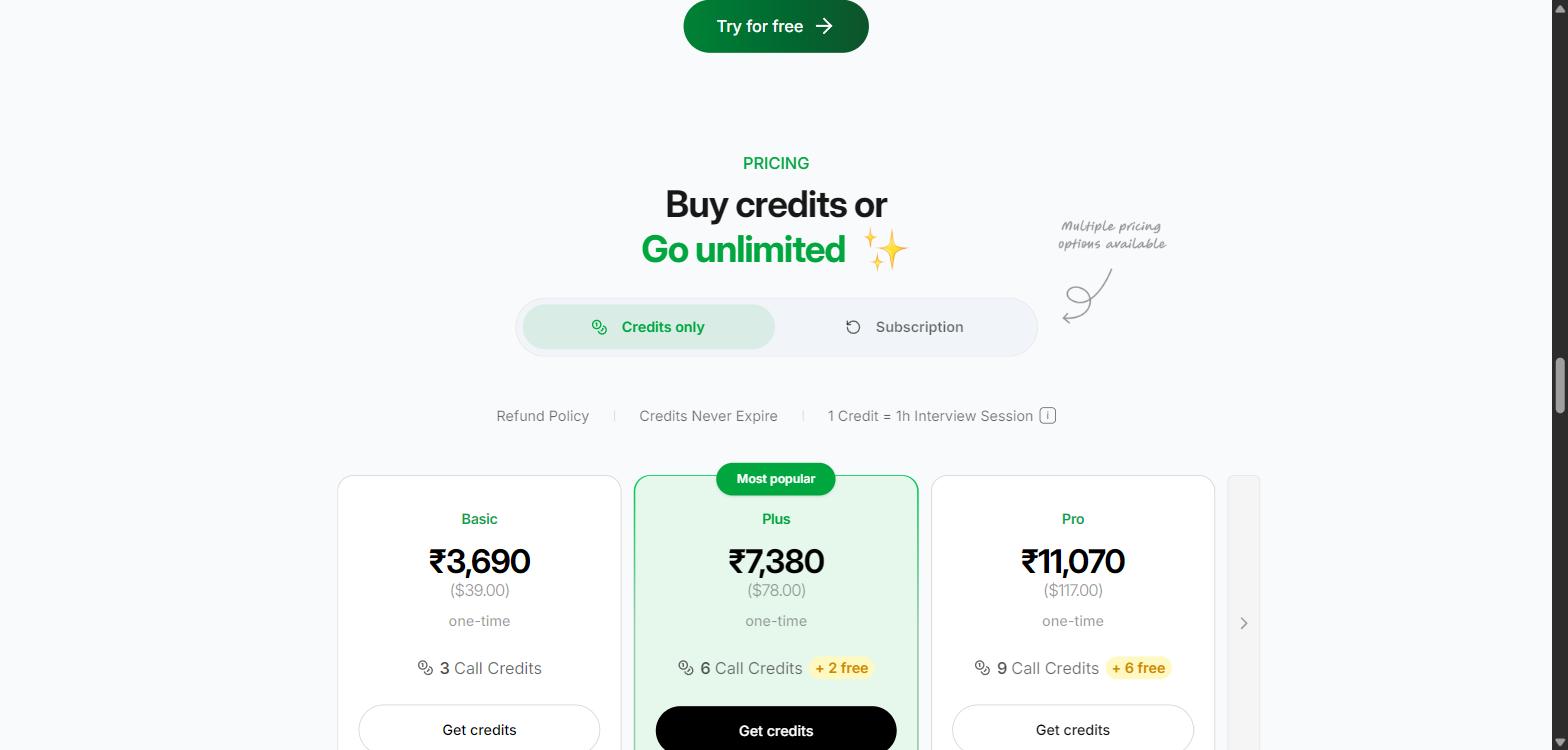
Here are the current numbers in US dollars. Prices show in local currency depending on your location, so you may see rupees or another currency on the page.
| Plan | Price | What you get |
|---|---|---|
| Basic credits | $39 one time | 3 credits (3 hours of calls) |
| Plus credits | $78 one time | 6 credits plus 2 free, so 8 total. Marked "most popular." |
| Pro credits | $117 one time | 9 credits plus 6 free, so 15 total |
| Single credit | $25 | 1 credit, for a single call |
| New Weekly unlimited | $52 per week | Unlimited calls for one week |
| Monthly subscription | $99.90 per month | Unlimited calls, cancel anytime |
| Yearly subscription | $399.90 per year was $599.90 | Unlimited calls. Works out at $33.33 a month. |
| New Lifetime plan | $599.90 one time | Now visible in the pricing widget, where it used to be mentioned but not sold |
| New Prepare only | $30.70/mo or $122.90/yr | Question Bank, Resume Maker and Headshots. Does not include calls or mocks. |
| Free trial | Free | 10 sessions of up to 10 min each, plus 1 free mock interview. No card. |
The biggest price change is the annual plan, which dropped by a third, from $599.90 to $399.90. If you read our July review, note that $599.90 now buys the lifetime plan instead. That makes the lifetime option unusually easy to reason about: it costs eighteen months of the annual plan, so it only pays off if you expect to be interviewing, or taking client calls, well into 2028.
The other thing worth doing is the arithmetic on the subscriptions, because the gaps are wide. A week of unlimited costs $52, which is more than two credits. A month costs $99.90, which is less than two weeks. And a year costs four months. The monthly plan is the worst value in the table unless you genuinely need exactly one month, and the weekly plan only makes sense if you have a dense cluster of final rounds in a single week.
How credits work now, and the trap inside them
This is the part that changed most, and it is a real improvement. Credits used to be billed as whole hours, and when one ran out mid call, everything froze until you clicked to continue — the single most damaging failure in our original review. Now:
- Credits bill in 30 minute halves. A session deducts 0.5 credits when it connects.
- Sessions extend automatically. Shortly before the half hour ends, an active session takes another 30 minutes and another 0.5 credits, with no click and no freeze. An idle session will not extend.
- Cancelling the screen capture costs nothing. You are only charged once the call tab is actually captured.
- Credits still never expire.
The freeze that ruined interviews should therefore be gone, and that is a real fix to a real problem. The new model has one downside, though, and users have already complained about it. Billing rounds up to the half hour, so a 15 minute call costs the same 0.5 credits as a 30 minute one. A September reviewer raised exactly this:
"Its easy to use very comfortable and reason behind giving 4 stars is if we use for 15 minutes credits are using 0.5 which is unfair they need to take an strong decision on this because the user should never affect"Hari Reddy, Trustpilot, September 8, 2026
There is a second thing to watch. Credits are now spent on the whole product, not just calls. A resume PDF download costs 0.5 credits, a headshot costs 0.5 credits, and a Question Bank position costs a full credit. So a $39 pack you bought for three hours of interview cover can be quietly drained by a few resume exports and a set of headshots. If you buy credits for calls, spend them on calls.
Read the refund policy first
The single most common billing complaint we found is people getting charged after they thought they had canceled, and being refused a refund when the tool underperformed. If you subscribe, note the cancellation steps and keep records. We quote these complaints in full below.
September 2026 update: Parakeet has now published a specific refund policy, which is an improvement on the vagueness we found in July. The terms are strict, so know them before you pay: there is a 7 day window, and only for purchases that are completely unused. One paid call session, one mock, one resume download or one generated headshot makes the whole purchase ineligible. There are no partial refunds for leftover credits, and it is one refund per person, not per account. Your free trial sessions and free mock do not count against you. If you are not sure the tool works for you, that is what the 100 minutes of free sessions are for — once you spend a credit, the money is gone.
What real users say about Parakeet AI
This is where the picture gets more honest than any homepage. Parakeet's own site shows a 4.86 star average from more than 340,000 reviews and testimonials that call it flawless. Independent platforms tell a very different story.
When we first published this review in July 2026, Parakeet AI sat at 2.9 out of 5 on Trustpilot, from only three reviews, all of them 1 or 2 stars.
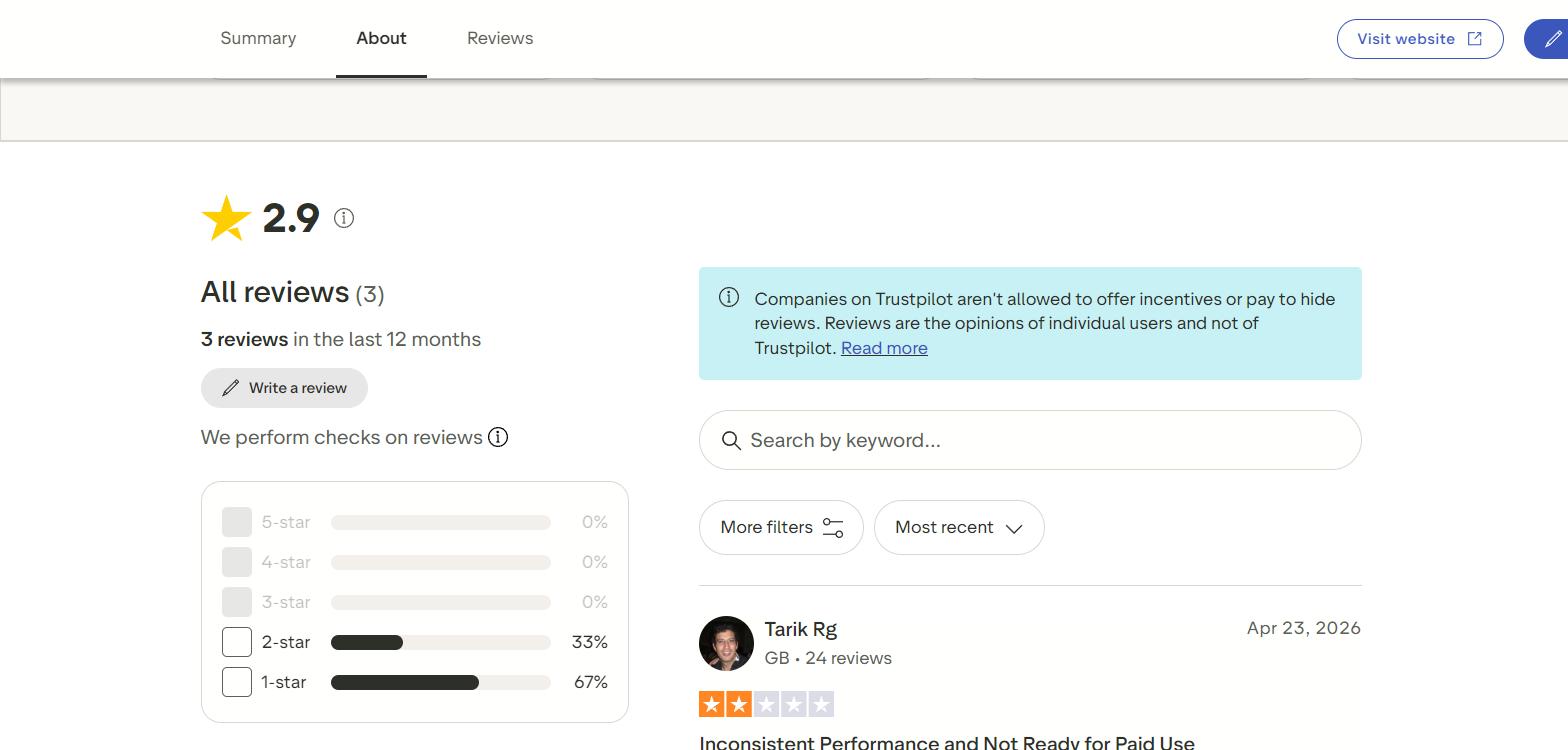
The score has since jumped to 4.4, and you should know why
By 18 September 2026, the same profile reads 4.4 out of 5 from 54 reviews, with 74% of them five star. On the face of it, that is a dramatic turnaround in two months, and the honest reading is that some of it is real: the product did improve, and the company now replies to complaints, which it did not do before.
But the number needs an asterisk, and we found it in Parakeet's own documentation. Buried in the privacy section of its FAQ, in a list of which AI providers process user data, is this line:
"Reviewing us for free credits: the screenshot you upload goes to Google, or OpenAI if that model is unavailable, to check the review is published and yours."ParakeetAI official FAQ, privacy section, September 2026
In other words, Parakeet AI gives users free credits in exchange for posting a review. You write one, upload a screenshot proving it is live and yours, and credits land in your account. That is not disclosed anywhere on the Trustpilot profile, and Trustpilot's own notice on that page states that companies "aren't allowed to offer incentives." Every recent entry is nonetheless labelled "Unprompted review," and Trustpilot's own panel flags that the company has "no recent history of asking for reviews," so the score "may not be representative."
The reviews themselves look like what you would expect from that offer. Checking the profile on 18 September, we counted more than a dozen new reviews posted within ten hours of each other, almost all from accounts with exactly one review to their name, and most only a few words long: "it's exceptional," "great app keep it up," "that was awesome it was mind blowing." Meanwhile every single 1 and 2 star review on the profile was written before August 2026, which is to say before the credits offer existed.
None of this proves the positive reviews are fake, and plenty of people clearly do like the tool. But a 4.4 collected this way is not the same kind of number as a 4.4 collected without an incentive, and you should not compare it directly with a competitor's score. Our advice is to read the long reviews and skip the one-line ones, in both directions.
The reviews themselves are specific, which makes them useful. One reviewer, Tarik, gave it 2 stars and questioned whether it is ready to charge for at all:
"I've used Parakeet AI a few times and found it quite inconsistent. Occasionally it gives the right answers, but most of the time it struggles to properly understand the questions, which makes it unreliable for real interview use... I don't think it's ready to be a paid product yet."Tarik, Trustpilot, April 2026
Another, from a reviewer named Kridge, is the billing complaint that came up again and again:
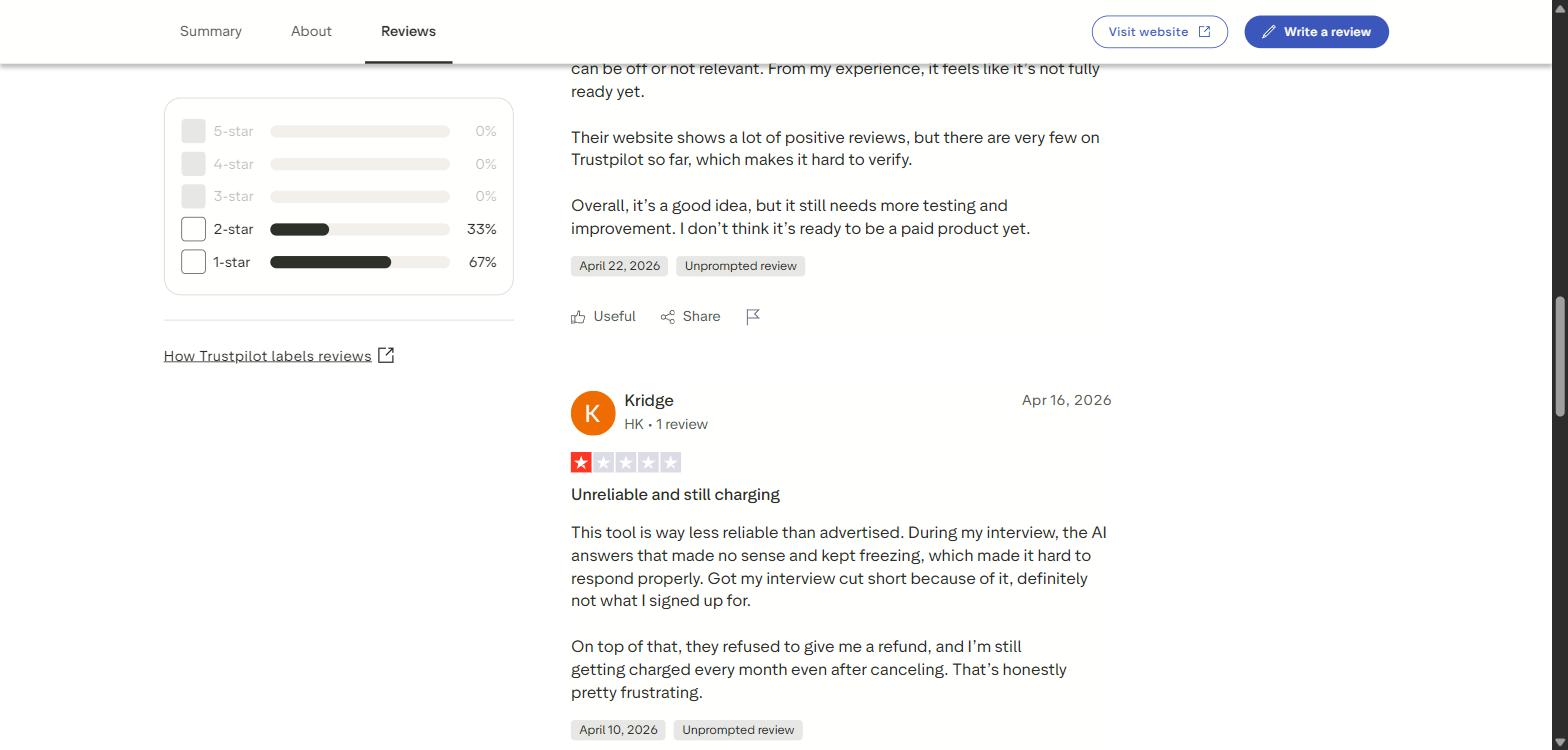
"During my interview, the AI answers that made no sense and kept freezing... Got my interview cut short because of it. On top of that, they refused to give me a refund, and I'm still getting charged every month even after canceling."Kridge, Trustpilot, April 2026
The third review is blunt. Titled "Scam APP," it reads: "The answer is bad and I ask their customer support for refund and they ignored me." Three reviews is a small sample, so we do not want to over read it. But the pattern lines up with a much longer, calmer account we found on Blind, the anonymous workplace forum.
A user tagged as a Google employee wrote a detailed post titled "I used an AI assistant to cheat on 2 interviews." It is worth reading because it is neither a hype piece nor a hit piece. It is someone describing exactly what happened.
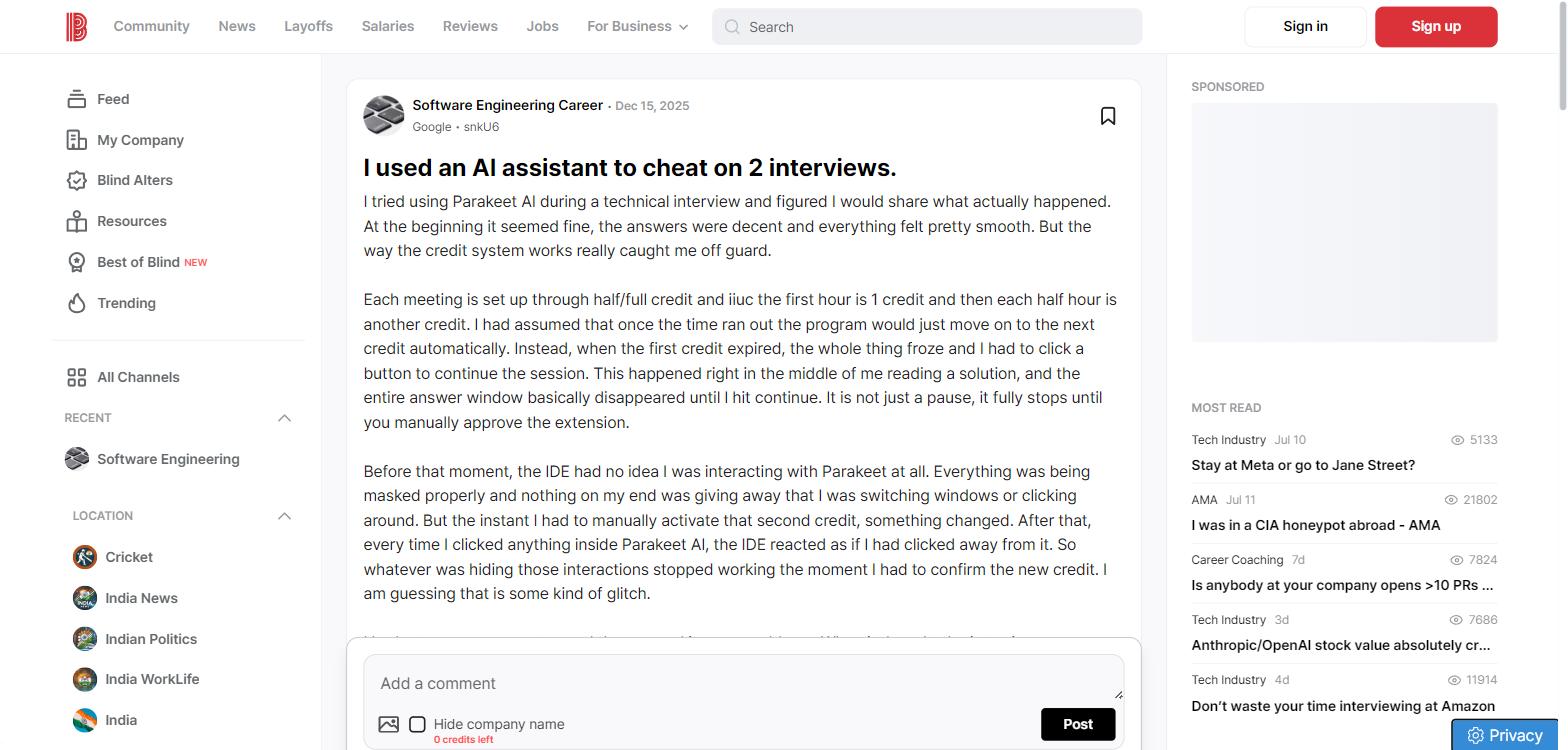
Their experience captures the core weakness better than any spec sheet. At first it felt smooth. Then a credit expired mid interview and everything froze:
"When the first credit expired, the whole thing froze and I had to click a button to continue the session. This happened right in the middle of me reading a solution, and the entire answer window basically disappeared until I hit continue."Blind user, Software Engineering Career, December 2025
Worse, that moment seems to have broken the tool's hiding:
"The instant I had to manually activate that second credit, something changed. After that, every time I clicked anything inside Parakeet AI, the IDE reacted as if I had clicked away from it... I was being notified that I left the IDE for x number of minutes."Blind user, Software Engineering Career, December 2025
They also describe the auto answer mode overwriting a correct answer when it thought a new question came in, and the coding helper getting stuck solving an error that had already been fixed, because it kept reading the old message in the terminal log. And, matching the Trustpilot pattern, support did not refund the wasted credit. The poster even ends unsure whether they got caught, which is the whole problem with betting an interview on a tool like this.
What reviewers are saying now
The credit freeze described above should be fixed by the automatic extension Parakeet shipped since. The rest of the complaints have not gone anywhere, and the most useful recent reviews are the ones in the middle of the range, written by people who liked the tool enough to keep using it.
The clearest warning sign is this one, posted the day before we updated this review:
"Parakeet AI failed to block screen sharing detection. The proctoring/AI tool flagged that I was sharing my screen, so it did not work as expected."Reddy, Trustpilot, September 17, 2026
A reviewer with a long posting history hit trouble at a very familiar moment:
"Great idea — Needs further improvements. Tripped badly 30 mins into my interview."George P, Trustpilot, August 27, 2026
Thirty minutes is precisely where a session now auto-extends and takes another half credit. We cannot prove the two are connected from one review, but it is the same boundary that broke things under the old system, and it is worth watching if you rely on this in a long round.
And this one is the sharpest observation any reviewer has made about the tool, because it identifies a tell that has nothing to do with software stealth:
"It is helpful. But sometimes it gets stuck and doesn't give any answer at all, sometimes it is unable to understand what interviewer is saying. For coding it is good, just that it gives complex code, which gives interviewer chance to ask for problematic cross question."Shubham Pandey, Trustpilot, September 3, 2026
That last point is the one most people miss. If the tool hands you a solution more sophisticated than you can explain, the interviewer asks a follow-up question and you are stuck. Nobody needed proctoring software to catch that. It is also the one risk no stealth feature can do anything about, which is why we keep saying the useful version of this tool is the practice mode.
Finally, the harshest recent complaint, from August, reports the tool doing nothing at all:
"I have purchased credits for interview for parakeet ai. It's literally just shows transcript of interaction. Nothing else. It does not provide answers not as easy as shown in advertisement. Literally waste of money."sabarinath jaladanki, Trustpilot, August 2026
To Parakeet's credit, it replied to this one the next day, suggesting a setup problem and pointing to the tutorials and free sessions. That responsiveness is new since July, when the negative reviews sat unanswered. Trustpilot currently records that the company has replied to 25% of its negative reviews.
What users like
- Simple to set up and start
- Good transcription, even with accents
- Fine for behavioral and general tech chat
- Credits that do not expire
- A genuinely long free trial
- Support now replies to complaints
What users complain about
- Answers freezing or making no sense
- Weak on deep coding problems
- Refunds refused, charges after canceling
- Billing rounds up to the half hour
- Code so complex it invites follow-up questions
- Screen sharing still getting flagged
The "undetectable" claim, and the truth
Parakeet AI leans hard on privacy. Its site lists a stack of promises: invisible on screen share, invisible in the dock, invisible in Activity Monitor, invisible when you switch tabs, and even cursor undetectability. It shows a board claiming it is verified invisible on eight platforms including Zoom, Teams, Meet, Webex and HackerRank.
One detail on that board has changed, and it is worth noticing. In July, each platform was marked as "checked" a few hours earlier, which suggested continuous monitoring. When we looked on 18 September 2026, the whole board read "Checked 29 days ago." Zoom, Teams and Meet all ship updates more often than once a month, so a check that is 29 days old does not tell you much about today.
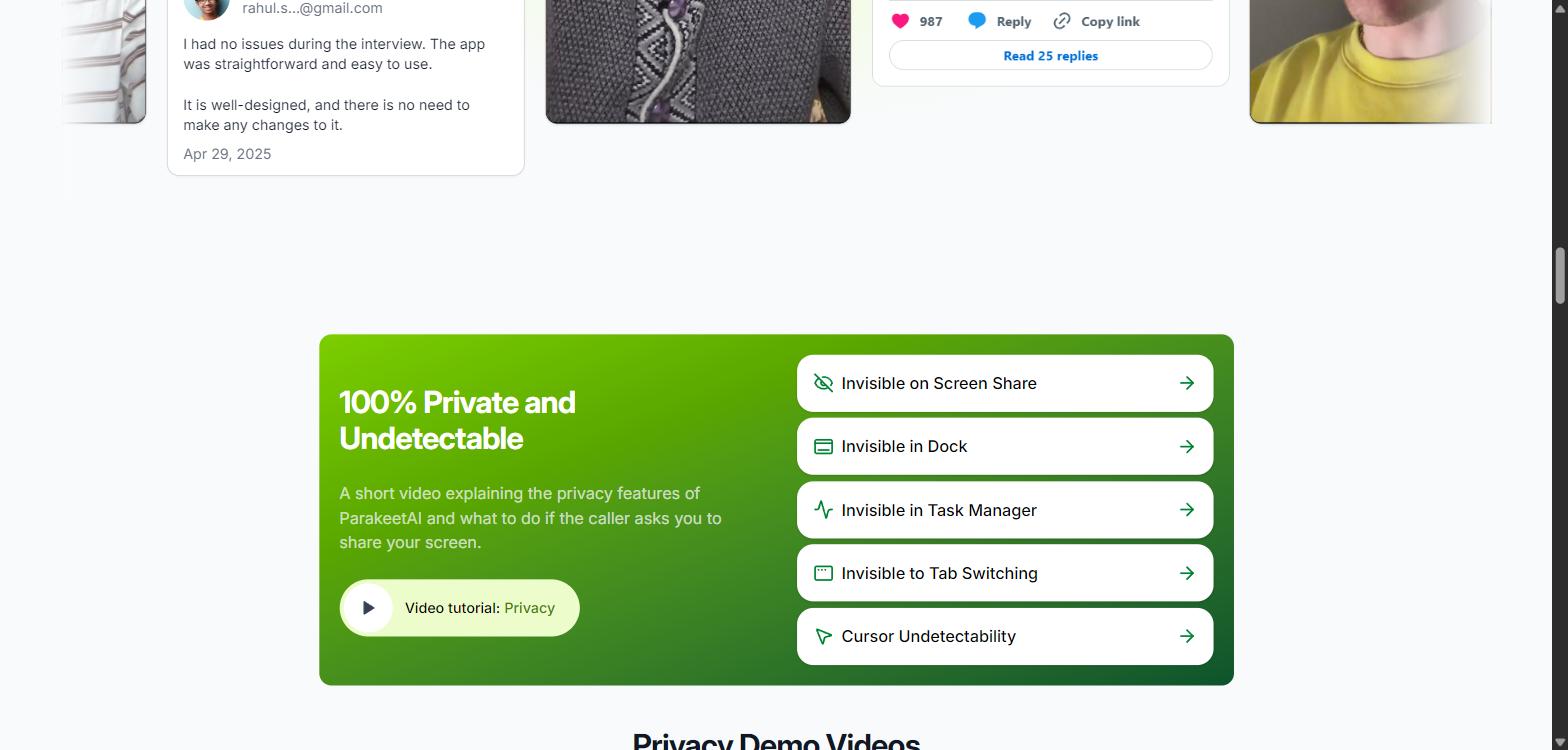
Here is the reality, based on Parakeet's own support pages and independent testing. This claim does not hold up.
A user was flagged this week. The most direct evidence is the most recent. On 17 September 2026, a Trustpilot reviewer wrote that "Parakeet AI failed to block screen sharing detection. The proctoring/AI tool flagged that I was sharing my screen, so it did not work as expected." That is one report and we cannot verify the setup behind it, but it is a paying user describing the exact failure the marketing says cannot happen, dated the day before this update.
The process-name claim has quietly changed. In July, Parakeet ran as a process called pmodule in macOS Activity Monitor and Windows Task Manager, and its own FAQ admitted there was no way to rename it — a giveaway on any managed or proctored laptop. The current site instead states that "the process has no visible name or icon in Activity Monitor," and the word pmodule no longer appears anywhere on the homepage. Either they have hardened it or they have softened the wording, and we could not confirm which from the outside. If you are on a company-managed machine, assume process monitoring is still the weakest link until someone demonstrates otherwise.
Proctoring companies target it by name. Talview, a large assessment vendor, runs a page called "Stop Parakeet AI Cheating." Others have built tools like parakeetdetector.com and published detection guides. When your tool is famous enough that vendors write software to catch it, "undetectable" is marketing, not fact.
Full screen share can expose it. Testers found that when you share your whole screen on Google Meet, the Parakeet window shows up in the shared view. You can share only a tab to avoid this, but many coding platforms want the full screen for exactly this reason. When you run it in the browser, the tab can be caught by tab snapshot monitoring too.
Your behavior gives it away. Even if the software stayed perfectly hidden, humans notice a fixed three to five second pause before every answer, eyes reading off screen, and answers that arrive fully structured. Interviewers who have seen it once recognize it fast.
Bottom line on stealth: Parakeet can be discreet in a casual, low stakes call. In a serious proctored technical interview at a company that watches for this, treating it as invisible is a bad bet. Nothing in the September update changes that, and a reviewer reporting a proctoring flag on 17 September is the newest evidence we have.
The ethics and employer policy question
This is the part most reviews skip, and it matters more than any feature. Using a copilot to prepare is fine. Using one to secretly feed you answers during a live interview is a different thing, and employers are done being relaxed about it.
Most large tech companies, including names like Google, Meta, and others, have added interview rules that treat real time AI assistants as a violation and grounds for disqualification. Undisclosed real time help misrepresents your actual ability, and if it is discovered, the fallout ranges from an immediate rejection to a signed offer being pulled later. There have been public cases of offers rescinded after the fact.
Companies are also changing formats to counter these tools. Behavioral rounds are getting more weight, and some on site loops are bringing back the whiteboard and pen and paper, where no overlay can help you. In other words, the arms race is not one you are likely to win by paying $99 a month.
Parakeet has changed its own public position on this
This is the most interesting development since our first review, and the one we did not expect. In July, the product was sold almost entirely on stealth. The FAQ now carries a statement that reads very differently:
"ParakeetAI is built for conversations where AI assistance is permitted. Sales calls, internal meetings, mock calls, language practice, self-study. Check the rules first. If your company, school, or caller says no, respect it. And if an employer wants us gone, we enforce it for them."ParakeetAI official FAQ, privacy section, September 2026
It goes further than a disclaimer. Parakeet now says it will blacklist itself on request: "We honor blocklist requests from any employer. Send us your domain or hiring process to [email protected] and we will blacklist it." Whatever the motivation — and there is an obvious legal and payment-processor incentive here — that is a real, checkable commitment, and no other tool in this category that we looked at offers one. If you run hiring somewhere and this worries you, that address is the fastest lever you have.
The catch is that the rest of the site has not caught up with the statement. The same FAQ page, a few questions earlier, advertises that the tool "also works during online exams." A company that asks you to check the rules first and offers to block itself for employers is simultaneously marketing itself as an exam aid. Both statements are on the same page, and they contradict each other. Until the exam line comes down, I would read the ethics statement as what the company plans to become, not as a description of what it is selling today.
A simple rule that keeps you safe
Practice with AI as much as you want. When a real interview or take home starts, ask the recruiter whether AI tools are allowed. A thirty second question protects you from a disqualification later. If they say no, believe them.
Parakeet AI alternatives
If you have read this far and still want a live copilot, you have options, and if you want to actually get better at interviewing, you have better ones. Copilot pricing changes often and varies by tier, so treat the numbers below as a starting point and confirm on each site.
If you want a live copilot
| Tool | Best for | Rough price | Trustpilot | Note |
|---|---|---|---|---|
| Parakeet AI | Pay as you go real time answers | From $39 in credits, or $99.90/mo | 4.4 (54) | Flexible credits, now bundles practice tools |
| Final Round AI | Answers tailored to your resume and the job | Premium monthly tiers | 2.9 (277) | Longest track record, polished, pricier at the top |
| LockedIn AI | Non native speakers, structured stories | Around $55 to $70/mo | — | STAR method focus, wide language support |
| Verve AI | Mixed formats, coding and behavioral | Around $60/mo unlimited | 3.5 (15) | Multiple copilot modes |
| Interview Coder | Coding interviews only | Around $60/mo | — | Desktop app, coding focused stealth |
| Cluely | General purpose on-screen assistant | Monthly tiers | 1.7 (20) | The most talked about and the worst reviewed |
Treat the Trustpilot column as rough context. Parakeet's 4.4 comes with the free-credits-for-reviews offer behind it, as covered above, while Final Round AI's 2.9 comes from a much bigger and older sample. A score built on 15 or 20 reviews swings wildly on a few entries, so none of these numbers should decide anything on their own.
All of these carry the same detection and ethics risks as Parakeet. A different logo does not change the fact that you are using a hidden helper during a live interview.
If you want to get better and stay safe
This is the route we actually recommend, because it builds skill that holds up when the overlay is gone.
| Tool | Best for | Rough price |
|---|---|---|
| Pramp by Exponent | Free live peer mock interviews | Free |
| interviewing.io | Real human mock interviews with feedback | From about $179 a session |
| Yoodli | Delivery: pace, filler words, structure | Around $24/mo, free tier available |
We put together a full, tested comparison of ethical practice tools in our guide to the best AI mock interview tools in 2026, if you want to go deeper on the safe route.
Who should and should not use Parakeet AI
It might make sense if
- You want mock interviews and a resume builder in one place
- You want to hear a strong sample answer while you rehearse
- You take a lot of low stakes calls and want live notes
- You are in sales or client work, where AI note-taking is normal and permitted
- You interview in a second language and want a transcription safety net during practice
- You understand and accept the detection and ethics risks
Avoid it if
- You are interviewing at a company that bans real time AI
- The round is a proctored, full screen coding test
- You are on a company-managed or locked-down laptop
- You want a solution you can trust under pressure
- A rescinded offer would be a disaster for you
Frequently asked questions
Is Parakeet AI legit or a scam?
It is a real product from a registered company, not a payment scam, and it works as advertised for many users. Its Trustpilot score rose from 2.9 out of 5 in July 2026 to 4.4 from 54 reviews in September, but Parakeet's own FAQ confirms it gives free credits to users who post a review, so the score is not an independent signal. Every 1 and 2 star review still predates August 2026, and they describe answers freezing, refused refunds and charges after cancellation. Read the refund policy before you pay.
How much does Parakeet AI cost in September 2026?
Credit packs are $39 for 3 credits, $78 for 6 plus 2 free, and $117 for 9 plus 6 free, with a single credit at $25. Unlimited is $52 a week, $99.90 a month or $399.90 a year, and a lifetime plan is $599.90. A Prepare-only plan covering the Question Bank, Resume Maker and Headshots is $30.70 a month or $122.90 a year but does not include calls. The annual plan dropped from $599.90 to $399.90 since our July review.
Is the Parakeet AI free trial any good?
It is much better than it was. You get 10 free sessions of up to 10 minutes each, with a new one available every 12 minutes, plus one free mock interview. That is roughly 100 minutes of free use with no credit card. Given that the refund policy voids itself the moment you use a paid credit, the free sessions are the only real way to evaluate the tool without risk.
How does the Parakeet AI credit system work now?
Credits bill in 30 minute halves. A session deducts 0.5 credits when it connects, and an active session extends automatically for another 30 minutes and another 0.5 credits without freezing, which fixes the old mid-call freeze. Idle sessions do not extend and credits never expire. Two catches: billing rounds up, so a 15 minute call still costs 0.5 credits, and credits are also spent on resume downloads and headshots, so a pack bought for calls can be drained by the Prepare tools.
Is Parakeet AI really undetectable?
No. A Trustpilot reviewer on 17 September 2026 reported that proctoring software flagged their screen share while using it. Parakeet historically ran as a process named pmodule that its own FAQ said could not be renamed; the site now claims the process has no visible name, but its own invisibility board had not been re-checked for 29 days when we looked. Sharing your full screen can expose the window, and a fixed pause before polished answers is a human tell. Treat "100% undetectable" as marketing.
Can you get caught using it in an interview?
Yes. Detection usually comes from behavior and platform monitoring rather than a magic AI scanner. One Blind user reported that after a glitch, the interview platform began logging that they had left the coding window, and a September 2026 reviewer was flagged for screen sharing. Another reviewer noted the tool produces code complex enough to invite follow-up questions you then cannot answer. Many big employers now ban real time AI help and can disqualify you or pull an offer.
Can employers block Parakeet AI?
Yes, and the company now says it will do it for you. Its FAQ states that it honors blocklist requests from any employer, and asks you to send your domain or hiring process to [email protected]. That is unusual in this category and is the fastest option if you run hiring and want the tool disabled against your process.
Is it ethical to use Parakeet AI?
Using AI to prepare, practice, and research is completely ethical. Using a hidden copilot to feed you answers during a live interview, without telling the employer, is widely treated as cheating and can carry real consequences. If in doubt, ask the recruiter whether AI is allowed.
What are the best alternatives to Parakeet AI?
For a live copilot, people compare it with Final Round AI, LockedIn AI, Verve AI, and Interview Coder, all with the same risks. For a safer path that actually builds skill, use ethical practice tools like Pramp, interviewing.io, and Yoodli.
The bottom line
Parakeet AI is not vaporware and it is not a scam. It is a capable real time call assistant with fair transcription, genuine model choice, and pricing that is friendly if you interview in bursts. On a casual call, it can feel like magic.
The problem is that interviews are not casual calls, and this is exactly where the cracks show. Users report it freezing, overwriting good answers, and looping on coding problems at the worst possible moment. Support and refunds draw steady complaints. And the headline promise, that you are invisible, is the part that fails hardest, both in software and in front of a human. Add the fact that a growing number of employers will disqualify you for using it, and the math gets hard to justify.
The September 2026 update genuinely improved the product, and we want to be fair about that. The freeze-at-credit-expiry bug that dominated our original review has been engineered away. The free trial went from near-useless to about a hundred free minutes. The refund policy is now written down. The annual price fell by a third. And the company built a practice suite — mock interviews, a resume maker, a question bank — which is the part of this product nobody has to feel uneasy about, and the part we would actually point you toward.
What did not improve is the risk. A user was flagged by proctoring software the day before we published this update. The invisibility board that claims continuous checking had not been touched in 29 days. The code it writes is complex enough to sink you in a follow-up question. And the Trustpilot score that looks so much better is collected with free credits attached, which is why our rating stays at 3.2 rather than moving with the headline number.
Our take is unchanged, and the new Prepare suite makes it easier to act on. Use the mock interviews. Use the resume tools. Use the free sessions to hear a good answer while you rehearse in your own words. Do not bet a real interview, or a real offer, on an overlay that the whole industry is now building tools to catch — including, on request, the company that sells it. The skill you build by practicing is the only thing that stays hidden, because it lives in your head. If you want the safe route, start with our roundup of ethical mock interview tools.
Sources and references
- Parakeet AI official website, features and pricing, captured July 2026 and re-checked 18 September 2026. https://www.parakeet-ai.com/
- Parakeet AI official FAQ, Billing section (free trial, credit system, payment methods, refund policy), captured 18 September 2026.
- Parakeet AI official FAQ, Privacy section (data processors, permitted-use statement, employer blocklist, free credits for reviews), captured 18 September 2026.
- Parakeet AI official FAQ, Features section (supported models, browsers, mobile app status, online exam use), captured 18 September 2026.
- Parakeet AI pricing widget, USD plan data for credits, weekly, monthly, yearly, lifetime and Prepare plans, captured 18 September 2026.
- Parakeet AI reviews on Trustpilot: 2.9 out of 5 from 3 reviews in July 2026, 4.4 out of 5 from 54 reviews on 18 September 2026. https://www.trustpilot.com/review/parakeet-ai.com
- Trustpilot reviews cited individually: Tarik (April 2026), Kridge (April 2026), Jam (April 2026), sabarinath jaladanki (August 2026), George P (27 August 2026), Shubham Pandey (3 September 2026), Hari Reddy (8 September 2026), Reddy (17 September 2026).
- "I used an AI assistant to cheat on 2 interviews," Blind, Software Engineering Career, December 2025. https://www.teamblind.com/post/i-used-an-ai-assistant-to-cheat-on-2-interviews-yn4bgxll
- Talview, "Stop Parakeet AI Cheating and AI Interview Assistants."
- Shadecoder, "Can Parakeet AI Be Detected During Coding Interviews? Detection Methods and Risks," 2026.
- Interview Coder, "Parakeet AI Review (2026): Pricing, Stealth, Complaints."
- Final Round AI, "What Is Parakeet AI? How It Works, Pricing, and What to Know."
- Interview Sidekick, "Parakeet AI Review 2026: Is the Credit Pricing Worth It?"