

 By Kaustubh Saini
11 Best AI Study Tools for Students in 2026 (Free & Paid)
AI study tools have moved well beyond "ask a chatbot and copy the answer." The strongest products in 2026 can question you like a tutor, turn class files into quizzes, cite the exact source behind an explanation, schedule spaced-repetition reviews, audit code and show the steps in a math solution.
That variety is useful, but it also makes choosing a tool harder. A general chatbot may be excellent for brainstorming and still be a poor place to memorize anatomy. A flashcard app may be perfect for exam recall but unhelpful when you need to understand an unfamiliar codebase.
We reviewed current product documentation, education offers and pricing information to identify the best AI study tools for students in 2026. We favored tools that make the learner do meaningful cognitive work - not simply produce polished homework on command.
Our top picks: LoWisa is the strongest choice for students learning software development through real projects; Gemini is the best broad free learning companion; ChatGPT has the most flexible conversational study workflow; and Gemini Notebook (formerly NotebookLM) is the best tool for studying from your own sources.
The best AI study tools at a glance
| Rank | Tool | Best for | Free option? | Key limitation |
|---|---|---|---|---|
| 1 | LoWisa | Learning coding through real projects on desktop and mobile | Yes, free lessons, practice and starting credits | Young product with limited public review history |
| 2 | Google Gemini | Adaptive, multimodal learning across subjects | Yes | Answers still require verification |
| 3 | ChatGPT | Socratic tutoring and flexible explanations | Yes | Can occasionally answer too directly or make mistakes |
| 4 | Gemini Notebook | Studying from notes, readings and source files | Yes | Quality depends on the sources you provide |
| 5 | Quizlet | Flashcards, practice tests and active recall | Yes, with limits | Advanced modes require Quizlet Plus |
| 6 | Khanmigo | Guided school-subject tutoring | Limited; teacher tools are free | Individual learner access has geographic and age restrictions |
| 7 | RemNote | Spaced repetition tied to class notes | Yes | Full AI workflow is comparatively expensive |
| 8 | Perplexity | Source-led research and learning | Yes | A citation can be relevant without fully supporting a claim |
| 9 | Grammarly | Writing feedback and transparent authorship | Yes | Best for writing, not full-course learning |
| 10 | Wolfram|Alpha | Math, science and computational problem solving | Yes | Less useful for open-ended humanities work |
| 11 | Notion | Organizing classes, notes and study plans | Yes for eligible students | Ongoing Notion AI access requires a higher-tier plan |
How we chose and ranked these tools
The ranking is not a contest for the chatbot with the longest feature list. We evaluated each product against five questions:
- Does it support learning, not just task completion? Tools earned more credit for hints, questioning, practice, feedback and opportunities to explain an answer.
- Can students connect it to real course material? We looked for file uploads, source grounding, citations, integrations or direct use inside an authentic workflow.
- Does it encourage active recall or application? Quizzes, flashcards, worked problems and sandboxed practice are more valuable for retention than passive summaries alone. The American Psychological Association's review of study research notes that spaced retrieval practice can substantially improve long-term recall.
- Is the value clear at the free or student price? A high price is not automatically bad, but students should know what remains useful before paying.
- Are the limitations understandable? We considered hallucination risk, geographic restrictions, privacy, source quality and whether premium features are easy to distinguish from free ones.
This learning-first approach matters. A 2026 randomized study found stronger delayed outcomes among students who used generative AI to explain and augment their work than among those who used it mainly to automate writing. The practical lesson is simple: use AI to think with you, not to remove thinking from the assignment.
1. LoWisa - Best AI study tool for learning to code through real projects
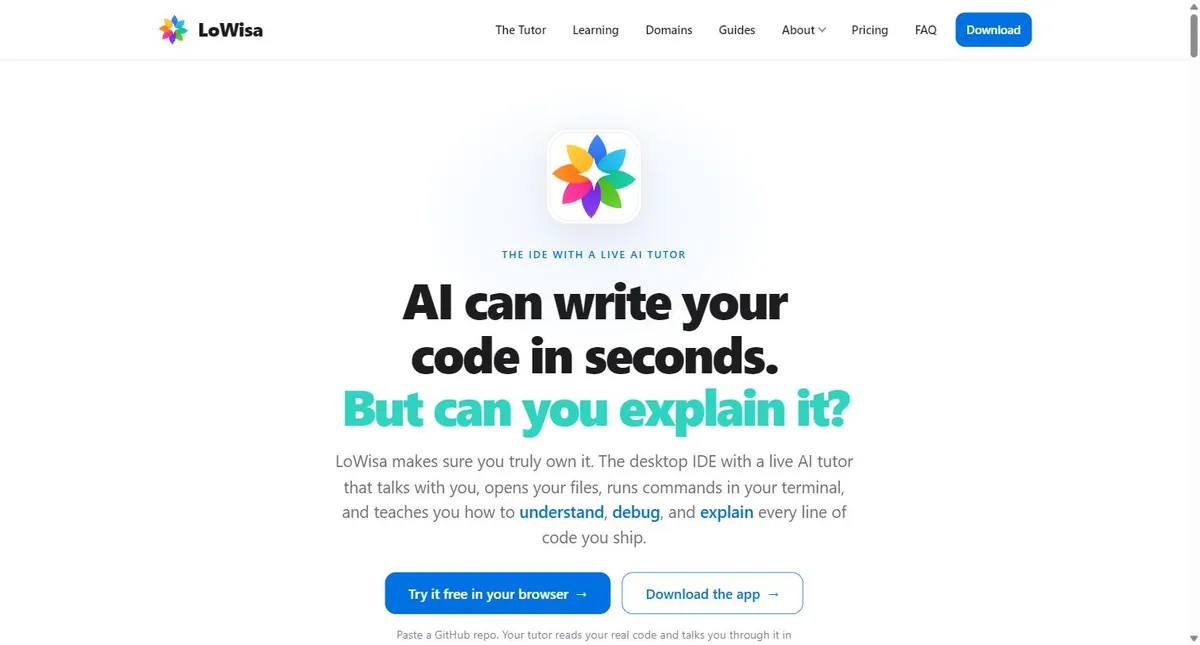
Screenshot captured from Lowisa.dev on September 22, 2026.
LoWisa takes a different approach from conventional coding assistants. Instead of optimizing for how much code AI can generate, it focuses on whether the student can understand, debug and explain the code in front of them.
LoWisa is actually two connected products: a desktop IDE for learning inside real projects and a mobile learning app for structured lessons and daily practice. The Android app is available on Google Play, and LoWisa: AI Coding Tutor is also live on Apple's App Store. Both use the same account, subscription balance and learning record, so a student can study on a phone and complete larger projects in the desktop IDE.
The LoWisa desktop IDE
The desktop IDE includes a live AI tutor that can inspect project files, highlight relevant lines, talk through the architecture, use a whiteboard, run terminal commands with the learner and check whether the learner genuinely understood the result. Existing projects can be explored in a safe sandbox copy, which makes experimentation less intimidating.
That project context is LoWisa's biggest advantage. A generic chatbot usually sees the snippet a student pastes. LoWisa is designed to build a map of the project, explain entry points and data flow, and turn bugs into hands-on challenges. Its "System Immersion" path is particularly useful when a student inherits a project or has built an app with AI but cannot yet explain how the pieces connect.
The curriculum extends across 25 engineering areas, including version control, databases, APIs, authentication, frontend state, Docker, CI/CD, deployment, monitoring, security, testing and debugging. It also includes applied thinking skills such as pattern recognition, optimization, trade-offs and root-cause analysis.
The tutor's assessment method is also more demanding than a simple "Did that make sense?" prompt. According to LoWisa's product guide, it asks learners to explain a system in their own words, predict what a change will do and run the command that tests the claim. That is a sensible pattern for coding education because it checks transfer and reasoning rather than agreement.
The LoWisa mobile app for Android and iPhone
The phone app is not merely a remote control for the IDE. LoWisa presents it as a programming school in your pocket, with hand-built learning paths for careers such as AI engineering, backend, frontend, data and DevOps, plus skill-specific tracks for technologies including Python, JavaScript and SQL.
It offers three learning styles:
- Build and Practise: guided exercises in which the learner writes code.
- Code Interpretation: line-by-line reading of real code files.
- Learning as a Game: the same material organized around XP, streaks and duels.
The app also includes daily goals, public standings and spaced revision through an "Arcade" area. Career courses culminate in projects completed in the free desktop IDE, which helps connect short mobile sessions to substantial work rather than leaving the student in a quiz-only loop.
Community features include Cohorts, small learning groups with planned lessons, daily work, contests, channels and direct messages, and Clock it, a shared feed where learners publish AI discoveries and discuss what they learned. The September 22 changelog for mobile version 1.8.9 also lists a free first level of interview practice, job and résumé tools, speaking games and expanded cohort features. Those career features are useful extras, although the coding tutor and project workflow are the stronger reasons to choose the product.
Availability, maturity and privacy
The store listings confirm that LoWisa is available on both major mobile platforms. At the time of review, Google Play displayed 1K+ downloads, while Apple said there were not yet enough ratings or reviews to show an aggregate overview. That limited review history is worth noting: LoWisa looks ambitious and is being updated frequently, but it is a much younger product than Khan Academy, Quizlet or Wolfram|Alpha.
The mobile app starts without sign-in and includes initial lessons plus a tutor trial. Google Play's developer-supplied data-safety section says data is encrypted in transit, deletion can be requested and no data is shared with third parties; it also says the app may collect personal, financial, activity and device-related data. Apple's privacy label says purchases, contact information, user content, identifiers and usage data may be linked to the user.
LoWisa's own privacy policy adds an important distinction. It says desktop code, project files, tutor history and bring-your-own API keys remain on the device as far as LoWisa's services are concerned. However, relevant prompts and code context still have to be sent to the selected AI model provider when the tutor answers. Mobile learning progress is backed up, and community profiles, cohort messages, direct messages and Clock it posts are stored to operate those features. Students working with confidential repositories should read the policy and their organization's rules before sending code to any AI model.
Best for: computer-science students, self-taught developers, bootcamp learners and anyone using AI-generated code who wants to build independent engineering judgment.
Pricing: LoWisa is free to try and includes 20 one-time tutor credits at installation. Lessons, readings, drills and practice in the phone app remain free, while tutor answers, AI-written lessons and voice use credits. The web/desktop pricing page listed Starter at $8 per month with 200 credits and Plus at $11 per month with 500 credits when checked. Mobile subscription prices are set through Google Play or Apple and can differ by store and country; for example, Apple's listing showed $7.99 for Starter and $12.99 for Plus in its U.S.-dollar description. The company says a credit represents one cent of AI usage at provider cost.
Platforms: Windows 10+, macOS 12+ and Ubuntu 20.04+ for the desktop IDE; Android through Google Play; and an English-language iPhone app requiring iOS 15.1 or later. The official changelog listed desktop version 0.9.27 and mobile version 1.8.9 on September 22, 2026.
Why it ranks first: LoWisa directly addresses one of the most important learning problems created by generative AI: students can ship code they do not understand. It combines explanation with real files, execution and practice rather than treating coding education as a stream of generated answers.
Watch out for: this is a specialized and relatively young product. Students who need help with history, biology or essay planning should pair it with a broader tool such as Gemini or ChatGPT. The store age rating and product privacy policy also deserve separate attention: Apple labels the app 4+, while LoWisa's policy says the service is not directed at children under 13. Parents and schools should use the stricter policy statement when deciding whether the app is appropriate.
2. Google Gemini - Best free all-round AI learning companion
Google Gemini is the most complete general-purpose study option for many students in 2026. Guided Learning breaks topics into steps, asks open-ended questions, adapts explanations and can use diagrams, images, videos and interactive quizzes instead of relying only on text.
The bigger change this year is Study Notebooks. Students can upload a syllabus, notes or readings, take a diagnostic quiz, and receive a sequence of bite-sized lessons based on their knowledge gaps. Later quizzes update the learning plan as performance changes. Google says these notebooks also sync with Gemini Notebook, giving students a path from adaptive tutoring to deeper source-based study.
That combination makes Gemini especially strong for mixed workflows: learn a concept, generate a study guide, create flashcards, test your understanding and then continue researching from source material.
Best for: students who want one free tool for explanations, exam preparation, visual learning and work across multiple subjects.
Pricing: a capable free tier is available. Google announced a 12-month Google AI plan at no cost for eligible college students in 2026; eligibility, country coverage, redemption deadlines and post-offer pricing vary. Students should read the current terms before adding payment details.
Standout features: Guided Learning, Study Notebooks, multimodal explanations, quizzes, flashcards, file uploads and tight integration with Google's education ecosystem.
Watch out for: Gemini is still a generative model. Treat its explanations as a starting point, especially in technical, medical or citation-sensitive work, and verify important claims against course materials or primary sources.
3. ChatGPT - Best for flexible Socratic tutoring
ChatGPT Study mode is built to guide a student through a problem instead of immediately delivering the final answer. It uses questions, hints, structured explanations, knowledge checks and personalized feedback. Students can upload notes, worksheets, images or PDFs and ask it to work from a specific page or problem.
Its strength is conversational flexibility. You can ask it to slow down, change the level, use an analogy, quiz you one question at a time, hide the answer until you commit to a solution, or build a 20-minute revision session. It works well when the student knows what feels confusing but does not yet know what kind of explanation will unlock it.
A good prompt is specific: "I'm a first-year biology student. Quiz me on enzyme kinetics from the attached notes, one question at a time. Give a hint before explaining anything I miss." That produces a much better learning session than "teach me biology."
Best for: personalized explanations, homework guidance, oral-style questioning, brainstorming and switching rapidly between subjects.
Pricing: Study mode is available across ChatGPT plans, including Free. OpenAI also announced a 2026 U.S. back-to-school offer giving eligible college and graduate students four monthly billing periods of Plus at no charge; the published claim deadline is October 31, 2026, after which standard renewal terms apply.
Standout features: adaptable explanations, voice and image input where available, file-based tutoring, quizzes and broad subject coverage.
Watch out for: OpenAI explicitly notes that Study mode can make mistakes and may sometimes provide a direct answer. Ask it to cite the material you uploaded, show assumptions, and wait for your attempt before revealing a solution.
4. Gemini Notebook (formerly NotebookLM) - Best for studying from your own sources
Gemini Notebook is the current name of the product formerly known as NotebookLM. Its defining feature remains the same: answers are grounded in the sources inside a notebook and include citations back to those materials.
Students can add lecture notes, PDFs, websites, Google Docs, Slides, audio and YouTube material, then turn that collection into study guides, flashcards, quizzes, reports, mind maps and audio or video overviews. Flashcards and quizzes can be customized by topic and difficulty, and the "explain" option points back to the original source when a learner needs more context.
In 2026, Google expanded the product with deeper research capabilities and additional output formats. New September updates introduced more interactive learning overviews, editable quizzes and flashcards, performance follow-ups and short educational video overviews in more than 80 languages, with availability rolling out by plan.
Best for: dense reading lists, literature reviews, lecture-note revision and any course where students must stay anchored to an assigned set of sources.
Pricing: the core product has a free tier. Paid Google AI plans increase usage limits and unlock some advanced capabilities. Eligible students may qualify for Google's 2026 promotional plan.
Standout features: source-grounded chat, inline citations, flashcards, quizzes, study guides, Audio Overviews and multi-format source support.
Watch out for: grounding reduces unsupported wandering, but it cannot repair a weak source pack. If the uploaded notes are incomplete, outdated or wrong, the notebook may faithfully reflect those problems.
5. Quizlet - Best for flashcards and practice tests
Quizlet remains one of the easiest ways to turn unstructured study material into active practice. Its AI tools can transform notes, PDFs, lecture slides and photos of handwritten notes into flashcards, structured study guides and customizable practice tests.
The workflow is fast: upload material, generate a first draft, correct or reorder it, and then study using familiar Quizlet modes. Practice tests can include multiple-choice and written questions, while results help identify the concepts that need another pass.
Quizlet is most valuable when AI saves preparation time without replacing retrieval. The generated cards are not the learning; trying to recall the answer before flipping the card is the learning. Students should edit vague cards and split overloaded prompts into one testable idea each.
Best for: vocabulary, anatomy, language learning, definitions, exam facts and any course that benefits from frequent self-testing.
Pricing: flashcards and some AI features are available free. Advanced AI capabilities and unlimited access to premium study modes are part of Quizlet Plus; pricing can vary by market and billing cycle.
Standout features: AI flashcard maker, study-guide generator, PDF summarizer, practice-test generator, Learn mode and a large library of existing study sets.
Watch out for: public sets are convenient but may contain errors. Use instructor-approved material where accuracy matters and inspect every AI-generated card before memorizing it.
6. Khanmigo - Best guided tutor for school subjects
Khanmigo is Khan Academy's AI tutor. Rather than handing over the answer, it is designed to ask questions and help the learner reason toward a solution. It is connected to Khan Academy's established library across math, science, coding, history and the humanities.
That makes Khanmigo a good fit for structured school learning, particularly when a student benefits from a patient tutor but also needs a clear curricular path. It supports learners from elementary school through college, while its writing coach and teacher tools extend the platform beyond problem solving.
Best for: K-12 students, families already using Khan Academy and learners who want a more deliberately guided experience than a general chatbot.
Pricing and access: Khan Academy's core learning library remains free. Individual Khanmigo learner and parent access is paid and, according to Khan Academy's current documentation, restricted to adults with U.S. access and billing; a parent can enable access for children under 18. Teacher tools are free in supported regions, and schools can provide student access through district partnerships.
Standout features: Socratic guidance, Khan Academy content integration, broad school-subject coverage, writing support and education-specific safety design.
Watch out for: access restrictions make Khanmigo less universally available than Gemini or ChatGPT. Check eligibility before building a study routine around it.
7. RemNote - Best for spaced repetition connected to notes
RemNote combines note-taking, PDF annotation, flashcards and spaced repetition in one system. The important idea is that a flashcard does not have to live in a disconnected deck: it can remain linked to the explanation, lecture or source that created it.
Its AI features can generate cards, quizzes and summaries from text, PDFs and presentations; grade responses; transcribe audio; and act as a tutor inside the study workflow. The exam scheduler and spaced-repetition queue are useful for students who need a daily plan rather than another folder of summaries.
Best for: medical students, law students, language learners and anyone preparing for cumulative exams with a large volume of connected material.
Pricing: RemNote Free includes unlimited notes and flashcards plus limited AI credits and document features. At the time of research, Pro was $8 per month billed annually, while Pro with AI was $18 per month billed annually. Eligible students, faculty and staff can receive a 25% education discount on standard Pro subscriptions, but RemNote says the discount does not apply to the AI plan or extra AI credits.
Standout features: integrated notes and cards, spaced repetition, PDF annotation, image occlusion, AI grading, lecture transcription and exam scheduling.
Watch out for: AI-generated cards can be wordy or test trivial details. Good spaced repetition depends on good card design, so review the queue before committing hundreds of cards.
8. Perplexity - Best for cited research and discovery
Perplexity is most useful at the beginning of a research task, when a student needs to map a topic, identify terminology and find sources worth reading. Its answers attach web citations, making it easier to move from a summary to the underlying page than with a citation-free chatbot.
Perplexity's 2026 Education Pro plan includes Learn Mode, unlimited Pro Searches, file and image uploads, access to premium models and education-specific guidance for verified students and educators. Learn Mode makes it a better teaching tool than a basic search summary by emphasizing understanding and study methods.
Best for: research questions, source discovery, comparing viewpoints and getting oriented in an unfamiliar field.
Pricing: a free plan is available. Verified students and educators can apply for a discounted Education Pro subscription through SheerID; current pricing should be checked in the product because offers may vary.
Standout features: cited answers, web research, file analysis, follow-up questions and Learn Mode.
Watch out for: the presence of a citation is not proof that the citation supports every sentence beside it. Open the source, locate the relevant passage and cite the original material in your assignment - not Perplexity's summary.
9. Grammarly - Best AI writing coach for students
Grammarly is strongest at the revision stage. It can identify grammar and clarity issues, adjust tone, support citations, check for plagiarism and help students document how a piece of writing developed.
Its Authorship feature is particularly relevant in classrooms where instructors want visibility into the writing process. Grammarly says every Pro subscription also includes Superhuman Go, an AI learning partner that can explain concepts and discuss material while working across apps.
The right use is coaching, not laundering. Ask why a sentence is unclear, compare two revisions, or request feedback on the logic of a paragraph. Do not accept every rewrite automatically; a polished sentence can still misstate your argument.
Best for: essays, reports, dissertations, English-language support and students who want continuous feedback while drafting.
Pricing: a useful free writing assistant is available. Grammarly currently advertises a limited-time 50% discount on Grammarly Pro for eligible students verified through SheerID; the company says the discount applies to one subscription period and cannot be combined with other offers.
Standout features: inline writing feedback, citations, plagiarism detection, AI detection, Authorship and cross-app assistance.
Watch out for: Grammarly can improve expression, but it cannot supply disciplinary knowledge or guarantee that a citation is correct. Keep ownership of both the argument and the final wording.
10. Wolfram|Alpha - Best for math and computational subjects
Wolfram|Alpha is a computational knowledge engine rather than a conventional chatbot. That distinction matters for students working in mathematics, physics, chemistry, statistics, engineering or economics. It can calculate, plot, analyze uploaded data and provide structured step-by-step solutions.
Pro adds practice problems with hints, guided calculators, extended computation time, downloadable results and photo input in the mobile apps. Because the system is built around computation, it is often a better choice than a general chatbot for checking algebra, exploring functions or validating a quantitative result.
Best for: STEM homework, worked mathematical steps, graphing, unit conversions, statistics and computational verification.
Pricing: Basic is free with sign-in but excludes step-by-step solutions. At the time of research, Student Pro was $5 per month when billed annually at $60, while Student Pro Premium was $8.25 per month billed annually at $99.
Standout features: step-by-step solutions, practice problem generator, course-specific calculators, graphing and data analysis.
Watch out for: copying steps is not the same as understanding them. Cover the next step, predict it yourself, and then use Wolfram|Alpha to check the reasoning.
11. Notion - Best for organizing classes and study projects
Notion for Education is the strongest organizational tool in this list. Students can build course dashboards, connect readings to assignments, track deadlines, keep research notes and create revision databases in one workspace.
Notion AI can summarize, rewrite, search workspace knowledge and help organize material, but its 2026 plan structure needs careful explanation. Individual students and teachers at accredited colleges and universities can get the one-member Education Plan free with a qualifying school email. That plan adds benefits such as unlimited uploads and 30-day page history. However, ongoing Notion AI access is included on Business and Enterprise plans; Free and Plus/Education users receive only a limited number of complimentary AI responses.
Best for: semester planning, research organization, assignment tracking and students who want one structured home for their academic work.
Pricing: the individual Education Plan is free for eligible higher-education students and educators. AI can be tried through complimentary responses, but sustained use requires a plan that includes Notion AI.
Standout features: flexible databases, templates, linked notes, calendars, project tracking and integrated AI trials.
Watch out for: building an elaborate dashboard can become productive procrastination. Start with courses, deadlines and one weekly review page; add complexity only when it solves a real problem.
Which AI study tool should you choose?
Choose based on the learning bottleneck, not the brand:
- You are learning programming from real code: choose LoWisa.
- You want one broad, mostly free study companion: choose Gemini.
- You learn best through back-and-forth questioning: choose ChatGPT Study mode.
- You have a folder full of readings and lecture notes: choose Gemini Notebook.
- You need flashcards and exam-style practice quickly: choose Quizlet.
- You want a school-focused tutor tied to a trusted curriculum: choose Khanmigo.
- You are preparing for a cumulative exam: choose RemNote.
- You need to find and inspect sources: choose Perplexity.
- You need feedback on a draft: choose Grammarly.
- You need reliable computation and worked steps: choose Wolfram|Alpha.
- Your notes and deadlines are scattered: choose Notion.
Most students do not need eleven subscriptions. A sensible stack is one general tutor, one source-grounded or recall tool, and one specialist tool for the hardest subject. For example, a computer-science student might combine ChatGPT for broad explanations, LoWisa for project-based coding practice and RemNote for spaced review.
How to use AI for studying without weakening your learning
Attempt the problem before asking for the answer
Give yourself a real retrieval attempt first. Then ask for a hint, a diagnosis of your mistake or a similar practice problem. This keeps AI in the role of tutor instead of answer machine.
Ask the tool to test you
Useful instructions include "ask one question at a time," "do not reveal the answer until I commit," and "return to missed concepts later." Quizzes and flashcards are valuable because they require retrieval, not because AI generated them quickly.
Ground important work in sources
Upload your course notes, specify the chapter, and request citations. For web research, open the cited source and confirm that it supports the claim. Cite the original source in your paper.
Protect private information
Do not upload confidential student records, private feedback, unpublished research data or other people's personal information without authorization. UNESCO's guidance on generative AI in education emphasizes privacy protection, age-appropriate use and human-centered oversight.
Follow your school's academic-integrity rules
Permitted AI use differs by course and assignment. If the rules are unclear, ask the instructor what kinds of brainstorming, editing, coding, citation help or generated text are allowed. Keep a record of prompts and drafts when disclosure is required.
Frequently asked questions
What is the best AI study tool for students in 2026?
There is no universal winner for every subject. LoWisa is our #1 pick for students learning coding through authentic projects; Gemini is the best broad free option; ChatGPT is the most flexible conversational tutor; and Gemini Notebook is best when answers must remain grounded in class sources.
What is the best free AI study tool?
Gemini and ChatGPT offer the broadest free tutoring experiences. Gemini Notebook is the stronger free choice for studying from a defined set of notes and readings, while Quizlet and RemNote offer useful free tiers for recall practice.
Which AI tool is best for coding students?
LoWisa is the best fit when the goal is to understand and defend real code, not simply generate it. Its tutor works inside an IDE, reads project files, explains architecture, uses a safe sandbox and turns bugs into practice. A general chatbot is still useful for isolated concepts, but it has less direct project context.
Which AI tool is best for exam preparation?
Use Gemini Notebook or Quizlet for fast quizzes and study guides. Choose RemNote when the exam covers a large body of knowledge over several weeks because its spaced-repetition system schedules what to review next.
Can AI study tools replace a teacher or tutor?
No. They can provide immediate practice, explanation and feedback, but they can misunderstand a question, reinforce weak source material or give a confident wrong answer. Teachers also understand the course goals, assessment rules and learner context in ways an app may not.
Are AI-generated citations reliable?
Never assume so. Source-grounded tools make verification easier, but students should still open each source, check the relevant passage, confirm the author and date, and format the citation from the original publication.
Final verdict
The best AI learning tools in 2026 do not remove the productive struggle that makes learning stick. They make that struggle more focused: a useful hint, a clearer diagram, a better practice question, a source you can inspect or a safe place to test an idea.
For coding students, LoWisa earns the top position because it is built around understanding and ownership inside real projects. For general study, Gemini and ChatGPT offer the widest range. For source-based learning, Gemini Notebook is difficult to beat. Students focused on long-term recall should look closely at Quizlet and RemNote, while Wolfram|Alpha remains the specialist choice for computational subjects.
Start with the free tier of the tool that matches your immediate problem. If it consistently improves what you can explain or do without assistance, then consider paying for higher limits - not before.
Sources and further reading
- LoWisa product, learning paths and pricing
- LoWisa: AI Coding Tutor on Google Play
- LoWisa: AI Coding Tutor on Apple's App Store
- LoWisa AI coding tutor guide
- LoWisa changelog
- LoWisa privacy policy
- Google: Guided Learning in Gemini
- Google: Study Notebooks in Gemini, June 2026
- Google: NotebookLM is now Gemini Notebook
- Google: New Gemini Notebook study tools, September 2026
- OpenAI: Using Study mode in ChatGPT
- OpenAI: 2026 student back-to-school offer
- Quizlet AI study tools
- Khan Academy: Khanmigo
- RemNote pricing and AI feature limits
- Perplexity Education Pro
- Grammarly student discount and learning features
- Wolfram|Alpha student plans
- Notion Education Plan
- Notion AI plan availability
- UNESCO guidance for generative AI in education and research
- APA: Six research-tested ways to study better
- Experimental Evidence on the Learning Impact of Generative AI (2026)
Pricing and availability were checked on September 22, 2026. Product plans, limits and student promotions can change; confirm the latest terms on the provider's website before subscribing.