Buying a resume builder should be boring. You type in your work history, pick a layout a machine can read, download a PDF, and get on with applying. For a lot of people it doesn't go like that. It goes like this: forty minutes of typing, a preview that looks great, a click on Download, and a payment screen.
That's not a bug. It's the business model at several of the biggest names here, and it's the one thing worth knowing before you pick anything. So we'll start there, then get to the tools.
Zety's Pro plan is listed at $25.95 every four weeks, which is 13 charges in a year. Search results counted August 2026. Full citations at the end.
The short answer
In a hurry? Here's the short version.
- Best free, and the safe defaultFlowCV. One resume, unlimited PDF downloads, no watermark, no card.
- Best for software and data jobsRezi, or the free LaTeX template r/EngineeringResumes actually recommends.
- Best for tailoring to a specific job postTeal, if you use it in a burst and then cancel.
- Best paid valueKickresume, and it's free with a student ID.
- Best if you hate subscriptionsNovoresume. You pay once and it never renews.
- Best checker, though it's not a builderJobscan, on its free tier.
- Best if you already apply on IndeedIndeed's own builder. Free, one plain template, no upsell.
- Best use of ChatGPTRewriting bullets you wrote yourself. Not writing the whole thing.
- Go in with your eyes openZety, Resume.io, MyPerfectResume, LiveCareer, Resume Genius.
What this guide covers
- Almost every list is written by a resume builder
- The $2.95 trial that turns into $337 a year
- Who actually owns these sites
- All 12 builders side by side
- The ones that are actually free
- FlowCV
- Rezi
- Teal
- Indeed Resume Builder
- Jobscan
- The ones worth paying for
- Novoresume
- Kickresume
- Enhancv
- The big names, and what to watch for
- Resume.io
- Zety
- Canva
- Can ChatGPT build a resume?
- Is it worth paying for one?
- Which ones have the best AI
- Best builder for beating an ATS
- What Reddit actually recommends
- You may not need a builder at all
- What ATS software actually does
- Pick yours in two minutes
- How to cancel before they charge you
- Frequently asked questions
Almost every list you read is written by a resume builder
Search for the best resume builder and count how many of the results sell one. On the first page in August 2026, five of the ten results came from a resume builder company. Every one of them put itself in first place.
Enhancv's list ranks Enhancv first. BeamJobs' list ranks BeamJobs first. Kickresume, Rezi and Novoresume all do the same thing on their own blogs. A few are honest about it. Kickresume's writer mentions in the article that he works there. Novoresume asks if it is biased and answers "maybe a little." Rezi says much the same.
Enhancv goes furthest of all. Its article opens by pointing out that every best-resume-builder list is written by the company sitting at number one. Then it puts Enhancv at number one.
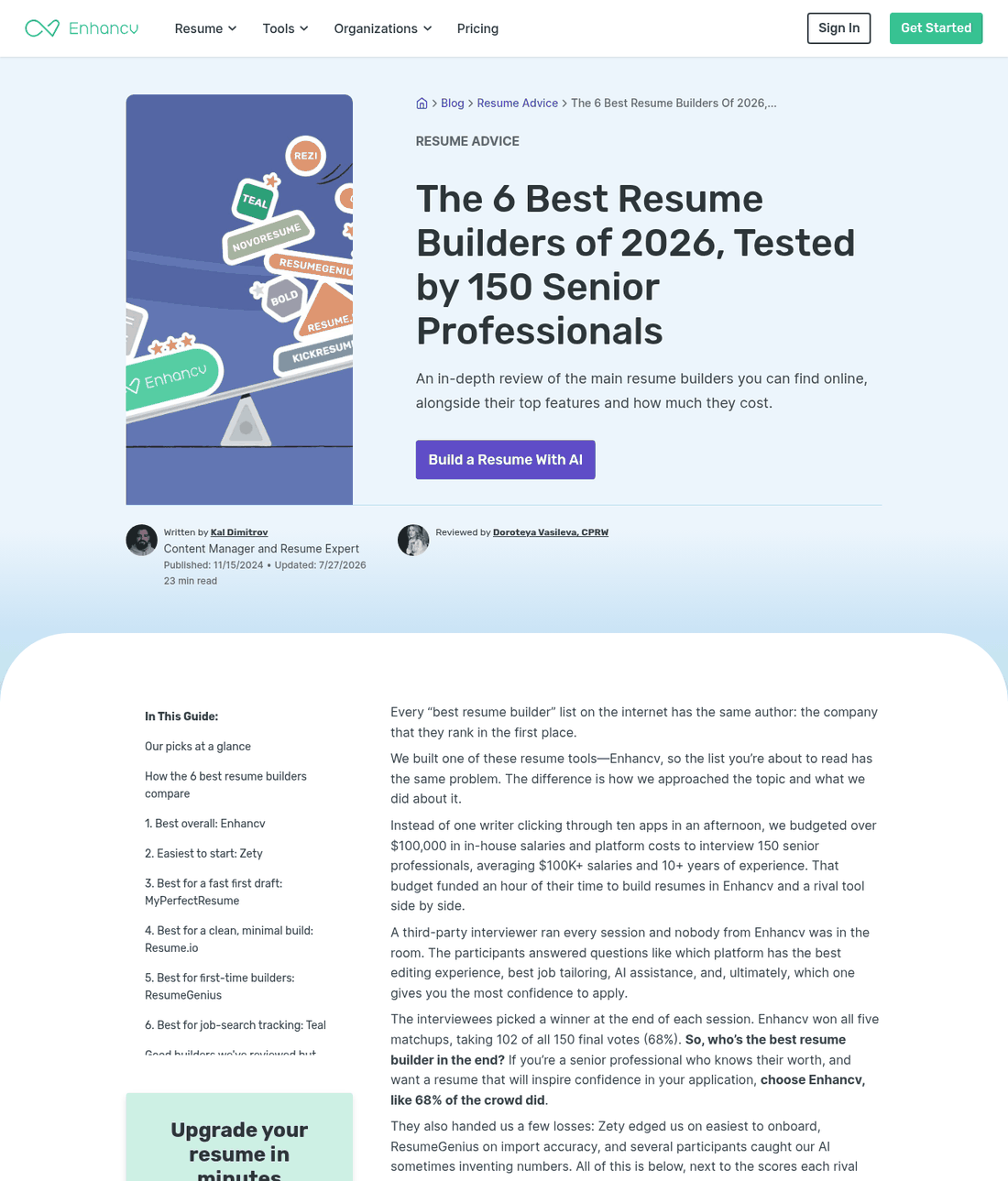
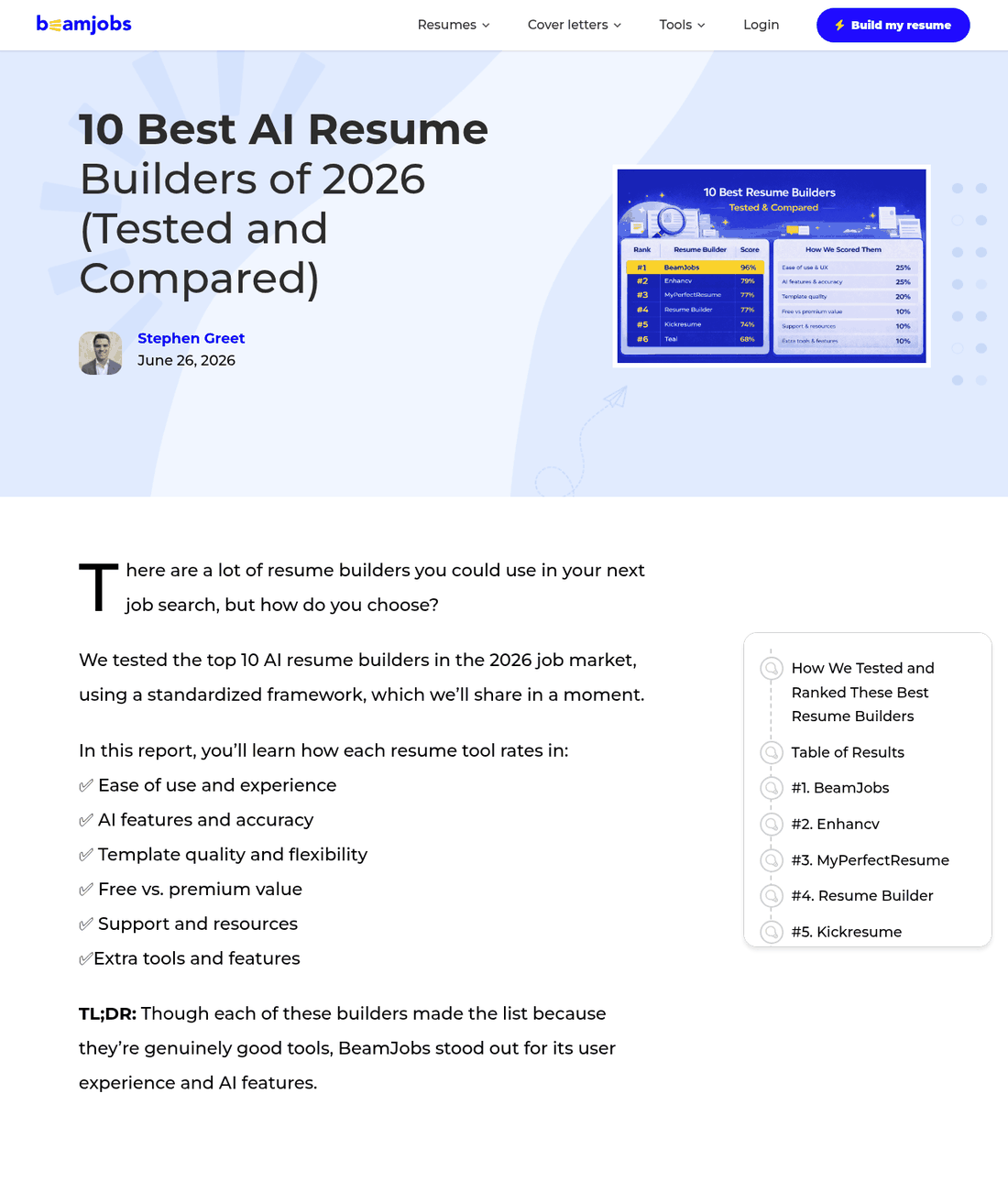
None of this makes those tools bad. Enhancv is good, and it shows up later on this page on merit. The point is simpler than that. A scorecard filled in by one of the contestants isn't really a scorecard. When you read one of those lists, the parts worth trusting are the bits about everybody else.
Where FavTutor stands
FavTutor teaches computer science and helps students with coding. It has never built a resume tool and makes no money from one. Nobody in this guide paid to be here, and none of the links are sponsored. If that ever changes, it will say so at the top of the page.
The $2.95 trial that turns into $337 a year
Five of the biggest resume builders online use the same pricing trick. You pay a tiny amount, usually $1.95 or $2.95, for a 7 or 14 day trial. Miss the cancel date and it turns into a full subscription that bills you every four weeks.
Four weeks is the bit that catches people. Bill monthly and you charge 12 times a year. Bill every four weeks and you charge 13. That extra month never shows up in the price on the page.
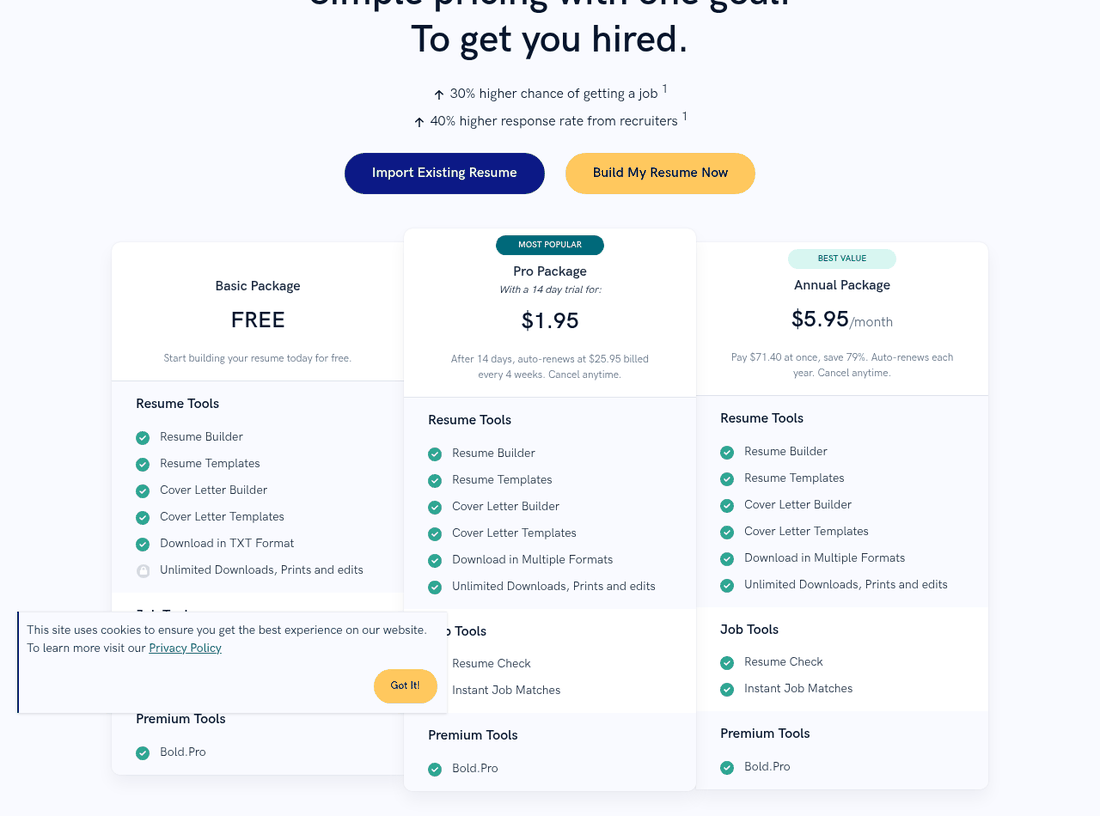
Do the math on that page. At $25.95 every four weeks, a year of Zety Pro costs $337.35, not the $311 you get by multiplying by twelve. Resume.io's $29.95 cycle comes to $389.35 a year. MyPerfectResume, LiveCareer and Resume Genius all charge $23.95 every four weeks, which is $311.35 a year.
| Builder | Trial | Then | Cost over 12 months | Free plan gets you |
|---|---|---|---|---|
| Zety | $1.95 for 14 days | $25.95 every 4 weeks | $337.35 | TXT download only |
| Resume.io | $2.95 for 7 days | $29.95 every 4 weeks | $389.35 | TXT download only |
| MyPerfectResume | $2.95 for 14 days | $23.95 every 4 weeks | $311.35 | TXT download only |
| LiveCareer | $2.95 for 14 days | $23.95 every 4 weeks | $311.35 | TXT download only |
| Resume Genius | $2.95 for 14 days | $23.95 every 4 weeks | $311.35 | TXT download only |
All figures read from each company's own US pricing page on 1 August 2026 and re-checked on 19 August 2026, unchanged. Annual totals assume 13 four-week cycles in 365 days. Each site also sells a cheaper annual plan, and those are a much better deal if you are certain you want the product.
Your free download is a .txt file
All five of them advertise a free plan. On all five, the free plan lets you download your finished resume as plain text and nothing else. No PDF. No Word file. Just a .txt file with every bit of your layout stripped out.
That is why it feels like an ambush. Nothing warns you on the way in that "free" means a text dump. You find out once the work is done, right when you least want to start over.
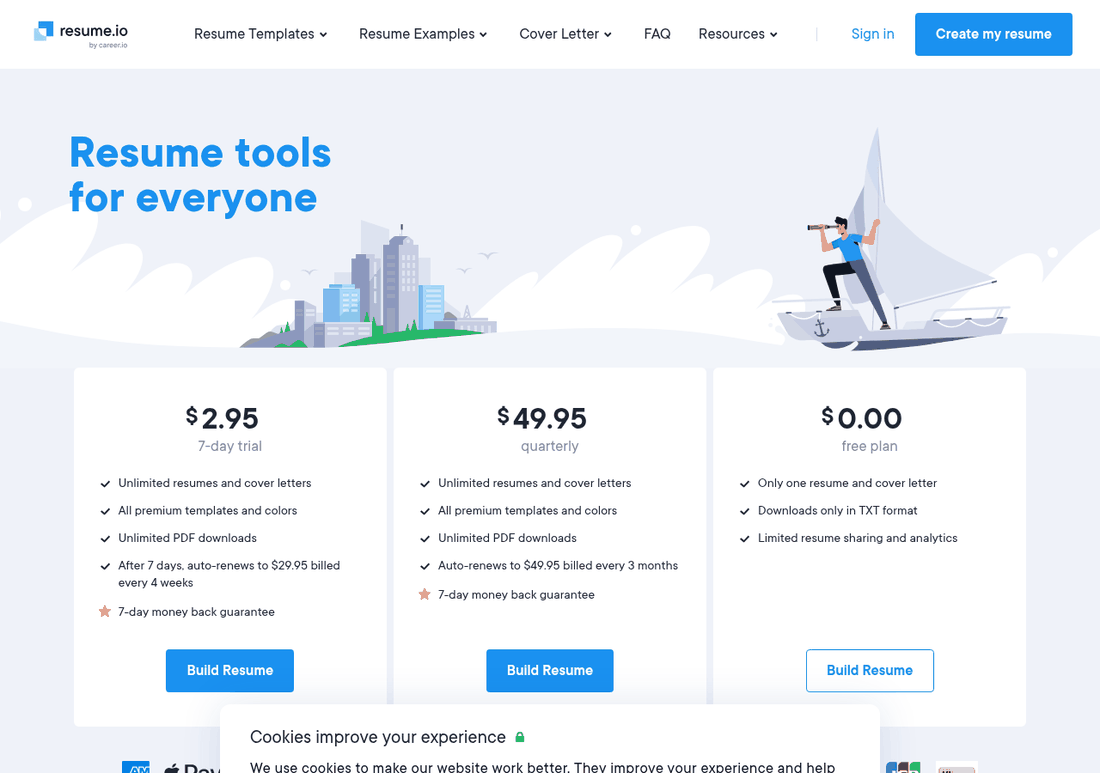
It is easily the loudest complaint about resume builders online. One r/ResumesATS thread asking for builders with no hidden paywalls summed it up: the "free" builders that hit you with a paywall right as you go to download your PDF are the worst.
Worth knowing
Billing is not the same in every country. Opened from an Indian connection on 1 August 2026, Resume.io showed something else entirely: ₹249 for a week and ₹1,999 for a month, both described on the page as a one-time payment with nothing to cancel. Zety's Indian page kept the recurring model, at ₹195 rising to ₹445 every four weeks. Trust the page in front of you, not the price a review quotes.
Who actually owns these sites
Look at the three pricing pages below. Same layout. Same three columns. Same $2.95 trial, same $23.95 renewal every four weeks, same text-only free plan, same "save 77 percent" pitch on the annual plan.
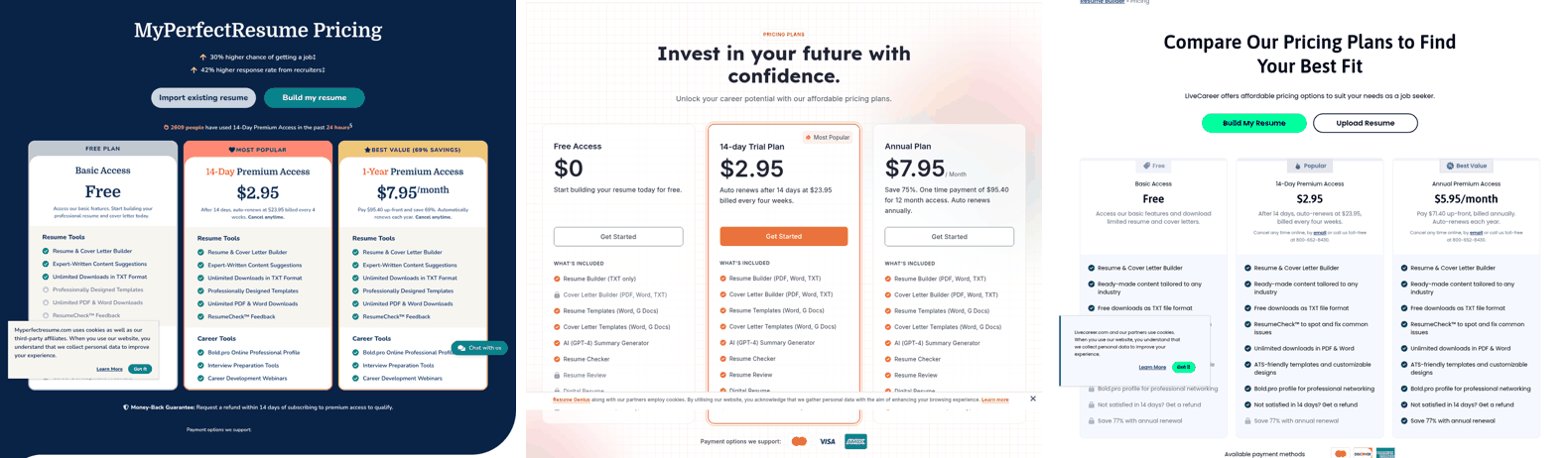
Two of those three are the same company. BOLD LLC, based in Guaynabo, Puerto Rico, owns MyPerfectResume, LiveCareer, Zety and the Bold.pro networking site. Its own about page talks about a family of resume builders and job sites, and the customer quotes it prints come from Zety and MyPerfectResume users. BOLD says its products have made over 120 million resumes since 2020 and pull more than 325 million visits a year.
Resume Genius has a different owner. Its footer credits Sonaga Tech Limited in Switzerland, which runs the same footer text word for word on ResumeCompanion. A separate company landed on the same trial price, the same renewal price and the same text-only free plan on its own. That tells you how well the model works.
Resume.io sits in a third group. Its own help center calls Resume.io, TopCV and TopResume sister brands under Career.io, and the logo on the site reads "resume.io by career.io".
So when a comparison article hands you Zety, MyPerfectResume and LiveCareer as three choices, it is really handing you one company three times.
Why those 4.5 star ratings look better than they are
Most of these brands sit above 4.3 on Trustpilot, which looks reassuring until you check how those reviews got there. Zety, MyPerfectResume, LiveCareer, Resume Now, Resume Genius, Resume.io, Kickresume, Novoresume, BeamJobs and Canva all pay for a Trustpilot subscription. Trustpilot marks a lot of their recent reviews as "Invited", which means the company asked for the review, at a moment of its choosing.
Nobody gets an invitation email on the day they spot a charge they didn't expect. Those reviews turn up on their own, which may explain why the one-star pile reads so differently from the average. LiveCareer shows it best: 23,063 reviews, a 4.3 overall, and the biggest share of one-star ratings in this group.
| Builder | Trustpilot score | Reviews | Paid Trustpilot plan | Replies to negative reviews |
|---|---|---|---|---|
| FlowCV | 4.9 | 1,719 | No | 80% |
| BeamJobs | 4.8 | 1,430 | Yes | Not shown |
| Enhancv | 4.7 | 967 | No | 58% |
| Kickresume | 4.6 | 3,821 | Yes | 94% |
| Rezi | 4.7 | 261 | No | Not shown |
| MyPerfectResume | 4.6 | 19,045 | Yes | 99% |
| Resume Genius | 4.6 | 45,511 | Yes | 100% |
| Resume Now | 4.5 | 18,474 | Yes | Not shown |
| Novoresume | 4.3 | 1,591 | Yes | 100% |
| Zety | 4.3 | 12,648 | Yes | 100% |
| LiveCareer | 4.3 | 23,063 | Yes | 99% |
| Jobscan | 4.4 | 338 | No | 50% |
| Resume.io | 4.2 | 55,992 | Yes | 99% |
| Teal | 4.1 | 114 | No | 100% |
| Canva | 4.0 | 6,618 | Yes | Not shown |
Every score above was read directly from the company's Trustpilot profile on 19 August 2026. Teal and Rezi have small review counts, so treat those two numbers loosely.
How much do resume builders cost in 2026?
Anywhere from nothing to $389 a year for the same basic job. The gap has almost nothing to do with quality. It is about how each company decided to bill you.
So here is the number that matters. Not the headline price or the crossed-out one, but the cheapest way to actually walk away with a finished resume file from each tool.
| Tool | Cheapest way to get a real download | Cost | Recurring |
|---|---|---|---|
| FlowCV | Free plan, unlimited watermark-free PDFs | $0 | No |
| Indeed | Free builder, free PDF download | $0 | No |
| Reactive Resume | Open source, free forever | $0 | No |
| Google Docs | Free template, export PDF or DOCX | $0 | No |
| Rezi | Free plan, 3 PDF downloads | $0 | No |
| Teal | Free plan, unlimited resumes and PDF export | $0 | No |
| Jobscan | Free plan, 5 scans a month plus a basic builder | $0 | No |
| Kickresume | Free with verified student ID, otherwise one month | $0 or $24 | Yes if paid |
| Novoresume | One month, single charge | $21.99 | No |
| Enhancv | One quarter (free plan stamps its branding on exports) | $69 | Yes |
| Rezi Lifetime | One payment, no renewal ever | $149 | No |
| Zety | 14-day trial, cancelled before it renews | $1.95 | Yes, $25.95 per 4 weeks |
| Resume.io | 7-day trial, cancelled before it renews | $2.95 | Yes, $29.95 per 4 weeks |
| MyPerfectResume | 14-day trial, cancelled before it renews | $2.95 | Yes, $23.95 per 4 weeks |
| LiveCareer | 14-day trial, cancelled before it renews | $2.95 | Yes, $23.95 per 4 weeks |
| Resume Genius | 14-day trial, cancelled before it renews | $2.95 | Yes, $23.95 per 4 weeks |
| Canva | Free templates, though the best ones need Pro | $0 or $180/yr | Yes if Pro |
All figures read from each company's own US pricing page on 19 August 2026. The trial prices in the bottom half only stay that low if you cancel inside the window.
Seven of these cost nothing at all. Three more cost under $30, once. The only way to spend $300 in a year is to start a trial and forget about it, which is exactly what four-week billing is built to let happen.
All 12 builders side by side
| Tool | Best for | Free plan | Cheapest paid | Auto-renews | Trustpilot |
|---|---|---|---|---|---|
| FlowCV | Everyone, as a default | 1 resume, unlimited PDF, no watermark | $3/mo billed yearly | Yes, if you upgrade | 4.9 |
| Rezi | Software and data roles | 1 resume, 3 PDF downloads | $29/mo or $149 once | Yes on Pro, no on Lifetime | 4.6 |
| Teal | Tailoring to each job post | Unlimited resumes, top 5 keywords | $13 per week | Yes | 4.1 |
| Indeed | Free, if you already use Indeed | Everything. Free PDF, one template | Free | No | 1.9* |
| Jobscan | Checking, not building | 5 scans a month, forever | $29.98/mo billed quarterly | Yes, after a 7-day trial | 4.3 |
| Novoresume | People who hate subscriptions | 1 page, 1 version, no cover letter | $21.99 for one month | No | 4.4 |
| Kickresume | Best paid value, students | Limited templates | $8/mo billed yearly | Yes | 4.6 |
| Enhancv | Design and content coaching | 7 days, branding on export | $23/mo billed quarterly | Yes | 4.6 |
| Resume.io | Speed, if you cancel | TXT download only | $2.95 trial then $29.95/4 wks | Yes | 4.2 |
| Zety | Guided writing help | TXT download only | $1.95 trial then $25.95/4 wks | Yes | 4.3 |
| Canva | Design roles only | Many free templates | $180/year Canva Pro | Yes | 4.0 |
| ChatGPT, Claude, Gemini | Rewriting your own bullets | Free tiers on all three | Free, or $20/mo plans | Yes if paid | n/a |
Prices read from each official US pricing page on 19 August 2026. Trustpilot scores read the same day. *Indeed's 1.9 rating covers the whole of Indeed.com, not the resume builder specifically, and the complaints behind it are about job listings and support rather than the builder. Kickresume's August promotion has ended, so its prices are back at list.
The ones that are actually free
Start here. If you're writing a first or second resume, one of these five will do the job, and four of them will still do it a year from now without asking for a card.
1. FlowCV
Trustpilot 4.9 / 5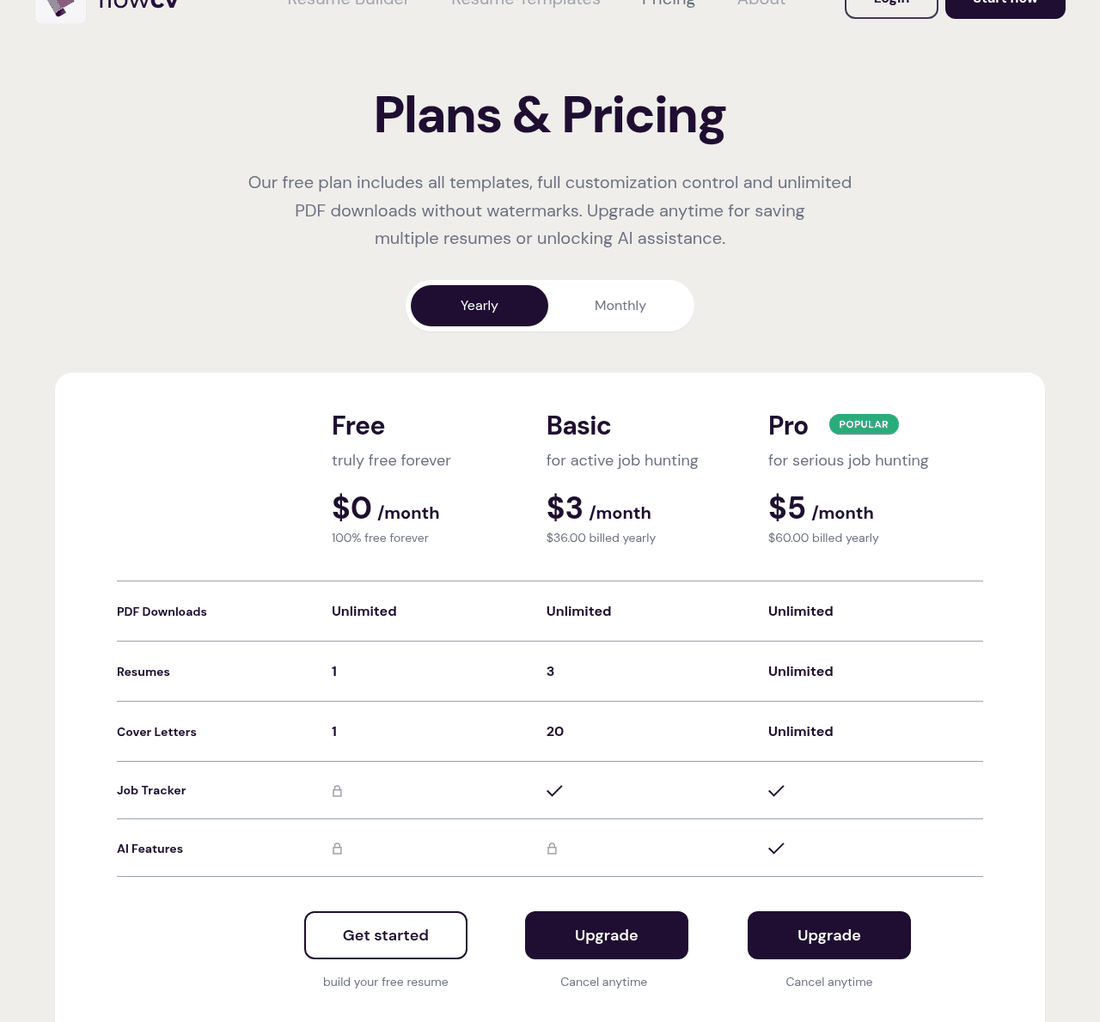
FlowCV is the answer to the paywall problem. The free plan gives you one resume, every template, full control of the layout, and as many PDF downloads as you want with no watermark. No trial clock, no card, no surprise upgrade. The pricing page says all of that in plain words, and the free plan does exactly what it promises.
What comes out is a clean, sensibly built PDF that reads well and parses well. If you're a student, a new graduate, or anyone applying with one solid resume, that's the whole job done for free.
Strengths
- Still free at the moment you press download, which almost nothing else here manages
- Highest Trustpilot score in this comparison at 4.9 across 1,719 reviews
- Layout controls are unusually good for a free tool, right down to spacing and section order
- Also builds a personal site and an email signature from the same data
Limitations
- PDF only. There's no Word export, which matters if a recruiter asks for a .docx
- Job description tailoring is still marked coming soon
- One resume on the free plan, so several tailored versions means paying $36 a year
- No ATS score, though the ATS section below explains why you're not missing much
2. Rezi
Trustpilot 4.7 / 5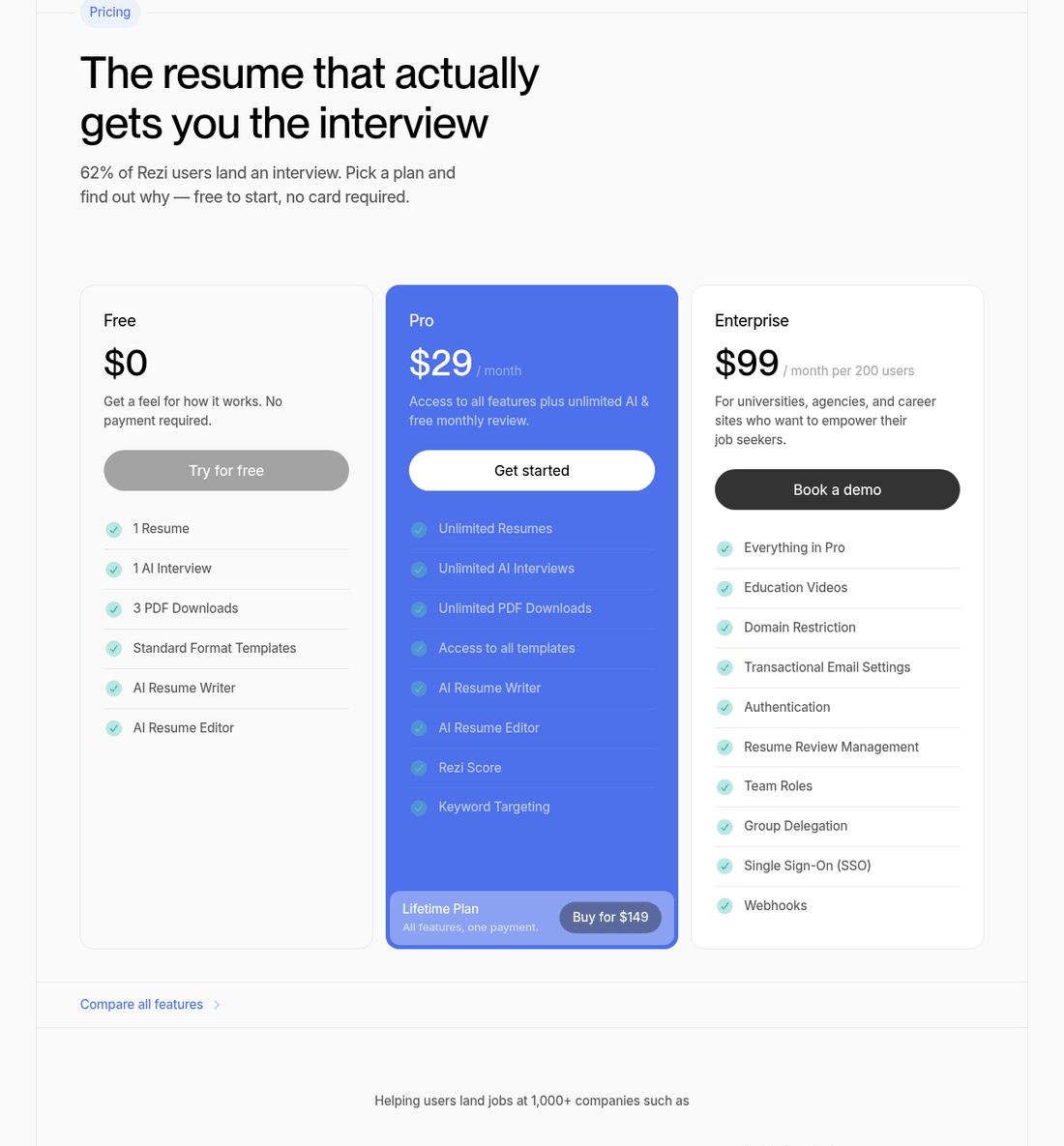
Rezi is built around the thing tech applicants really need: matching your bullet points to the wording of a specific job post. Paste in a job description and its keyword tool pulls out the terms that matter, then shows you which ones your resume is missing. The templates are deliberately plain, single column, and free of the icons and rating bars that cause trouble.
The free plan is honest about its limits: one resume, one AI interview and three PDF downloads, with no card needed to get to them. That's enough to finish a resume and walk away with it.
Strengths
- The $149 Lifetime plan means there's no renewal to forget
- Templates default to single column with no graphics, which is what an engineering resume wants
- Exports to Word as well as PDF
- The free Chrome extension pulls job postings in so you don't have to copy and paste
Limitations
- $29 a month is the priciest monthly rate of anything recommended here
- Only 261 Trustpilot reviews, so that 4.7 rests on a thin sample
- The Rezi Score is Rezi's own number and has nothing to do with any real ATS
- Its claim that 62 percent of users land an interview is self-reported and can't be checked
3. Teal
Trustpilot 4.1 / 5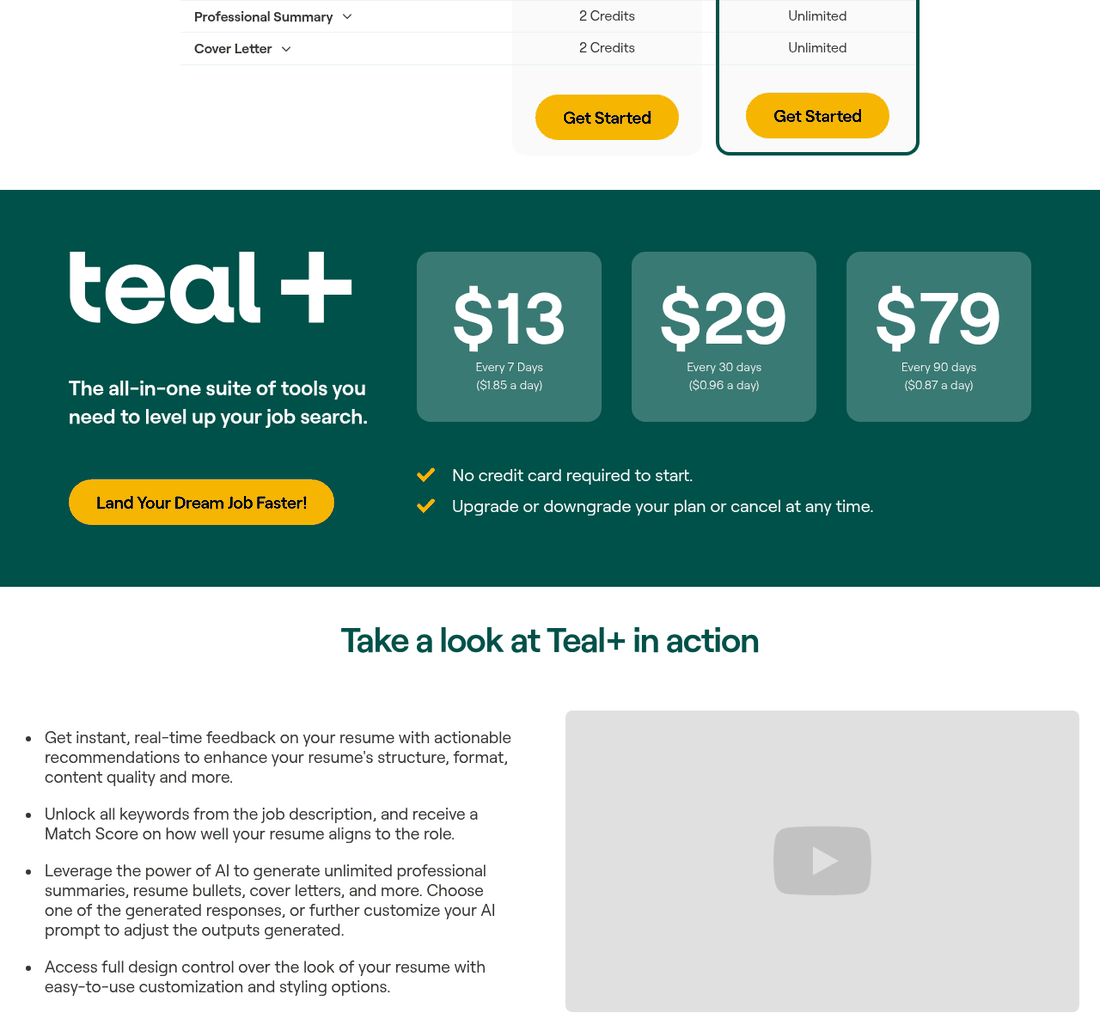
Teal is really a job tracker with a resume builder bolted on, and the tracker is the good part. You bookmark roles with a browser extension, Teal grabs the description, and it shows you where that posting and your resume overlap. Then you copy the resume and tweak it for that role.
The free tier is unusually generous. Unlimited resumes, unlimited job tracking and ten templates all cost nothing. What's capped is the smart stuff: free users see only the top five keyword matches and get a small pot of AI credits.
Strengths
- The free tier stays useful for months, not days
- The weekly plan matches how people really job hunt, in short bursts
- Tracking and tailoring in one place saves you a spreadsheet
- No card to start, and no trial that quietly turns into a subscription
Limitations
- $13 a week works out to $676 a year if you forget it's running
- PDF only, which Teal confirms in its own help docs
- The lowest Trustpilot score of anything recommended here, on just 114 reviews
- The AI writing is fine but generic, and needs your own numbers dropped in
4. Indeed Resume Builder
Free, one template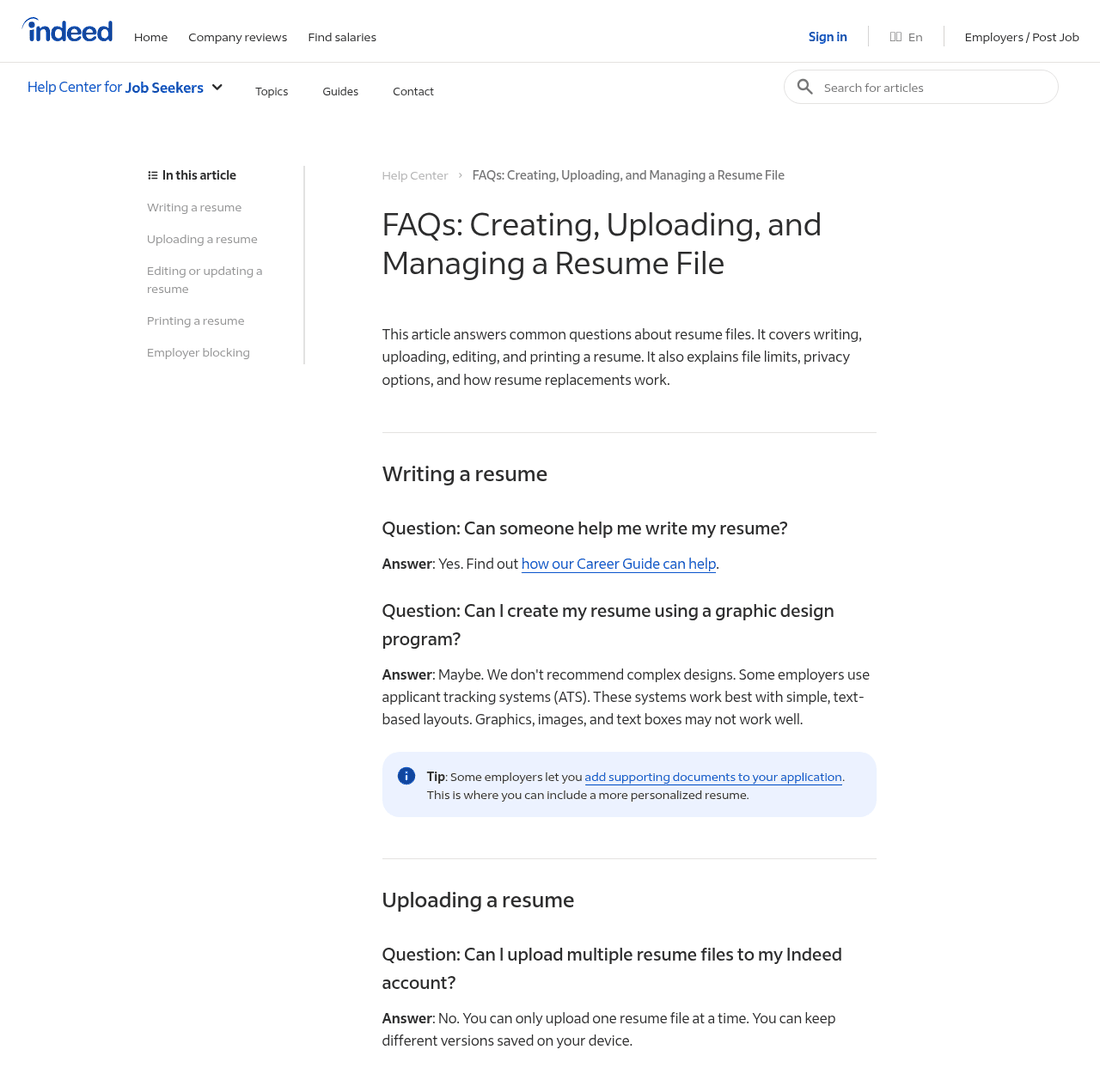
Indeed's builder is free, has always been free, and has no paid tier hiding behind it. That alone puts it ahead of half this list. You fill in your details, Indeed formats them, and you download a PDF for nothing. If you already apply through Indeed, this is the easiest route there is.
The catch is that you get one layout and cannot change it. Indeed's help page says so directly: your profile resume has one layout, you can edit the words, and when you download it again the layout is the same. No second template, no font choice, no margin settings.
One thing trips people up. Indeed keeps two separate things. Your profile resume lives inside your account and is what recruiters search, if you set your profile to visible. An uploaded file is a separate document you attach to applications. You can only keep one uploaded file at a time, and a new upload wipes the old one for good. Indeed's own FAQ says it cannot send the deleted copy back.
Strengths
- Free with no card, no trial and no upgrade prompt at the download button
- The single layout it gives you is plain single column text, which is what parses best
- Uploads accept .doc, .docx, .pdf, .txt and .rtf and get converted to PDF automatically
- Since 8 April 2026 Indeed has removed citizenship, ethnicity, disability, date of birth and gender fields from the Indeed Resume, and deleted the values it already held
Limitations
- One template, and no way to change fonts, spacing or margins
- PDF export only. There is no Word download
- Only one uploaded file at a time, and a new upload wipes the previous one with no recovery
- No job description tailoring in the classic builder, so the same resume goes everywhere
- That April 2026 privacy cleanup covers the Indeed Resume only. If your own uploaded PDF still contains those details, employers can still read them
5. Jobscan
Trustpilot 4.4 / 5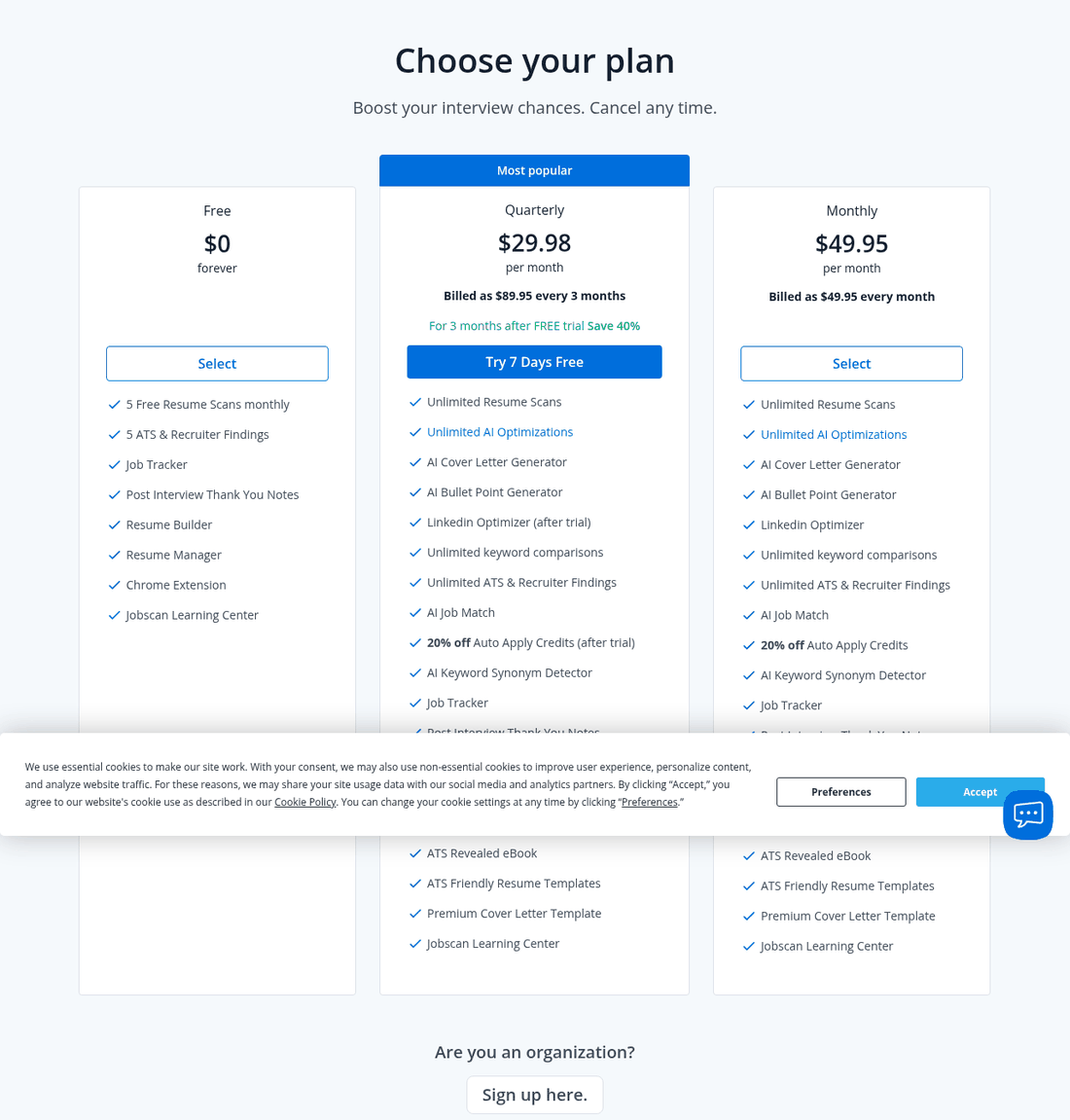
Jobscan lines your resume up against a job description and tells you what's missing. That's a useful second opinion, and the free plan gives you five of those checks every month, forever, plus a basic builder, a job tracker and a Chrome extension.
The paid plans are expensive and the refund rules are strict, so the smart move is to stay on free and spend your five scans on the five roles you care about most.
Strengths
- Five free scans a month is plenty for a focused search
- The report tells you what to change instead of handing you a vague score out of 100
- Jobscan writes openly about what applicant tracking systems do and don't do
Limitations
- Refunds need a dispute within 2 calendar days, with the service unused, and still lose 3.5 percent in fees
- The 7 day trial turns into an $89.95 quarterly charge if you forget
- Answers only half of its negative Trustpilot reviews, the lowest rate in this table
- The match rate is Jobscan's own number, not something any employer ever sees
The ones worth paying for
These three want money and give you something back for it. Two of them will never charge you again unless you ask.
6. Novoresume
Trustpilot 4.3 / 5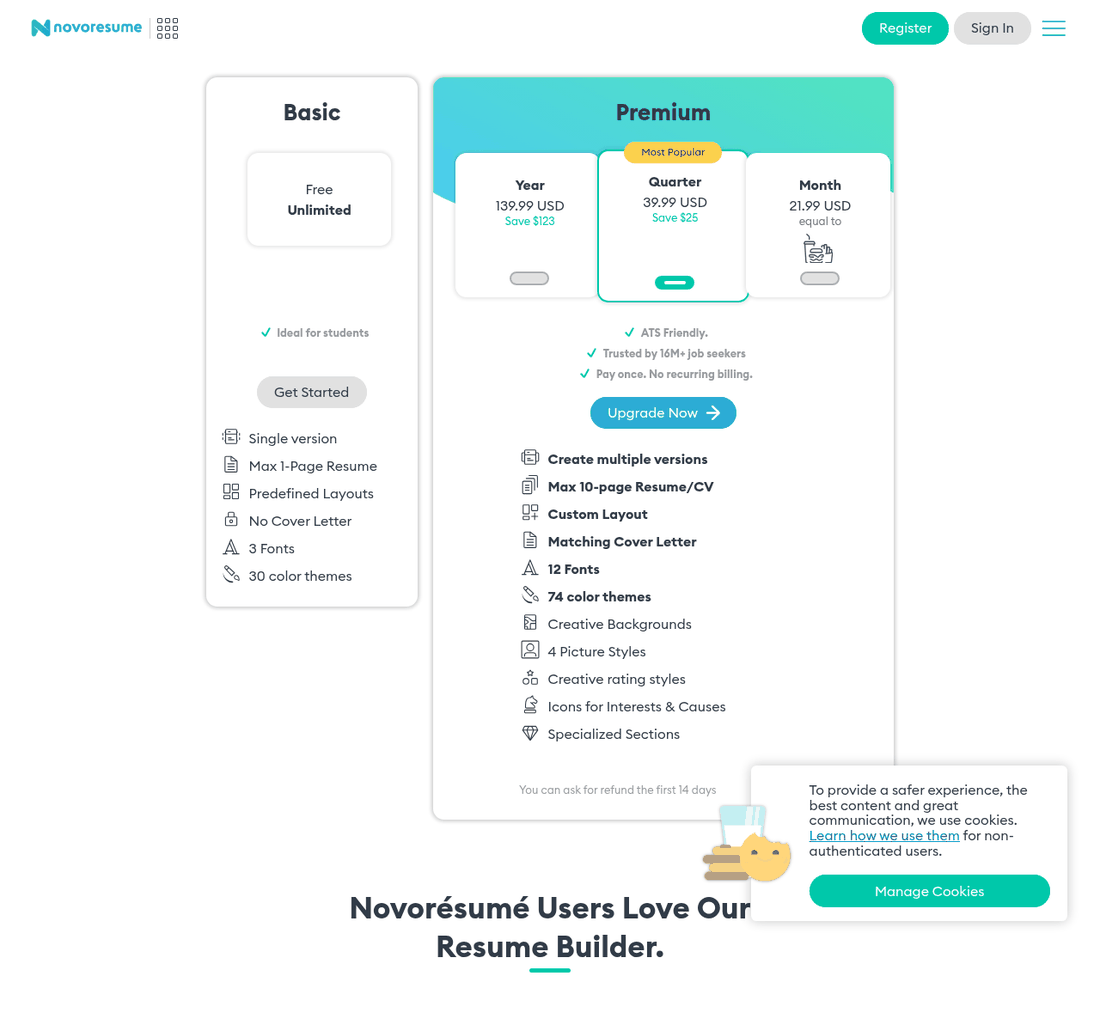
Novoresume is the opposite of everything in the billing section above. Its pricing page says "Pay once. No recurring billing", and the checkout says it again: there is no automatic subscription. You buy a month, a quarter or a year, it runs out, and your card is left alone.
The free plan is real, but tight. One version of a strictly one-page resume, a fixed layout, three fonts and thirty color themes. No cover letter. For a student with one page of history that's usually plenty, and students are exactly who it's aimed at.
Strengths
- Nothing renews, so nothing surprises you three months later
- The one-page cap on the free plan quietly forces good habits early on
- Replies to every negative Trustpilot review
- Layouts are calmer than most design-led builders
Limitations
- $21.99 for one month is dear next to Kickresume at $19.20 or FlowCV at $36 for a year
- PDF export only
- The free plan locks the cover letter builder completely
- Some Premium layouts use sidebars and icons, which is what engineers should avoid
7. Kickresume
Trustpilot 4.6 / 5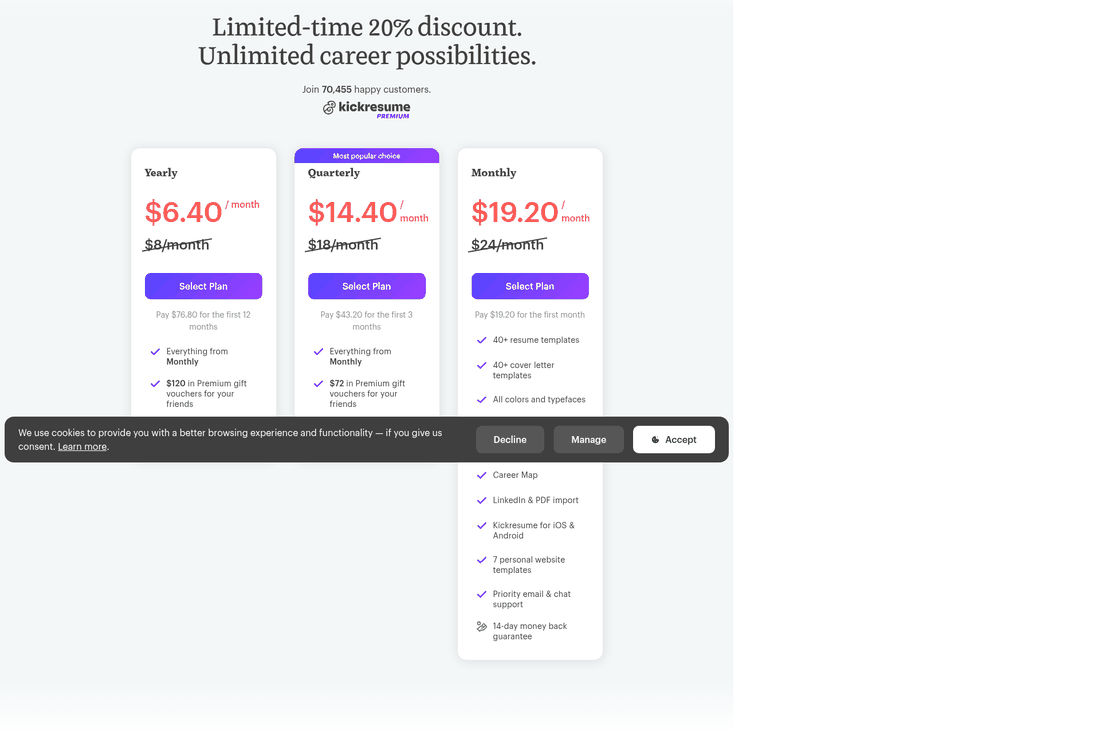
Kickresume packs more into a paid plan than anything else near this price: 40-plus templates, an AI writer, an ATS checker, LinkedIn and PDF import, a personal website builder, and both PDF and Word export. At $8 a month on the yearly plan it costs a quarter of what the four-week brands charge, and the whole year comes to $96 in one payment.
Students shouldn't pay at all. Kickresume hands Premium over free to students verified through ISIC, ITIC or UNiDAYS. If you're still enrolled, that makes it the best deal on this page by a distance.
Strengths
- Free for verified students, easily the best deal in this guide
- Exports Word as well as PDF
- 4.6 across 3,821 reviews is a much healthier sample than the smaller tools here
- Answers 94 percent of its negative reviews
Limitations
- The "limited time" 20 percent discount that ran through early August has now ended, and prices went up to list. Treat the next countdown timer accordingly
- The discount applies to your first term only, so the renewal charges list price
- The 14 day refund guarantee only covers first-time subscribers, per the terms
- Indian and US prices differ a lot, so the number you see may not match any review
8. Enhancv
Trustpilot 4.7 / 5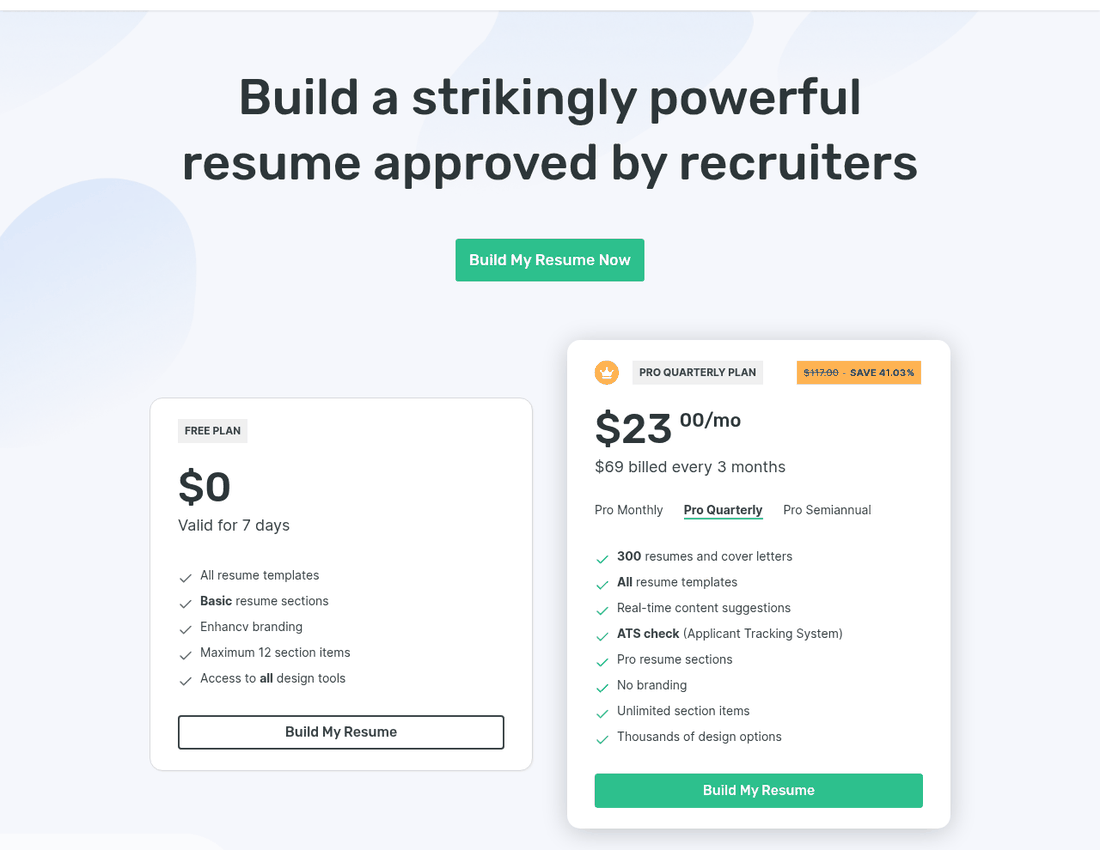
Enhancv is the best-looking builder here, and the one that pushes hardest on what you write rather than how it looks. It catches weak bullet points as you type and nudges you toward specifics, which is the part most people get wrong. It runs an ATS check on the finished file too.
Two things to know first. The free plan expires after seven days rather than running out of features, and anything you export on it carries Enhancv branding. To its credit, you don't need a card to get that far.
Strengths
- The best writing feedback of anything here
- No card needed to try it
- Its own comparison article calls out rivals' billing traps accurately, which is more than most manage
Limitations
- $69 a quarter is steep next to Kickresume's $43.20
- Branding on free exports makes the free plan a demo, not something you can send
- Answers only 58 percent of its negative Trustpilot reviews
- PDF only, with no Word file
- Several of its signature templates use sidebars, rating bars and icons, all wrong for a technical resume
The big names, and what to watch out for
These three are the ones an ad or a search result is most likely to drop you on. None of them is a scam. All three come with a warning.
9. Resume.io
Trustpilot 4.2 / 5Resume.io is the biggest name here by review count, with 55,992 Trustpilot reviews, and the builder itself is quick and clean. The catch is the one from the top of this page. That $2.95 is a 7 day trial that renews at $29.95 every four weeks, and the free plan only downloads as plain text.
The one-star reviews are about the billing, not the product. One posted the day before this guide went up opens with a complaint about the subscription model, which is the theme running through nearly all of them.
10. Zety
Trustpilot 4.3 / 5Zety writes some of the best free career advice online, and that's why it sits at the top of so many searches. The builder underneath is decent, with good prompts if you freeze at a blank page.
The claim printed above its own price list is worth a second look. Zety's pricing page promises a 30 percent higher chance of getting a job and a 40 percent higher response rate from recruiters. The footnote at the bottom of that same page explains where those come from: 1,000 survey respondents, only 287 of whom used a resume tool at all. That's what people said, not something anyone measured, and 287 people is a thin base for numbers that big.
11. Canva
Trustpilot 4.0 / 5Canva has thousands of free resume templates and they look better than anything else here. That's the problem. The best-looking ones are two-column designs with sidebars, colored blocks, skill bars and icons, and those are exactly the things that trip up older resume parsers.
There is a real use for it. If you're applying for a design, marketing or brand job where the resume doubles as a portfolio piece, a Canva resume says the right things. For a backend engineering role at a company running Taleo or iCIMS, it's a risk that buys you nothing.
The free tier does let you export a PDF for nothing, but a lot of the nicest templates are locked behind Canva Pro, which is $180 a year for one person in the US and ₹4,000 a year in India.
Can ChatGPT build a resume?
Short answer: it can write one, and it should not write all of one.
It is the question people ask most about resumes right now, so here is what these tools really do, what goes wrong, and where the line is.
12. ChatGPT, Claude and Gemini
Free tiers available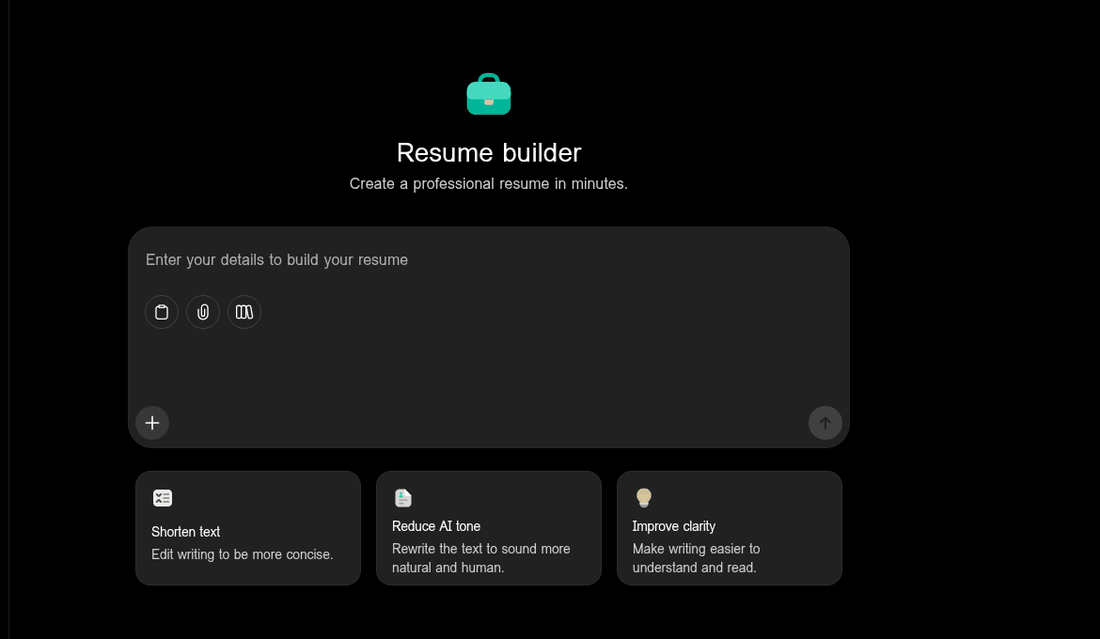
None of the three is really a resume tool. ChatGPT's resume page is just a chat box with three suggested prompts under it. One of those prompts is Reduce AI tone, which rewrites the text to sound more human. OpenAI knows what its own output sounds like.
Getting a proper file out takes an extra step. In ChatGPT you use Canvas, which has been able to save as PDF or Word since June 2025. Claude puts longer answers in a panel called Artifacts that you can download. Gemini is the easiest of the three because it works inside Google Docs, but Google says the full version needs a paid Workspace or Google AI plan, so it is not free for everyone.
What happens when you let it write the whole thing
One job seeker ran the test properly and posted the numbers. They took a resume that was already getting responses, asked ChatGPT to rewrite it from scratch, then sent 10 applications with each version. The human version got 6 responses, 3 phone screens and 1 interview. The ChatGPT version got 1 response and nothing else.
They then showed both to a recruiter friend without saying which was which. She picked the AI one straight away. Her reason is the useful bit: AI resumes all use the same phrases, things like spearheaded initiatives and leveraged cross-functional collaboration, and the achievements are always vague.
That is one person and 20 applications, so treat it as a story, not proof. It does match the bigger surveys. Resume Now asked 925 HR workers in March 2025 and 62 percent said they would reject an AI-written resume that felt generic. Insight Global's 2025 survey found 53 percent of hiring managers say they can spot AI writing right away.
Nobody is scanning for AI, and that is not the point
No major applicant tracking system checks who wrote your resume. Workday, SAP SuccessFactors, iCIMS, Taleo and Lever all sort candidates by skills and experience. They were never built to spot writing styles. AI detectors do not work either. OpenAI shut down its own one in July 2023 because it was right only 26 percent of the time, and Stanford researchers found detectors wrongly flagged 61 percent of English essays written by people who learned English as a second language.
Some employers say so openly. Greenhouse's position is that using AI to help write your resume or cover letter is fine. Oracle even invites candidates to draft a cover letter with AI on its own hiring platform. So the risk is not getting caught. The risk is sounding like the other 300 people who applied.
Use it for this
- Rewriting a bullet you already wrote so it leads with the result
- Pulling the keywords out of a job description and telling you which ones you are missing
- Cutting a three-line bullet down to one line without losing the number
- Checking whether a stranger could tell what you actually did from the line
Never use it for this
- Making up numbers. "Increased team productivity by 312 percent" falls apart in the first interview
- Claiming skill levels you do not have, which surfaces in a technical screen
- Writing the whole thing and sending it untouched, which is what every survey above is really measuring
- Building your final layout. Pasted chat text carries hidden formatting that breaks lists and spacing in Word
A workflow that holds up
If you want the help without sounding like everyone else, do it in this order.
- Write every line yourself first, with the real numbers in it. Rough is fine.
- Paste in one job description and ask which words from it your resume is missing.
- Add back only the words you could defend in an interview.
- Ask it to cut each line down to one line, leaving your numbers exactly as they are.
- Read it out loud. Anything you would never say out loud gets deleted.
- Build the final file in a real builder or template. Do not paste chat text into Word, it breaks the formatting.
Is it worth paying for a resume builder?
For most people applying to tech roles, no. Here is the simple test.
Pay if you are applying to 20 or more jobs and need a different version for each one. Doing that by hand eats evenings. Teal, Rezi and Jobscan turn it into minutes, and that is worth money during a real search.
Do not pay if all you want is a nicer template. A free FlowCV file and a $25 Zety file get read by the same person for the same seven seconds. No layout has ever saved a line that says "responsible for various tasks".
One exception. If you are a student, Kickresume Premium is free with a student ID, so there is nothing to decide. Check that before you pay anyone.
Which resume builders have the best AI features
Every builder on this page advertises AI now. Most of it is the same feature under different names: it rewrites your bullet point to sound more formal. That is worth something. It is not worth $25 a month.
The AI that genuinely helps is the kind that compares your resume to a specific job posting and tells you what is missing. Here is who does what.
| Tool | Writes bullets | Matches a job description | Gives a score | Free AI allowance |
|---|---|---|---|---|
| Rezi | Yes | Yes, keyword targeting | Rezi Score | AI writer and editor on the free plan |
| Teal | Yes | Yes, keyword matching | Match score | Top 5 keywords, 10 bullet credits |
| Jobscan | Yes, on paid | Yes, its core product | Match rate | 5 full scans every month |
| Kickresume | Yes | Yes, resume tailoring | ATS checker | Limited on free |
| Enhancv | Yes, best writing feedback | Yes | ATS check | 7 days, branded exports |
| Zety | Yes | No | Resume Check | Builder only, TXT download |
| FlowCV | On paid tiers | Listed as coming soon | No | None on free |
| Indeed | Career Scout, mobile app only | In Career Scout | No | Free while it lasts |
| ChatGPT, Claude, Gemini | Yes, the best writing | Yes, if you paste the posting | No | Free tiers on all three |
If AI is why you are here, use three free things instead of one paid one. Jobscan's five free scans tell you what is missing. Rezi or Teal help you fix it. A chatbot writes the actual sentences. Paying for a builder's AI writer on its own is the weakest option of the three.
The best resume builder for getting past an ATS
Every tool here says its templates are ATS-friendly. No builder has any actual link to those systems, so the phrase only means one thing in practice: does the template avoid the things that confuse a parser.
On that test, the winners are the plainest.
- Rezi defaults to single column with no icons or rating bars, and its keyword targeting is aimed at exactly the filtering problem that actually loses you interviews.
- Indeed gives you one plain text-first layout and nothing to get wrong. Its own help page tells you graphics, images and text boxes may not work well.
- FlowCV exports clean, well-structured PDFs even on the free plan.
- Jobscan is not a builder but it is the best check, and its free tier covers five roles a month.
- The r/EngineeringResumes LaTeX or Google Docs template is the most conservative option on this page and costs nothing.
The ones to avoid here are the pretty ones: Canva's two-column layouts and the showcase templates from Enhancv and Novoresume with sidebars and skill bars. They look great. They are the wrong shape for this job.
What Reddit actually recommends
Reddit sits at number two on Google for "best resume builder", above nearly every article written about it. That tells you where people go once they stop trusting these lists. Three things come up again and again.
The paywall is the complaint. One thread asking for builders with no hidden paywalls got the same answer over and over: the "free" builders that stop you at the download button are the worst kind. One person described doing all the work, reaching the end, and then being asked to pay.
Free tools get named more than paid ones. Canva, Google Docs, Indeed and plain Word come up constantly in those threads, usually with a note that the job market is hard enough without paying for a PDF.
A lot of the advice is planted. Read any of these threads and you will find accounts pushing tools nobody has heard of, sometimes offering free lifetime access in exchange for feedback. The engineering subreddits handle it differently. r/EngineeringResumes does not recommend a paid builder at all. It hands out its own Google Docs and LaTeX templates instead.
The lesson is not any one recommendation. It is that the people who read the most resumes keep landing on the same answer: free, plain, single column. That is the opposite of what the template galleries are selling you.
You may not need a resume builder at all
The engineers who give the most resume feedback online mostly don't use resume builders. The r/EngineeringResumes wiki, which is as close as that community gets to a rulebook, doesn't recommend a single paid product. It hands you two of its own templates and a list of rules.
Three free ways to do it
The r/EngineeringResumes templates. The wiki links a Google Docs template and its own LaTeX template on Overleaf. Both are free. It also carries a warning worth repeating: don't download the Google Doc as a .docx and edit it in Word, because the formatting falls apart.
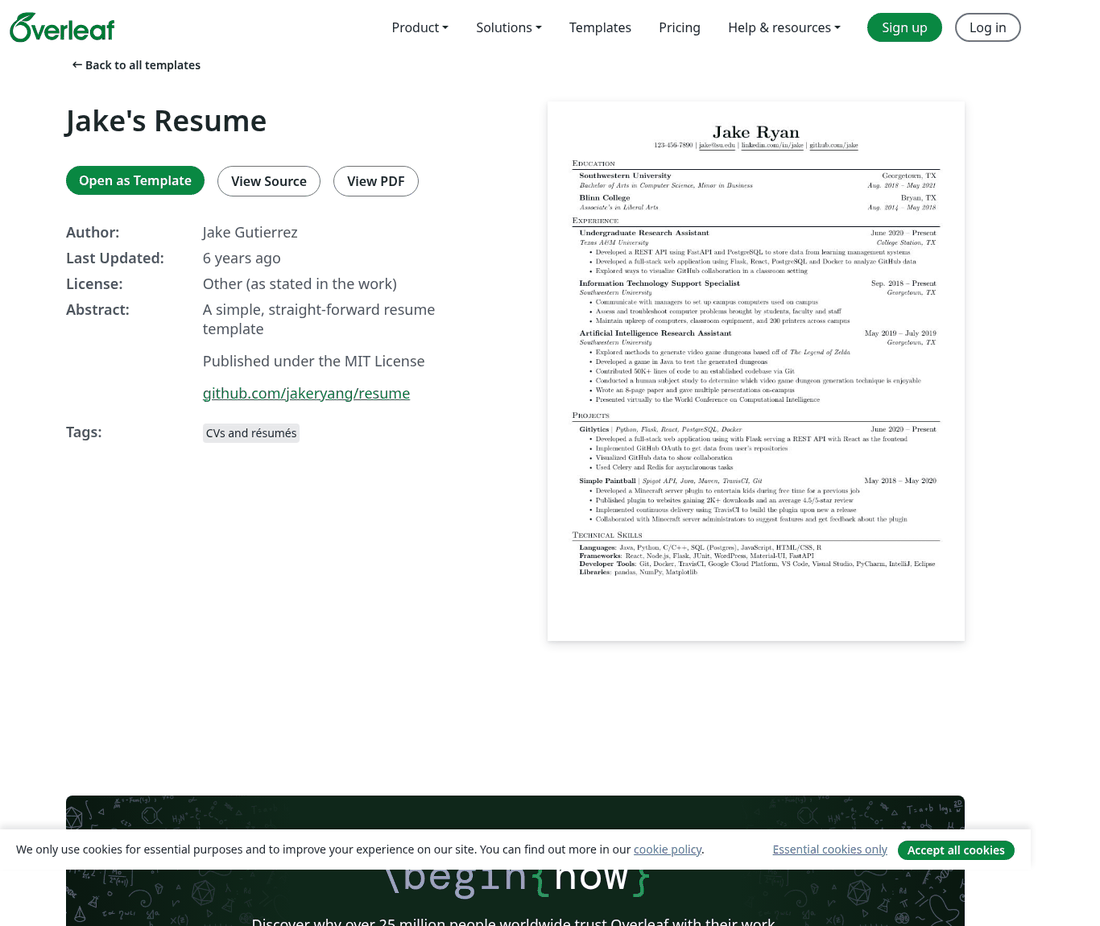
Jake's Resume on Overleaf. Written by Jake Gutierrez and released under an MIT license, this single-column LaTeX template became the unofficial standard for CS applicants. Its GitHub repo has 2,800 stars and 672 forks. Worth knowing: the repo was archived in 2024 and Overleaf lists it as last updated six years ago. It still compiles and it still parses cleanly. The real downside is how popular it is. A recruiter reading CS resumes sees this exact layout all day.
Reactive Resume. Open source, free forever, and you can host it yourself if you'd rather your work history didn't sit on someone else's server. It exports PDF, and there's no paid tier waiting to upsell you.
The rules engineers are told to follow
These rules are worth reading even if you pay for a builder. They're the clearest description anywhere of what an engineering resume should look like.
- Single column. Multiple columns sit under "you should not", including in the skills section.
- No icons, no images, no graphics.
- One page. The rule of thumb is one page per decade of experience, and a second page is for people already in the running for a senior or staff role.
- Readable fonts only: Calibri, Bitstream Charter, Carlito, Arial, Lato or Helvetica.
- Black text, not gray, and a color that still works when printed in grayscale.
- Don't justify the text, because it leaves uneven gaps between words.
- Go very light on italics and bold. The wiki says both are only for sparing use, and calls bolded keywords inside bullet points distracting.
Put that list next to the average template gallery and the problem is obvious. The templates that sell are the ones with sidebars, icons and skill bars. The format this community actually recommends is the plainest one on the page.
What ATS software actually does to your resume
Every builder on this page advertises ATS-friendly templates. It's worth knowing what that phrase is actually saving you from, because the popular version of the story is wrong.
The 75 percent stat was never real
You've probably read that 75 percent of resumes get rejected by software before a human sees them. That number comes from a 2012 sales pitch by a company called Preptel, which sold resume optimization and shut down in 2013. No study, no sample size, no method was ever published. The figure drifts between 70, 75 and 88 percent depending on who's repeating it, which is what happens to a stat with nothing holding it down.
There is a real study people mix it up with. Harvard Business School's Hidden Workers: Untapped Talent, published in 2021 by Joseph Fuller and Manjari Raman with Accenture, surveyed 8,000 workers and 2,250 executives across the US, UK and Germany. It cites separate research showing 99 percent of Fortune 500 companies use an applicant tracking system, and its own survey found 88 percent of employers agreed that good candidates get filtered out for not matching the exact criteria typed into the system.
Read that carefully. Being filtered out of a recruiter's search results is not the same as being rejected by a robot. It means your resume is sitting in the database and nobody is finding it.
The software rarely rejects anyone
Greenhouse, Lever, Workday and Ashby read your resume, file it, and let a recruiter search through it. The automatic rejections that do happen almost always come from a knockout question about work authorization, location or a required license, answered in the form rather than read off your PDF.
Enhancv asked 25 recruiters about this in late 2025. Twenty-three said their system doesn't auto-reject on formatting or content, and all 25 used knockout questions. That's a small sample from a company that sells a resume builder, so hold the exact ratio loosely. It does line up with what recruiters say elsewhere and with how these products are documented.
Farah Sharghi, a recruiter who worked at Google, puts it more bluntly in a video watched over 337,000 times: ATS compliance is a phrase used to sell resume tools. Her point is that being clear to the human reading it beats trying to game the parser.
Just send the PDF
The old advice to always send a Word file is out of date. Greenhouse's own support docs, last updated in October 2025, list .doc, .docx, .pdf, .rtf and .txt as supported and pick no favorite. A clean, text-based PDF reads fine on every modern system.
What still breaks things is a PDF that's really a picture. If you scanned it, or your phone number sits inside an image or a logo, no parser can read it.
What actually breaks a resume
- Two columns and tables. Older systems, usually Taleo and iCIMS, are said to read straight across the page and shuffle the two columns into nonsense. Newer parsers cope better. Textkernel, which builds the parsing engines inside some of these systems, has published engineering work purely on finding where columns start and end.
- Text inside images or graphics. Invisible to every parser, every single time.
- Anything in the page header or footer. Put your name, email and phone number in the body of the document instead.
- Skill bars and icons. A five-dot rating for Python tells a parser nothing and a human barely more.
One warning about the numbers you'll see on columns. Several resume companies have run tests claiming two-column layouts fail anywhere from 2 percent to 88 percent of the time. Those come from small, unrelated tests with no shared method, and they can't all be right. What you can safely say is that single column is the lower-risk option, especially on older systems, and that nobody has published a trustworthy figure for how much lower.
What really changed in 2026
The volume changed. LinkedIn reported roughly 11,000 applications a minute across the platform, up 45 percent in a year. The average corporate job posting now pulls somewhere around 240 to 250 applications.
Employers answered with more automation, and recruiting got it first. SHRM's State of AI in HR 2026 report, based on 1,722 HR professionals surveyed in December 2025, found recruiting is the most common place AI has landed inside HR, named by 27 percent, ahead of HR technology at 21 percent and learning and development at 17 percent. The report also found the real uses are the boring ones, and it lists resume parsing first.
Two smaller things worth knowing. Applicant tracking systems can't tell whether AI wrote your resume, because they're built to match candidates, not spot authors. And the trick of hiding white keyword text is old news to everyone. Greenhouse, which handles around 300 million resumes a year, found hidden white-text prompts in about 1 percent of resumes in the first half of 2025. Paste that resume into any plain-text box and the whole block shows up.
The one number worth remembering
The Ladders eye-tracking study, updated in 2018, timed recruiters at an average of 7.4 seconds on a first look. It's a small study run by a company that sells job search services, the recruiter sample size was never published, and nobody has repeated it at scale. Treat it as a useful instinct rather than a rule: whatever matters most needs to be visible in the first few seconds, near the top, in plain text.
Pick yours in two minutes
Most people overthink this. The builder isn't what gets you the interview. Your bullet points are. Find the line below that sounds like you and go with it.
- You are a student or new graduateKickresume, free with a student ID. If that verification fails, FlowCV.
- You want to spend nothing, everFlowCV, or the r/EngineeringResumes Google Docs template.
- You apply mostly through IndeedIndeed's own builder. Free, plain, and already attached to your applications.
- You are applying to software or data rolesRezi, or the LaTeX route. Single column, no icons, one page.
- You are applying to 30 roles and losing trackTeal free tier for the tracker, one paid week for the tailoring.
- Your bullet points are the weak partEnhancv for a quarter, on a plain template.
- You want to pay once and never think about itNovoresume for a month, or Rezi Lifetime at $149.
- You already have a resume and want a second opinionJobscan's free five scans a month.
- You are applying to design or brand rolesCanva, and only then.
- You were going to ask ChatGPT to write itUse it to edit your own bullets instead. The full-rewrite version is the one recruiters spot.
Three things that matter more than the tool
Numbers beat adjectives. "Improved API performance" says nothing. "Cut p95 API latency from 800ms to 210ms by adding a Redis cache layer" says everything, and it still lands when someone reads it in seven seconds.
One page until you have ten years behind you. That's the r/EngineeringResumes rule and it's the right one. A second page says you're senior. Taking one before you are just looks like padding.
Tailor the top third. You don't need a fresh resume for every application. You need your skills line and the first two bullets of your latest role to use the words from the job posting. That's where the keyword tools earn their keep.
How to cancel before they charge you
If you've already started a trial on one of the four-week brands, do this now, not later.
- Find the renewal date. It's 7 or 14 days from the moment you paid the trial fee, not the end of the month. Put it in your phone with a reminder the day before.
- Cancel from inside the account. On Zety, MyPerfectResume, LiveCareer, Resume Genius and Resume.io it sits in the account or billing settings. A few will push you into a support chat first. Keep going.
- Export everything first. Download the PDF and the Word file while the paid plan is still live, because access ends when the plan does.
- Screenshot the confirmation. If a charge shows up anyway, that screen or email is what you'll need. Being charged after cancelling is the most common complaint in these brands' one-star reviews.
- Check the refund window. They vary a lot, and several are very short.
| Tool | Refund window, per its own terms |
|---|---|
| Rezi | 30 days on Pro and Lifetime |
| Kickresume | 14 days, first-time subscribers only |
| Novoresume | 14 days, first upgrade only |
| Zety, MyPerfectResume, LiveCareer, Resume Genius | 14 days |
| Resume.io | 7 days |
| Teal | 2 days weekly, 7 days monthly, 14 days quarterly |
| Enhancv | Monthly is non-refundable once used. Longer plans are pro-rated |
| Jobscan | 2 calendar days, service unused, minus a 3.5% fee |
| Canva | No blanket money-back clause in the terms |
Read from each company's own terms and refund pages on 1 August 2026. Terms change, so check the current version before relying on this.
Frequently asked questions
What is the best free resume builder in 2026?
FlowCV. Its free plan gives you one resume, unlimited PDF downloads and no watermark, and it never asks for a card or starts a trial clock. The r/EngineeringResumes Google Docs template and Reactive Resume are free too, with nothing to upgrade to.
Why do so many resume builders charge me after a cheap trial?
Because the cheap trial is really a subscription signup. Zety, MyPerfectResume, LiveCareer and Resume Genius each sell a 14 day trial for $1.95 or $2.95 that turns into roughly $24 to $26 every four weeks. Resume.io does the same over 7 days at $29.95. Billing every four weeks means 13 charges a year, not 12.
Are Zety, MyPerfectResume and LiveCareer the same company?
Yes. All three belong to BOLD LLC, along with the Bold.pro networking site. BOLD is based in Guaynabo, Puerto Rico, and says its products have made more than 120 million resumes since 2020. Resume Genius has a different owner, Sonaga Tech Limited, but runs an almost identical pricing structure.
Do applicant tracking systems automatically reject resumes?
Mostly no. Greenhouse, Lever, Workday and Ashby read your resume and file it so recruiters can search it. The rejections that are automatic usually come from a knockout question about work authorization or location. That famous claim about 75 percent of resumes being rejected by software comes from a 2012 sales pitch by Preptel, a company that shut down in 2013, with no study behind it.
Should I send a PDF or a Word file?
A text-based PDF is fine everywhere that matters. Greenhouse's support docs accept .doc, .docx, .pdf, .rtf and .txt and pick no favorite. Send Word only if the application asks for it. Never send a scanned or image-based PDF, because no parser can read it.
Is a two-column resume bad for ATS?
Riskier, not fatal. Older systems like Taleo and iCIMS are the ones most often reported to read across columns and scramble the text, while newer parsers manage fine. Every percentage floating around comes from a small vendor test with an undisclosed method, so single column is the safe default and nobody has a trustworthy number for the risk.
Are paid resume builders worth it?
For most tech applicants, no. A free tool that exports a clean single-column PDF does the same job. Paid plans earn their keep on tailoring to a specific job description, keyword matching and application tracking, not on templates. If you do pay, a one-time plan like Novoresume or Rezi Lifetime sidesteps the renewal problem completely.
Can employers tell if AI wrote my resume?
Applicant tracking systems can't tell who typed the words, because they're built to match candidates, not spot authors. Some employers bolt on separate AI-detection tools, and those get unreliable as soon as a human edits the text. The real risk isn't detection, it's that AI writing sounds generic. Drop your own numbers in and it stops sounding like everybody else.
What about the resume builders that give me an ATS score?
Those scores live inside the tool. No employer ever sees a Rezi Score or a Jobscan match rate, and there's no shared standard between systems. Use them as a checklist of missing keywords, not as a number to chase.
Can ChatGPT build a resume?
It can write one, and you should not let it write all of one. ChatGPT has no real resume product, just a prompt page and Canvas, which exports PDF, DOCX and Markdown. It is excellent at tightening a bullet point you already wrote and at telling you which words from a job posting are missing. It is bad at the whole document, because recruiters now recognize the phrasing and because it invents metrics you cannot defend. Write the bullets yourself with real numbers, then let it edit.
What is the 30 second rule for a resume?
It is the idea that a recruiter decides in well under a minute whether to keep reading. The most quoted measurement is the Ladders eye-tracking study, updated in 2018, which timed an average first pass at 7.4 seconds, so the popular 30 second version is generous rather than strict. Either way the practical rule is the same: your name, current title, top skills and your strongest one or two achievements have to be visible without scrolling.
Is Indeed's resume builder actually free?
Yes, completely, with no paid tier for job seekers and no paywall at the download button. Indeed makes its money charging employers to search its resume database. The trade-off is that you get exactly one layout you cannot change, PDF export only, and one uploaded file at a time, where a new upload permanently overwrites the old one.
How much does a resume builder cost?
Anywhere from nothing to $389 a year for the same job. FlowCV, Indeed, Reactive Resume and Google Docs are free forever. Novoresume is $21.99 once for a month with no renewal, and Rezi Lifetime is $149 once. At the other end, Zety's four-week billing works out to $337.35 over a year and Resume.io's to $389.35, because four-week cycles mean 13 charges rather than 12.
Do prices differ between countries?
A lot, and sometimes the billing model changes too. On 1 August 2026, Resume.io's Indian page offered ₹249 for a week as a one-time payment, while its US page sold a $2.95 trial that renews at $29.95 every four weeks. Kickresume's Indian prices were roughly half its US ones. Trust the page you're on, not the price a review quotes.
The bottom line
This market has two halves. One half sells you a tool. The other half sells you a subscription and uses the tool as bait, which is why the same $2.95 trial and the same text-only free plan show up on four different brand names owned by two companies.
Once you can see that split, the choice is easy. Build in FlowCV for nothing, or in Indeed's builder if that's where you apply anyway. If you're a student, get Kickresume Premium free with your ID. If you're going for engineering roles, use Rezi's keyword targeting or the LaTeX template engineers actually recommend, keep it to one column and one page, and put the time you saved into the bullet points.
As for the AI question, use it the way you would use an editor. Write the bullet yourself with the real number in it, then ask the model to tighten it. Hand the whole job over and you get the version a recruiter has already read three hundred times this month.
Sources and references
Pricing pages, read 1 August and re-checked 19 August 2026
- Zety pricing, MyPerfectResume pricing, LiveCareer pricing, Resume Genius pricing and Resume.io pricing, for the trial and renewal figures.
- FlowCV pricing, Rezi pricing, Teal pricing, Jobscan pricing, Novoresume pricing, Kickresume pricing, Enhancv pricing and Canva pricing.
Ownership and company information
- BOLD, company website, for the brand portfolio, the Guaynabo headquarters, and the 120 million resumes and 325 million annual visits figures.
- Resume Genius and ResumeCompanion site footers, both crediting Sonaga Tech Limited.
- Resume.io help center, describing Resume.io, TopCV and TopResume as sister brands under Career.io.
Ratings and reviews, read 19 August 2026
- Trustpilot profiles for Zety, Resume.io, LiveCareer, MyPerfectResume, Resume Genius, FlowCV, Rezi, Teal, Enhancv, Kickresume, Novoresume, Jobscan, BeamJobs and Canva.
ATS research and data
- Harvard Business School, Hidden Workers: Untapped Talent (Fuller and Raman with Accenture, 2021), for the 99 percent and 88 percent figures.
- The Interview Guys, the ATS rejection myth, tracing the 75 percent claim to Preptel.
- Greenhouse, supported file formats for candidate uploads, last updated October 2025.
- SHRM, State of AI in HR 2026, fielded December 2025 across 1,722 HR professionals.
- Enhancv, its survey of 25 recruiters on ATS auto-rejection. Note that Enhancv sells a resume builder.
- Jobscan, on whether applicant tracking systems detect AI-written resumes.
- Entrepreneur, on hidden white-text prompts in resumes, reporting Greenhouse's 1 percent figure.
- Ladders, Eye-Tracking Study (2018 update), for the 7.4 second figure and its methodology.
- Textkernel, on extracting data from column-based resumes.
Indeed, ChatGPT and AI resumes
- Indeed, FAQs on creating, uploading and managing a resume file, for the single-layout rule, the one-file limit and its own advice against complex designs.
- Indeed, Changes to personal details in your Indeed Resume, dated 8 April 2026.
- Indeed, What is Indeed Career Scout, its AI career assistant.
- OpenAI, ChatGPT capabilities overview and its June 2025 announcement that Canvas exports PDF, DOCX and Markdown.
- Anthropic, What are Artifacts and how do I use them.
- Google, Gemini in Google Docs, including the plan requirements.
- Jobscan, Can an ATS detect an AI resume, dated May 2026, which collects the TopResume, Resume Now, Insight Global and Stanford figures cited above. Jobscan sells ATS optimization, so the underlying surveys matter more than its own framing.
- The Washington Post, on AI-generated job applications, 21 February 2026.
- iHire, 2025 State of Online Recruiting Report (1,421 job seekers and 529 employers, surveyed July 2025), for AI use rising from 17.3 to 29.3 percent.
- r/JobSearchMethods, one job seeker's 20-application test of a ChatGPT-written resume against their own. A single person's experiment, not a study.
Community and templates
- r/EngineeringResumes, wiki and recommended templates.
- Jake Gutierrez, Jake's Resume on Overleaf and the source repository on GitHub.
- Farah Sharghi, "Beat the ATS"? They Lied, YouTube, June 2025.
- Self-ranking examples: Enhancv, BeamJobs, Kickresume, Rezi and Novoresume.
All pricing, ratings and terms were re-verified on 19 August 2026 from the official source in each case. Figures in this category change often, so confirm the current price before you enter a card. Screenshots were captured on 1 and 19 August 2026, as noted in each caption.